Block 1 - When chat message received
- Type / Role
- @n8n/n8n-nodes-langchain.chatTrigger - chatTrigger
- Config choices
- Version 1.1


 Early Deal
This workflow is provided as-is. Please review and test before using in production.
This n8n template creates an intelligent AI powered travel agent that can assist with travel planning and send email confirmations. The agent can extract user requests, plan travel itineraries by f...
@n8n/n8n-nodes-langchain.chattrigger, @n8n/n8n-nodes-langchain.agent, @n8n/n8n-nodes-langchain.outputparserstructured, n8n-nodes-base.httprequesttool, n8n-nodes-base.gmail, @n8n/n8n-nodes-langchain.lmchatgooglegemini, n8n-nodes-base.stickynote
This workflow is cataloged by N8N Workflows and links back to its original n8n.io source page by Paul Abraham.
Original n8n.io sourceUse Cases
Quickly plan a trip by providing your destination and dates.
Get real-time flight and accommodation details for a planned vacation.
Receive a summary of your travel plans directly in your inbox.
A personal travel planner available on-the-go.
Good to Know This template uses Google Gemini for AI reasoning. The Planner Agent can break down complex travel requests and make multiple API calls to gather all the necessary information. The Email Agent crafts a professional and personalized email to send to the user.
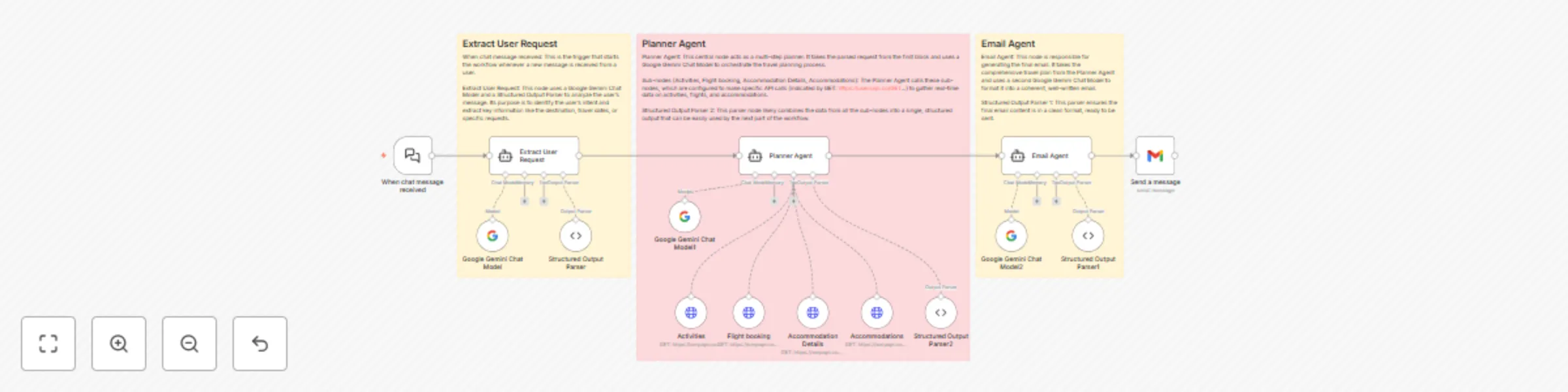
Incoming Message Trigger: The workflow begins when a new message is received from a user.
Extract User Request: The user's message is sent to a Gemini Chat Model which identifies the user's intent and extracts key details like destination, dates, and interests.
Planner Agent: The extracted information is passed to the Planner Agent. This agent, powered by Gemini, determines what information is needed and then calls a series of sub-agents to gather:
Activities: Fetches information about local attractions and things to do.
Flight Booking: Retrieves flight details and pricing.
Accommodation Details: Looks for hotels, rentals, and other lodging options.
Accommodations: Gathers general information about accommodations.
Email Agent: Once the Planner Agent has collected all the necessary information, it’s handed over to the Email Agent. This agent uses a second Gemini Chat Model to format a clear and professional email containing the full travel itinerary.
Send Message: The final email is sent to the user, providing a comprehensive travel plan.
Clone this workflow into your n8n instance.
Connect your accounts as required. You will need credentials for your email service and any APIs you want to use for fetching travel data (e.g., flight booking, accommodation, and activities).
Modify the nodes with your specific credentials and API endpoints.
Run the workflow and start receiving automated travel plans.
Google Gemini account for AI reasoning.
Email integration (e.g., Gmail, Outlook).
Serp API keys for travel-related services (optional, depending on your setup).
Add more integrations (e.g., a hotel booking service like Booking.com, a restaurant reservation system) for extended functionality. Modify the AI prompts in the agent nodes to fine-tune the personality or focus of the travel agent. Connect the final output to a different messaging service like Telegram or Slack instead of email.
This catalog entry is organized from the workflow JSON. The node-level section below shows the executable blocks available for review before importing the template.
| Workflow | Create travel itineraries & send email confirmations with Gemini AI |
|---|---|
| Complexity | advanced |
| Nodes | 18 |
| Categories | AI Chatbot |
| Author | Paul Abraham |
| Published | 23 Sept 2025 |
Use the JSON export at /data/workflows/8881/8881.json as the source template for this automation.
Open n8n, import the downloaded JSON, and review each node before activating the workflow.
Replace placeholder credentials, API keys, webhook URLs, account IDs, and environment-specific values with your own settings.
Run the workflow manually or in a staging workspace, inspect node output, and confirm downstream systems receive the expected data.
Enable the workflow only after testing, then monitor executions, errors, and rate limits during the first production runs.
Review imported nodes carefully before activation. This catalog entry is intended to help you inspect the workflow structure, understand required services, and find related templates faster.
Node names, credentials, schedules, webhook paths, and external service limits may need adjustment for your workspace.
This n8n template creates an intelligent AI powered travel agent that can assist with travel planning and send email confirmations. The agent can extract user requests, plan travel itineraries by f...
Review the workflow JSON, configure any required credentials in n8n, and test the automation in a safe workspace before using it in production.
Yes. Use the block-by-block analysis and the downloadable JSON to inspect each node, then adjust credentials, prompts, schedules, filters, or destinations for your AI Chatbot use case.