Create & Publish Instagram Carousel Posts with GPT-4.1-mini, Imgur & Graph API

Workflow preview

Workflow preview
100%
Create & Publish Instagram Carousel Posts with GPT-4.1-mini, Imgur & Graph API preview
Open on n8n.io

Important notice

This workflow is provided as-is. Please review and test before using in production.

1. Workflow Overview

Create & Publish Instagram Carousel Posts with GPT 4.1 mini, Imgur & Graph API Version : 2.0.0 n8n Version : 1.88.0+ Author : Unknown License : MIT Description An intelligent and modular workflow t...

Best for

  • Content Creation automation workflows
  • Multimodal AI automation workflows
  • advanced n8n builders looking for reusable templates

Tools used

n8n-nodes-base.code, @n8n/n8n-nodes-langchain.agent, n8n-nodes-base.scheduletrigger, n8n-nodes-base.manualtrigger, @n8n/n8n-nodes-langchain.lmchatopenai, @n8n/n8n-nodes-langchain.vectorstoreinmemory, @n8n/n8n-nodes-langchain.embeddingsopenai, @n8n/n8n-nodes-langchain.memorybufferwindow

Source and attribution

This workflow is cataloged by N8N Workflows and links back to its original n8n.io source page by Luciano Gutierrez.

Original n8n.io source

1.1 Workflow description

Title
Create & Publish Instagram Carousel Posts with GPT-4.1-mini, Imgur & Graph API
Workflow name
Create & Publish Instagram Carousel Posts with GPT-4.1-mini, Imgur & Graph API

Create & Publish Instagram Carousel Posts with GPT-4.1-mini, Imgur & Graph API

Version: 2.0.0 n8n Version: 1.88.0+ Author: Unknown License: MIT

Description

An intelligent and modular workflow that automatically generates, manages, and publishes Instagram carousel posts, using AI for both content and images. It includes semantic memory to ensure uniqueness across posts and a scalable architecture for brand growth.

Key Features

  • 🤖 Advanced AI Carousel Content: Generates unique multi-slide post content—titles, captions, hashtags, and strategic CTAs for each card in the carousel.
  • 🎨 Automated Image Generation: Creates high-quality visuals for every slide using OpenAI's DALL¡E API.
  • 🧠 Semantic Memory Search: Checks each theme against a local vector database using OpenAI Embeddings to avoid content repetition.
  • 📊 Publication Database: Logs all generated carousel posts into Google Sheets for tracking, analytics, and audits.
  • 📱 Instagram Direct Publishing: Publishes carousel media and captions automatically through the Instagram Graph API.
  • 🗓️ Scheduled & Manual Runs: Trigger manually or schedule every 12 hours.
  • 🔐 Secure Credential Management: Uses n8n credential fields—no hardcoded API keys or tokens.
  • 🚀 Flexible Prompting System: Dynamically adapts style templates for different brands and industries.

Use Cases

  1. E‑commerce Launches: Showcase product features across multiple slides with tailored benefits and CTAs.
  2. Fitness & Wellness Tips: Educate followers with step-by-step workouts or nutrition advice in a carousel format.
  3. Educational Infographics: Present multi-part tutorials, stats, or course highlights.
  4. SaaS Feature Demos: Demonstrate software workflows or new features slide by slide.
  5. Event Announcements: Build excitement for webinars, conferences, or local meetups.

Customization Examples

  • Retail/E‑commerce: Adjust the Theme Generator Code Node to include product category, price point, and seasonal focus as vector inputs.
  • Health & Fitness: Tweak the AI Prompt Templates to match your brand voice—e.g., friendly coach tone with bullet‑pointed workout steps.
  • Education/Training: Modify the Semantic Memory Embeddings Node thresholds to deepen topic variety across tutorial series.
  • Tech/SaaS: Customize the Image Hosting HTTP Request Node to use your company’s CDN instead of Imgur by swapping the endpoint and credential field.

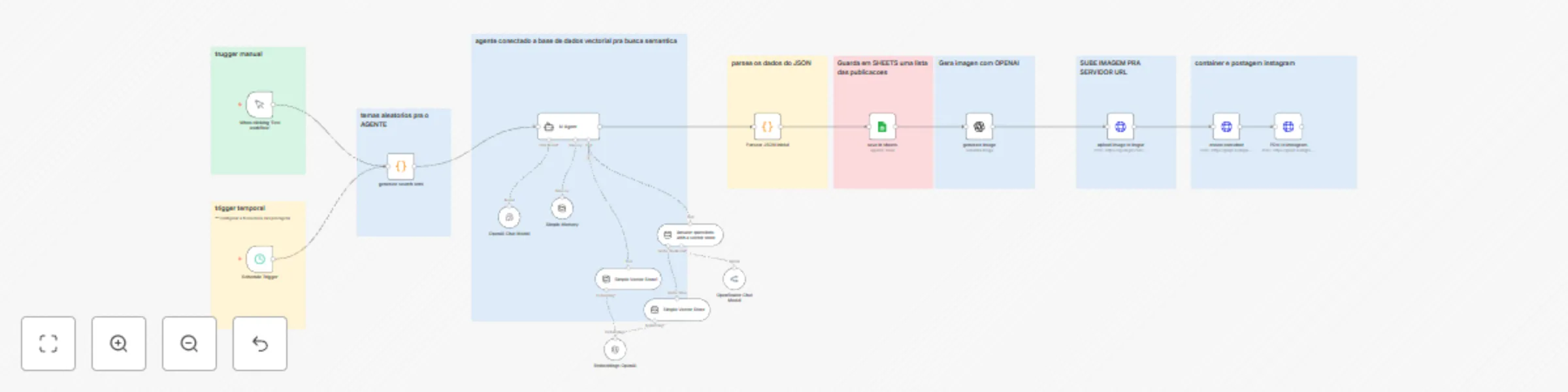
Workflow Overview

1. Theme Generation (Generate Theme Code Node)
  • Combines random vectors (topic starter + focus + benefit) to create unique carousel themes.
2. Content Creation (AI Agent Code Node)
  • Sends themed prompts to OpenAI, generating slide-by-slide titles, captions, and CTAs in structured JSON.
3. Semantic Memory Check (OpenAI Embeddings Node)
  • Runs embeddings against past themes stored in a Postgres vector database (pgvector) to ensure novelty.
  • If similarity > threshold, regenerates theme.
4. JSON Validation (Parse & Validate Code Node)
  • Parses AI response, validates JSON schema, and handles errors gracefully to prevent workflow failures.
5. Content Storage (Google Sheets Node)
  • Writes carousel metadata (titles, captions, hashtags, slide count, scheduled date) to a Google Sheets spreadsheet.
6. Image Generation (DALL¡E Image Generation Node)
  • Generates one graphic per slide at 1024×1024 resolution.
7. Image Hosting (Imgur Upload HTTP Request Node)
  • Uses an HTTP Request node with Imgur credential field to upload each image and retrieve public URLs.
8. Instagram Publishing (Instagram Graph API Nodes)
  • Create Media Containers: Sends batch media creation request.
  • Publish Carousel: Publishes the carousel using the list of container IDs and caption.
9. Scheduling & Triggers
  • Manual Trigger: For testing and one‑off posts.
  • Cron Trigger: Scheduled trigger every 12 hours (configurable).

Security

All sensitive values (OpenAI API key, Imgur Client ID/Secret, Instagram Access Token, Google Sheets OAuth2) must be stored in n8n’s Credentials panel. Do not hardcode keys or tokens in HTTP Request or Code nodes. Instead, reference credential fields:

  • In HTTP Request nodes: select the corresponding credential under Authentication.
  • In Code nodes: access this.getCredentials('openAI'), this.getCredentials('imgur'), etc.

Instructions

  1. Import the Workflow: In n8n, go to Workflows > Import from File and upload the JSON.

  2. Configure Credentials:

    • OpenAI API – set up in Credentials > OpenAI API.
    • Google Sheets OAuth2 – set up in Credentials > Google Sheets OAuth2.
    • Imgur – set up in Credentials > Imgur.
    • Instagram Graph API – set up in Credentials > Instagram Graph API.
  3. Set Placeholders:

    • Google Sheets Document ID
    • Instagram User ID
  4. Customize Prompts & Vectors: Tweak Code node inputs and prompt templates as needed.

  5. Test & Activate: Run a manual trigger, verify outputs, then enable the cron schedule.

Tags

Social Media Instagram Carousel AI Content Generation OpenAI n8n Marketing Automation Vector Search Content Scheduling

Technical Notes

  • Uses pgvector in Postgres for efficient semantic similarity.
  • Supports extensible platforms—duplicate the publishing steps to add LinkedIn or Facebook.
  • Error handling ensures invalid JSON never reaches the publishing nodes.

License

This workflow is released under the MIT License.

1.2 Logical Blocks

This catalog entry is organized from the workflow JSON. The node-level section below shows the executable blocks available for review before importing the template.

2. Block-by-Block Analysis

Block 1 - Parsear JSON Inicial

Type / Role
n8n-nodes-base.code - code
Config choices
Version 2

Block 2 - AI Agent

Type / Role
@n8n/n8n-nodes-langchain.agent - agent
Config choices
Version 1.8

Block 3 - Schedule Trigger

Type / Role
n8n-nodes-base.scheduleTrigger - scheduleTrigger
Config choices
Version 1.2

Block 4 - When clicking ‘Test workflow’

Type / Role
n8n-nodes-base.manualTrigger - manualTrigger
Config choices
Version 1

Block 5 - OpenAI Chat Model

Type / Role
@n8n/n8n-nodes-langchain.lmChatOpenAi - lmChatOpenAi
Config choices
Version 1.2

Block 6 - Simple Vector Store

Type / Role
@n8n/n8n-nodes-langchain.vectorStoreInMemory - vectorStoreInMemory
Config choices
Version 1.1

Block 7 - Embeddings OpenAI

Type / Role
@n8n/n8n-nodes-langchain.embeddingsOpenAi - embeddingsOpenAi
Config choices
Version 1.2

Block 8 - Simple Memory

Type / Role
@n8n/n8n-nodes-langchain.memoryBufferWindow - memoryBufferWindow
Config choices
Version 1.3

Block 9 - Sticky Note

Type / Role
n8n-nodes-base.stickyNote - stickyNote
Config choices
Version 1

Block 10 - Sticky Note1

Type / Role
n8n-nodes-base.stickyNote - stickyNote
Config choices
Version 1

Block 11 - Sticky Note2

Type / Role
n8n-nodes-base.stickyNote - stickyNote
Config choices
Version 1

Block 12 - Sticky Note3

Type / Role
n8n-nodes-base.stickyNote - stickyNote
Config choices
Version 1

Block 13 - Sticky Note4

Type / Role
n8n-nodes-base.stickyNote - stickyNote
Config choices
Version 1

Block 14 - Sticky Note5

Type / Role
n8n-nodes-base.stickyNote - stickyNote
Config choices
Version 1

Block 15 - Sticky Note6

Type / Role
n8n-nodes-base.stickyNote - stickyNote
Config choices
Version 1

Block 16 - Sticky Note7

Type / Role
n8n-nodes-base.stickyNote - stickyNote
Config choices
Version 1

Block 17 - Sticky Note8

Type / Role
n8n-nodes-base.stickyNote - stickyNote
Config choices
Version 1

Block 18 - Answer questions with a vector store

Type / Role
@n8n/n8n-nodes-langchain.toolVectorStore - toolVectorStore
Config choices
Version 1.1

Block 19 - OpenRouter Chat Model

Type / Role
@n8n/n8n-nodes-langchain.lmChatOpenRouter - lmChatOpenRouter
Config choices
Version 1

Block 20 - Simple Vector Store1

Type / Role
@n8n/n8n-nodes-langchain.vectorStoreInMemory - vectorStoreInMemory
Config choices
Version 1.1

Block 21 - generate search term

Type / Role
n8n-nodes-base.code - code
Config choices
Version 2

Block 22 - save in sheets

Type / Role
n8n-nodes-base.googleSheets - googleSheets
Config choices
Version 4.5

Block 23 - upload image to imgur

Type / Role
n8n-nodes-base.httpRequest - httpRequest
Config choices
Version 4.2

Block 24 - create container

Type / Role
n8n-nodes-base.httpRequest - httpRequest
Config choices
Version 4.2

Showing the first 24 of 26 workflow blocks. Download the JSON for the full node graph.

3. Summary Table

Workflow Create & Publish Instagram Carousel Posts with GPT-4.1-mini, Imgur & Graph API
Complexity advanced
Nodes 26
Categories Content Creation, Multimodal AI
Author Luciano Gutierrez
Published 24 Apr 2025

4. Reproducing the Workflow from Scratch

  1. 1. Download the workflow JSON

    Use the JSON export at /data/workflows/3693/3693.json as the source template for this automation.

  2. 2. Import the template into n8n

    Open n8n, import the downloaded JSON, and review each node before activating the workflow.

  3. 3. Configure credentials and variables

    Replace placeholder credentials, API keys, webhook URLs, account IDs, and environment-specific values with your own settings.

  4. 4. Test with sample data

    Run the workflow manually or in a staging workspace, inspect node output, and confirm downstream systems receive the expected data.

  5. 5. Activate and monitor

    Enable the workflow only after testing, then monitor executions, errors, and rate limits during the first production runs.

5. General Notes & Resources

Review imported nodes carefully before activation. This catalog entry is intended to help you inspect the workflow structure, understand required services, and find related templates faster.

Node names, credentials, schedules, webhook paths, and external service limits may need adjustment for your workspace.

Frequently asked questions

What does Create & Publish Instagram Carousel Posts with GPT-4.1-mini, Imgur & Graph API do?

Create & Publish Instagram Carousel Posts with GPT 4.1 mini, Imgur & Graph API Version : 2.0.0 n8n Version : 1.88.0+ Author : Unknown License : MIT Description An intelligent and modular workflow t...

What do I need before importing this workflow?

Review the workflow JSON, configure any required credentials in n8n, and test the automation in a safe workspace before using it in production.

Can I customize this workflow?

Yes. Use the block-by-block analysis and the downloadable JSON to inspect each node, then adjust credentials, prompts, schedules, filters, or destinations for your Content Creation, Multimodal AI use case.