Block 1 - Status Check2
- Type / Role
- n8n-nodes-base.if - if
- Config choices
- Version 2


 Early Deal
This workflow is provided as-is. Please review and test before using in production.
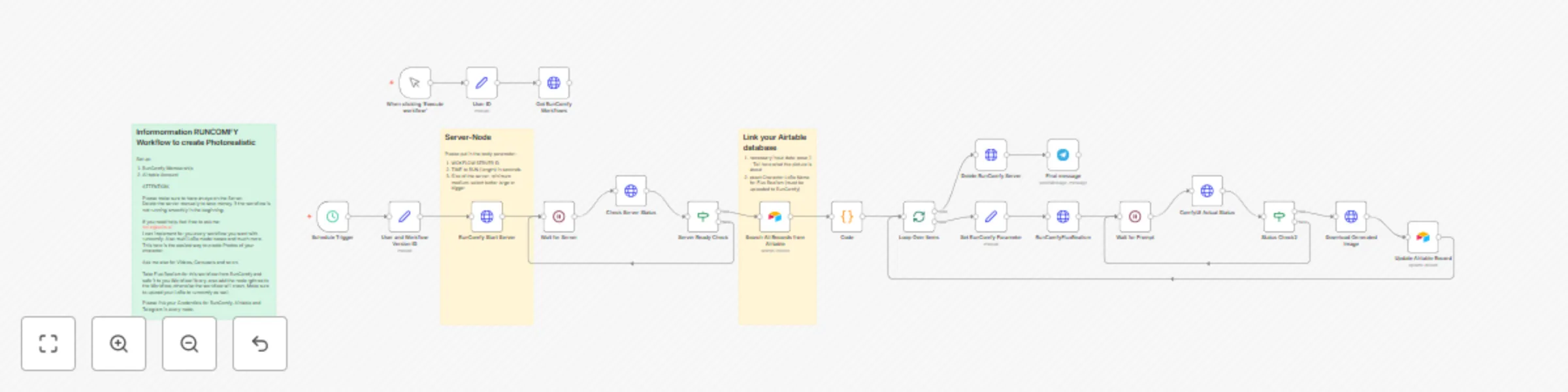
AI Image Generation Workflow for Social Media Content Overview This n8n workflow automates the creation of photorealistic AI generated images for social media content. The workflow uses RunComfy (C...
n8n-nodes-base.if, n8n-nodes-base.splitinbatches, n8n-nodes-base.code, n8n-nodes-base.httprequest, n8n-nodes-base.manualtrigger, n8n-nodes-base.airtable, n8n-nodes-base.wait, n8n-nodes-base.stickynote
This workflow is cataloged by N8N Workflows and links back to its original n8n.io source page by Robert Schröder.
Original n8n.io sourceThis n8n workflow automates the creation of photorealistic AI-generated images for social media content. The workflow uses RunComfy (ComfyUI cloud service) combined with Airtable for data management to create high-quality images based on custom prompts and LoRa models.
Automated Image Generation: Creates photorealistic images using Flux Realism model and custom LoRa models
Airtable Integration: Centrally manages content requests, model information, and image status
Cloud-based Processing: Utilizes RunComfy servers for powerful GPU processing without local hardware requirements
Status Tracking: Monitors generation process and automatically updates database entries
Telegram Notifications: Sends success notifications after image completion
The database must contain these fields:
topic: Content descriptionpose_1: Detailed image prompt LoRa Name Flux: LoRa model nameModel: Character namepose_1_drive_fotolink: Link to generated imageBilder erstellt: Generation statusImage Resolution: Default 832x1216px (adjustable in ComfyUI parameters)
Generation Parameters: 35 steps, Euler sampler, Guidance 2.0
Server Size: "Large" for optimal performance (adjustable based on requirements)
Time Intervals: 30s status checks, 50s server initialization
This workflow is ideal for content creators who need regular, high-quality, character-consistent images for social media campaigns.
This catalog entry is organized from the workflow JSON. The node-level section below shows the executable blocks available for review before importing the template.
| Workflow | Create photorealistic social media images with Flux Realism, LoRa models & Airtable |
|---|---|
| Complexity | advanced |
| Nodes | 24 |
| Categories | Content Creation, Multimodal AI |
| Author | Robert Schröder |
| Published | 19 Aug 2025 |
Use the JSON export at /data/workflows/7578/7578.json as the source template for this automation.
Open n8n, import the downloaded JSON, and review each node before activating the workflow.
Replace placeholder credentials, API keys, webhook URLs, account IDs, and environment-specific values with your own settings.
Run the workflow manually or in a staging workspace, inspect node output, and confirm downstream systems receive the expected data.
Enable the workflow only after testing, then monitor executions, errors, and rate limits during the first production runs.
Review imported nodes carefully before activation. This catalog entry is intended to help you inspect the workflow structure, understand required services, and find related templates faster.
Node names, credentials, schedules, webhook paths, and external service limits may need adjustment for your workspace.
AI Image Generation Workflow for Social Media Content Overview This n8n workflow automates the creation of photorealistic AI generated images for social media content. The workflow uses RunComfy (C...
Review the workflow JSON, configure any required credentials in n8n, and test the automation in a safe workspace before using it in production.
Yes. Use the block-by-block analysis and the downloadable JSON to inspect each node, then adjust credentials, prompts, schedules, filters, or destinations for your Content Creation, Multimodal AI use case.