Block 1 - When clicking ‘Execute workflow’
- Type / Role
- n8n-nodes-base.manualTrigger - manualTrigger
- Config choices
- Version 1


 Early Deal
This workflow is provided as-is. Please review and test before using in production.
This workflow provides an intelligent automation solution for processing RSS feeds using ScrapeGraph API and delivering personalized news summaries via email and Telegram. Key Benefits Time Saving ...
n8n-nodes-base.manualtrigger, n8n-nodes-base.rssfeedread, n8n-nodes-base.limit, n8n-nodes-base.splitinbatches, n8n-nodes-scrapegraphai.scrapegraphai, @n8n/n8n-nodes-langchain.lmchatopenai, n8n-nodes-base.filter, n8n-nodes-base.gmail
This workflow is cataloged by N8N Workflows and links back to its original n8n.io source page by Davide.
Original n8n.io sourceThis workflow provides an intelligent automation solution for processing RSS feeds using ScrapeGraph API and delivering personalized news summaries via email and Telegram.
Time-Saving Automation
Multi-Channel Distribution
AI-Powered Content Processing
Quality Content Filtering
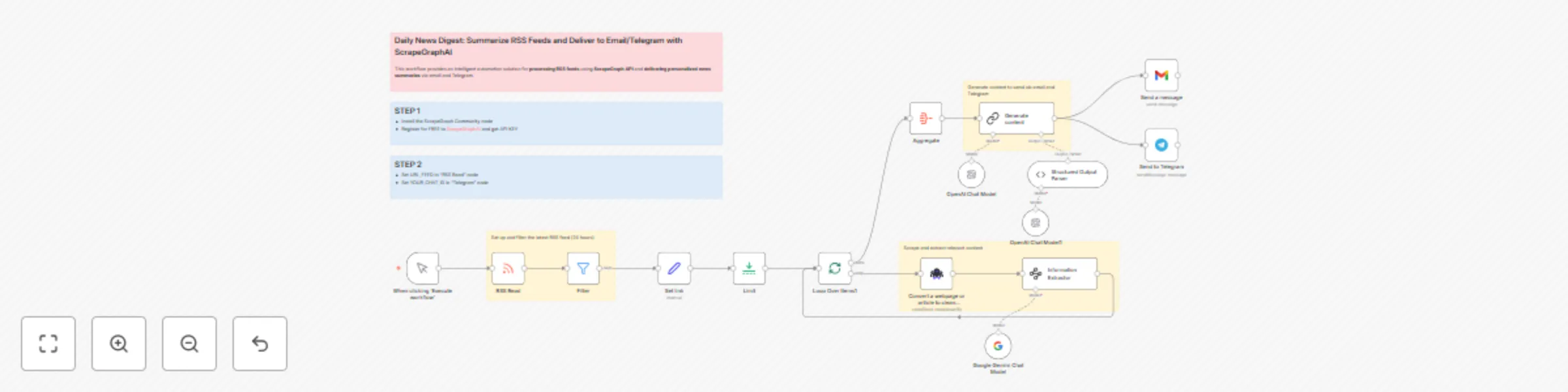
Trigger & Data Fetching: The workflow starts manually. It reads a specified RSS feed and immediately filters the items to keep only those published within the last 24 hours, ensuring the digest is current.
Content Processing: For each recent article (up to a limit of 3), the workflow performs a two-step process:
Digest Generation & Delivery: The extracted content from all articles is aggregated. A powerful Language Model (OpenAI) is then instructed to synthesize this information into a well-structured summary with a clear subject and body, formatted as an email. Finally, this generated digest is sent simultaneously to a specified email address via Gmail and to a Telegram channel or chat.
Before executing the workflow, you need to configure the following steps:
Install the Community Node: Install the ScrapeGraphAI node from the n8n community nodes list. This node is essential for scraping article content and is not part of the core n8n installation.
Configure Credentials: Ensure the following credentials are correctly set up in your n8n instance:
ScrapegraphAI account: For the web scraping functionality.OpenAi account: For the summary generation.Gmail account: To send the email.Telegram account: To send the Telegram message.Set Key Parameters: Update the workflow with your specific details:
URL_FEED with the actual URL of the RSS feed you want to monitor.YOUR_CHAT_ID with the unique identifier of your Telegram channel or chat.Contact me for consulting and support or add me on Linkedin.
This catalog entry is organized from the workflow JSON. The node-level section below shows the executable blocks available for review before importing the template.
| Workflow | Create personalized news digests from RSS feeds with GPT & Gemini via email/Telegram |
|---|---|
| Complexity | advanced |
| Nodes | 22 |
| Categories | AI Summarization |
| Author | Davide |
| Published | 23 Sept 2025 |
Use the JSON export at /data/workflows/8863/8863.json as the source template for this automation.
Open n8n, import the downloaded JSON, and review each node before activating the workflow.
Replace placeholder credentials, API keys, webhook URLs, account IDs, and environment-specific values with your own settings.
Run the workflow manually or in a staging workspace, inspect node output, and confirm downstream systems receive the expected data.
Enable the workflow only after testing, then monitor executions, errors, and rate limits during the first production runs.
Review imported nodes carefully before activation. This catalog entry is intended to help you inspect the workflow structure, understand required services, and find related templates faster.
Node names, credentials, schedules, webhook paths, and external service limits may need adjustment for your workspace.
This workflow provides an intelligent automation solution for processing RSS feeds using ScrapeGraph API and delivering personalized news summaries via email and Telegram. Key Benefits Time Saving ...
Review the workflow JSON, configure any required credentials in n8n, and test the automation in a safe workspace before using it in production.
Yes. Use the block-by-block analysis and the downloadable JSON to inspect each node, then adjust credentials, prompts, schedules, filters, or destinations for your AI Summarization use case.