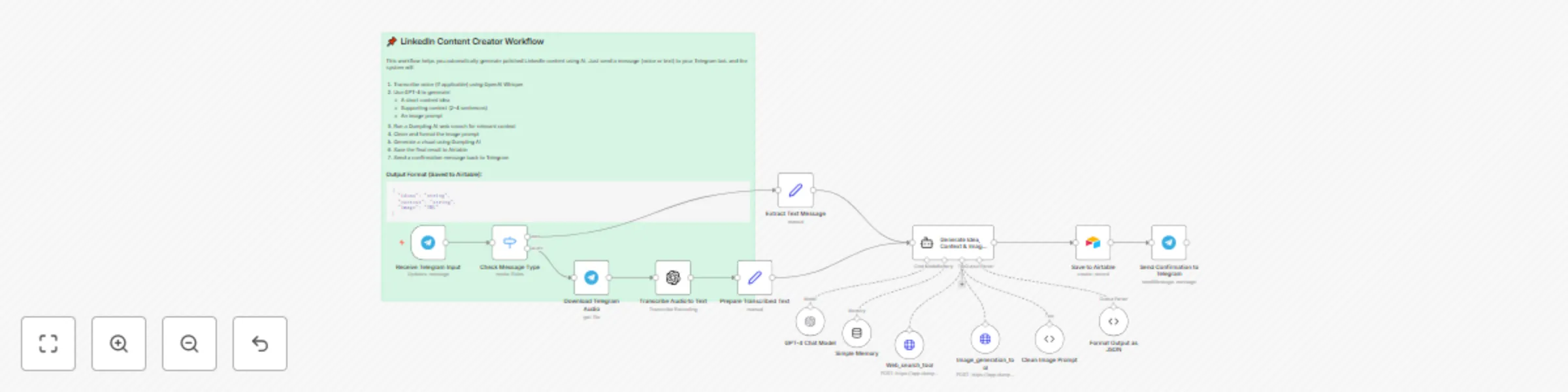
Create LinkedIn content from Telegram voice/text using Whisper, GPT-4 & Dumpling AI

Workflow preview

Workflow preview
100%
Create LinkedIn content from Telegram voice/text using Whisper, GPT-4 & Dumpling AI preview
Open on n8n.io

Important notice

This workflow is provided as-is. Please review and test before using in production.

1. Workflow Overview

What this workflow does This automation turns a Telegram voice or text message into a high quality LinkedIn post using OpenAI’s Whisper, Dumpling AI and GPT 4, and then repurposes that same mess...

Best for

  • Content Creation automation workflows
  • Multimodal AI automation workflows
  • advanced n8n builders looking for reusable templates

Tools used

@n8n/n8n-nodes-langchain.memorybufferwindow, n8n-nodes-base.httprequesttool, n8n-nodes-base.telegramtrigger, n8n-nodes-base.switch, n8n-nodes-base.telegram, @n8n/n8n-nodes-langchain.openai, n8n-nodes-base.set, @n8n/n8n-nodes-langchain.agent

Source and attribution

This workflow is cataloged by N8N Workflows and links back to its original n8n.io source page by Yang.

Original n8n.io source

1.1 Workflow description

Title
Create LinkedIn content from Telegram voice/text using Whisper, GPT-4 & Dumpling AI
Workflow name
Create LinkedIn content from Telegram voice/text using Whisper, GPT-4 & Dumpling AI

🧾 What this workflow does

This automation turns a Telegram voice or text message into a high-quality LinkedIn post using OpenAI’s Whisper, Dumpling AI and GPT-4, and then repurposes that same message into a content idea with visual inspiration using Dumpling AI. All outputs are saved to Airtable for review, approval, and scheduling.


👤 Who is this for

  • Founders or creators sharing ideas while walking or multitasking
  • Content teams turning voice memos into carousel content
  • Personal brands posting on LinkedIn with minimal manual work
  • Virtual assistants or SMMs handling voice-driven content tasks

⚙️ How to set up

✅ Requirements

You’ll need active accounts for:

  • Telegram Bot (via n8n’s Telegram Trigger node)
  • OpenAI (for Whisper and GPT-4)
  • Dumpling AI (to search Google and create Image)
  • Airtable (to log your posts)

In Airtable, create a table with the following fields:

  • Ideas (Single line text)
  • Context (Long text)
  • Image URL (URL)

🔧 Setup steps

  1. Set up your Telegram bot

    • Use BotFather to create a bot and get your token
    • Add the bot to a private group or channel
  2. Connect all credentials in n8n

    • Telegram Trigger (Bot Token)
    • OpenAI (for Whisper + GPT-4)
    • Dumpling AI (HTTP Auth)
    • Airtable (OAuth or Personal Token)
  3. Update node parameters

    • In the Telegram Trigger node, specify your bot and listening chat
    • In the HTTP node for Dumpling AI, add your API key via header
    • In Airtable nodes, map to your base and table correctly
  4. Optional prompt customization

    • In the GPT-4 node, you can update the prompt for tone, formatting, or CTA style
  5. Optional: Adjust the Dumpling AI prompt to suit your niche (e.g., health, tech, finance).


🧠 How it works

  1. The Telegram bot receives a voice message.
  2. Whisper transcribes the voice into clean text.
  3. GPT-4 formats the text into a polished LinkedIn post.
  4. Dumpling AI:
    • Generates a short-form content idea from the transcript.
    • Creates a branded image prompt and renders a matching image.
  5. The full set of outputs (text, idea, image) is saved to Airtable.
  6. You can now review and schedule the post manually or via another automation.

🛠️ Customization ideas

  • Swap Telegram for WhatsApp or voice memos via Google Drive
  • Add moderation or approval steps before saving to Airtable
  • Send the LinkedIn post directly to Buffer or Hootsuite for auto-posting
  • Generate post captions or hashtags using GPT-4 before publishing
  • Extend the workflow to auto-create carousel slides from the content idea

This workflow makes it easy to share your voice with your audience — literally. Whether you're walking, thinking out loud, or sending team updates, this automation turns your spoken ideas into professional content, ready to post or polish.

1.2 Logical Blocks

This catalog entry is organized from the workflow JSON. The node-level section below shows the executable blocks available for review before importing the template.

2. Block-by-Block Analysis

Block 1 - Simple Memory

Type / Role
@n8n/n8n-nodes-langchain.memoryBufferWindow - memoryBufferWindow
Config choices
Version 1.3

Block 2 - Web_search_tool

Type / Role
n8n-nodes-base.httpRequestTool - httpRequestTool
Config choices
Version 4.2

Block 3 - Image_generation_tool

Type / Role
n8n-nodes-base.httpRequestTool - httpRequestTool
Config choices
Version 4.2

Block 4 - Receive Telegram Input

Type / Role
n8n-nodes-base.telegramTrigger - telegramTrigger
Config choices
Version 1.2

Block 5 - Check Message Type

Type / Role
n8n-nodes-base.switch - switch
Config choices
Version 3.2

Block 6 - Download Telegram Audio

Type / Role
n8n-nodes-base.telegram - telegram
Config choices
Version 1.2

Block 7 - Transcribe Audio to Text

Type / Role
@n8n/n8n-nodes-langchain.openAi - openAi
Config choices
Version 1.8

Block 8 - Prepare Transcribed Text

Type / Role
n8n-nodes-base.set - set
Config choices
Version 3.4

Block 9 - Extract Text Message

Type / Role
n8n-nodes-base.set - set
Config choices
Version 3.4

Block 10 - Generate Idea, Context & Image Prompt

Type / Role
@n8n/n8n-nodes-langchain.agent - agent
Config choices
Version 2.2

Block 11 - GPT-4 Chat Model

Type / Role
@n8n/n8n-nodes-langchain.lmChatOpenAi - lmChatOpenAi
Config choices
Version 1.2

Block 12 - Format Output as JSON

Type / Role
@n8n/n8n-nodes-langchain.outputParserStructured - outputParserStructured
Config choices
Version 1.3

Block 13 - Clean Image Prompt

Type / Role
@n8n/n8n-nodes-langchain.toolCode - toolCode
Config choices
Version 1.3

Block 14 - Save to Airtable

Type / Role
n8n-nodes-base.airtable - airtable
Config choices
Version 2.1

Block 15 - Send Confirmation to Telegram

Type / Role
n8n-nodes-base.telegram - telegram
Config choices
Version 1.2

Block 16 - Sticky Note

Type / Role
n8n-nodes-base.stickyNote - stickyNote
Config choices
Version 1

3. Summary Table

Workflow Create LinkedIn content from Telegram voice/text using Whisper, GPT-4 & Dumpling AI
Complexity advanced
Nodes 16
Categories Content Creation, Multimodal AI
Author Yang
Published 13 Sept 2025

4. Reproducing the Workflow from Scratch

  1. 1. Download the workflow JSON

    Use the JSON export at /data/workflows/8563/8563.json as the source template for this automation.

  2. 2. Import the template into n8n

    Open n8n, import the downloaded JSON, and review each node before activating the workflow.

  3. 3. Configure credentials and variables

    Replace placeholder credentials, API keys, webhook URLs, account IDs, and environment-specific values with your own settings.

  4. 4. Test with sample data

    Run the workflow manually or in a staging workspace, inspect node output, and confirm downstream systems receive the expected data.

  5. 5. Activate and monitor

    Enable the workflow only after testing, then monitor executions, errors, and rate limits during the first production runs.

5. General Notes & Resources

Review imported nodes carefully before activation. This catalog entry is intended to help you inspect the workflow structure, understand required services, and find related templates faster.

Node names, credentials, schedules, webhook paths, and external service limits may need adjustment for your workspace.

Frequently asked questions

What does Create LinkedIn content from Telegram voice/text using Whisper, GPT-4 & Dumpling AI do?

What this workflow does This automation turns a Telegram voice or text message into a high quality LinkedIn post using OpenAI’s Whisper, Dumpling AI and GPT 4, and then repurposes that same mess...

What do I need before importing this workflow?

Review the workflow JSON, configure any required credentials in n8n, and test the automation in a safe workspace before using it in production.

Can I customize this workflow?

Yes. Use the block-by-block analysis and the downloadable JSON to inspect each node, then adjust credentials, prompts, schedules, filters, or destinations for your Content Creation, Multimodal AI use case.