Block 1 - JotForm Trigger
- Type / Role
- n8n-nodes-base.jotFormTrigger - jotFormTrigger
- Config choices
- Version 1


 Early Deal
This workflow is provided as-is. Please review and test before using in production.
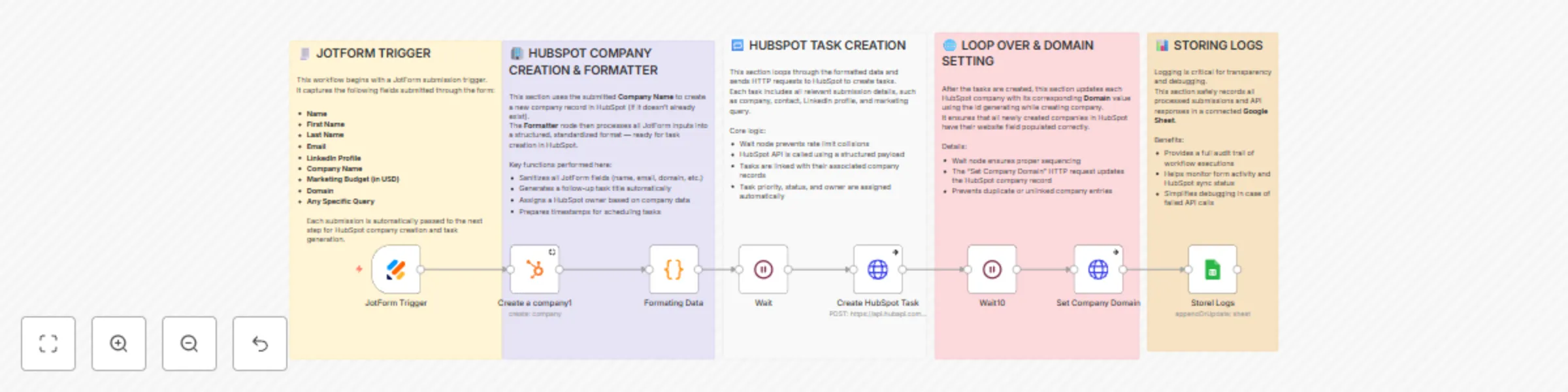
️ Workflow: Jotform → HubSpot Company + Task Automation Automatically create or update HubSpot companies and generate follow up tasks whenever a Jotform is submitted. All logs are stored to Googl...
n8n-nodes-base.jotformtrigger, n8n-nodes-base.wait, n8n-nodes-base.httprequest, n8n-nodes-base.hubspot, n8n-nodes-base.code, n8n-nodes-base.googlesheets, n8n-nodes-base.stickynote
This workflow is cataloged by N8N Workflows and links back to its original n8n.io source page by Rahi Uppal.
Original n8n.io sourceAutomatically create or update HubSpot companies and generate follow-up tasks whenever a Jotform is submitted.
All logs are stored to Google Sheets for traceability, transparency, and debugging.
The workflow starts when a new submission is received via the Jotform webhook.
Captured fields include: name, email, LinkedIn profile, company name, marketing budget, domain, and any specific query.
After tasks are created, another loop updates each HubSpot company record with the submitted domain.
This ensures all HubSpot companies have proper website data for future enrichment.
All processed submissions, responses, errors, and metadata are appended or updated in a Google Sheets document.
This provides a complete audit trail — ideal for debugging, reporting, and performance monitoring.
| Step | Node | Description |
|---|---|---|
| 1️⃣ | Jotform Trigger | Receives form submission data |
| 2️⃣ | HubSpot Create Company | Ensures company record exists |
| 3️⃣ | Formatter / Function Node | Cleans & structures data, assigns owner, generates task fields |
| 4️⃣ | Wait / Delay Node | Controls API call frequency |
| 5️⃣ | HTTP Request (Create Task) | Pushes task to HubSpot |
| 6️⃣ | HTTP Request (Update Domain) | Updates company domain in HubSpot |
| 7️⃣ | Google Sheets Node | Logs inputs, outputs, and status |
crm.objects.companies.write and crm.objects.tasks.write scopes Add contact association:
Modify the payload to also link the task with a HubSpot Contact (via email) so it appears in both company and contact timelines.
Use fallback values:
In the Formatter node, provide defaults like “Unknown Company” or “No query provided.”
Dynamic owner assignment:
Replace hash-based assignment with round-robin or territory logic.
Conditional task creation:
Add logic to only create tasks when certain conditions are met (e.g., budget > 0).
Error branches:
Capture failed HTTP responses and send Slack/Email alerts.
Extended logs:
Add response codes, errors, and retry counts to your Google Sheet for more transparency.
A marketing form on your website captures partnership or franchise inquiries.
This workflow instantly creates a HubSpot company, logs the inquiry as a task, assigns it to a regional manager, and saves a record in Google Sheets — all within seconds.
Tags: HubSpot Jotform CRM GoogleSheets Automation LeadManagement
This catalog entry is organized from the workflow JSON. The node-level section below shows the executable blocks available for review before importing the template.
| Workflow | Create HubSpot companies & tasks from Jotform submissions with Google Sheets |
|---|---|
| Complexity | intermediate |
| Nodes | 13 |
| Categories | CRM |
| Author | Rahi Uppal |
| Published | 09 Oct 2025 |
Use the JSON export at /data/workflows/9394/9394.json as the source template for this automation.
Open n8n, import the downloaded JSON, and review each node before activating the workflow.
Replace placeholder credentials, API keys, webhook URLs, account IDs, and environment-specific values with your own settings.
Run the workflow manually or in a staging workspace, inspect node output, and confirm downstream systems receive the expected data.
Enable the workflow only after testing, then monitor executions, errors, and rate limits during the first production runs.
Review imported nodes carefully before activation. This catalog entry is intended to help you inspect the workflow structure, understand required services, and find related templates faster.
Node names, credentials, schedules, webhook paths, and external service limits may need adjustment for your workspace.
️ Workflow: Jotform → HubSpot Company + Task Automation Automatically create or update HubSpot companies and generate follow up tasks whenever a Jotform is submitted. All logs are stored to Googl...
Review the workflow JSON, configure any required credentials in n8n, and test the automation in a safe workspace before using it in production.
Yes. Use the block-by-block analysis and the downloadable JSON to inspect each node, then adjust credentials, prompts, schedules, filters, or destinations for your CRM use case.