Block 1 - When chat message received
- Type / Role
- @n8n/n8n-nodes-langchain.chatTrigger - chatTrigger
- Config choices
- Version 1.3


 Early Deal
This workflow is provided as-is. Please review and test before using in production.
What It Does This workflow lets users create Google Calendar events through natural chat messages — no forms, no clicking around, just type like you're talking to a friend. For example, you can say...
@n8n/n8n-nodes-langchain.chattrigger, @n8n/n8n-nodes-langchain.agent, @n8n/n8n-nodes-langchain.lmchatopenai, @n8n/n8n-nodes-langchain.memorybufferwindow, @n8n/n8n-nodes-langchain.chat, n8n-nodes-base.googlecalendartool
This workflow is cataloged by N8N Workflows and links back to its original n8n.io source page by Loren Brabante.
Original n8n.io sourceThis workflow lets users create Google Calendar events through natural chat messages — no forms, no clicking around, just type like you're talking to a friend.
For example, you can say:
“Lunch with John tomorrow at 12:30” and it’ll auto-create a calendar event with the correct title, time, and duration.
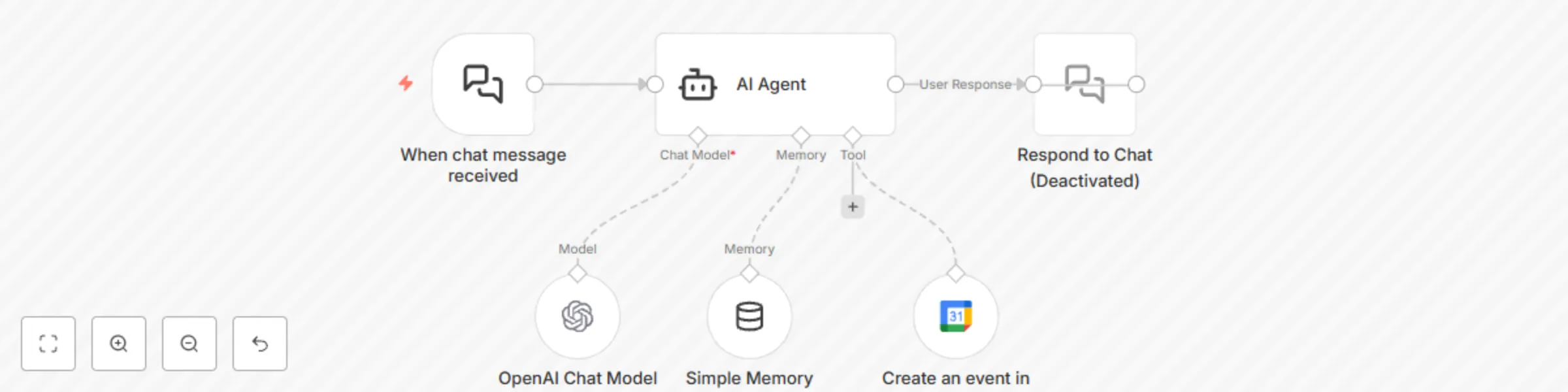
Trigger: Chat Message Received The flow starts with a chat interface node (When chat message received) that listens for incoming user messages like:
“Book dentist next Wed 10am”
“Schedule Zoom call with Jane Friday 3–4pm”
AI Agent with Scheduling Instructions The message is handed off to a Langchain-powered AI Agent that:
Parses the message
Resolves relative time (like "next Tuesday") into actual ISO timestamps
Generates a title (summary) if not provided by the user
Ensures all required fields are correctly filled
Handles vague messages by asking a single clarifying question
LLM (OpenAI) The agent is powered by gpt-4o-mini (or your preferred OpenAI model). You can customize this or swap it out.
Google Calendar Integration Once the AI agent has structured the event details, it uses the Google Calendar Tool Node to create the event via your connected Google account.
(Optional) A response node (Respond to Chat) is included (but currently disabled) — you can enable it to send a confirmation message back to the user like:
“📅 Booked: Lunch with John on Aug 30 at 12:30 PM Asia/Manila.”
To make this workflow functional, you need to connect:
🔐 Google Calendar OAuth2 credentials Add your Google account under Credentials > Google Calendar OAuth2 API.
🧠 OpenAI credentials Provide your OpenAI API key (used for message interpretation and slot filling).
Add email collection to invite attendees
Expand to support recurring events
Add error handling or fallback if date parsing fails
Connect to Slack or Telegram for real-time event booking
This template does not include any personal API keys or credential tokens. You’ll need to connect your own Google and OpenAI credentials after import.
This catalog entry is organized from the workflow JSON. The node-level section below shows the executable blocks available for review before importing the template.
| Workflow | Create Google Calendar events from natural language chat using GPT |
|---|---|
| Complexity | intermediate |
| Nodes | 6 |
| Categories | AI Chatbot, Multimodal AI |
| Author | Loren Brabante |
| Published | 26 Aug 2025 |
Use the JSON export at /data/workflows/7910/7910.json as the source template for this automation.
Open n8n, import the downloaded JSON, and review each node before activating the workflow.
Replace placeholder credentials, API keys, webhook URLs, account IDs, and environment-specific values with your own settings.
Run the workflow manually or in a staging workspace, inspect node output, and confirm downstream systems receive the expected data.
Enable the workflow only after testing, then monitor executions, errors, and rate limits during the first production runs.
Review imported nodes carefully before activation. This catalog entry is intended to help you inspect the workflow structure, understand required services, and find related templates faster.
Node names, credentials, schedules, webhook paths, and external service limits may need adjustment for your workspace.
What It Does This workflow lets users create Google Calendar events through natural chat messages — no forms, no clicking around, just type like you're talking to a friend. For example, you can say...
Review the workflow JSON, configure any required credentials in n8n, and test the automation in a safe workspace before using it in production.
Yes. Use the block-by-block analysis and the downloadable JSON to inspect each node, then adjust credentials, prompts, schedules, filters, or destinations for your AI Chatbot, Multimodal AI use case.