L

Loren Brabante

1
Workflow

Workflows by Loren Brabante

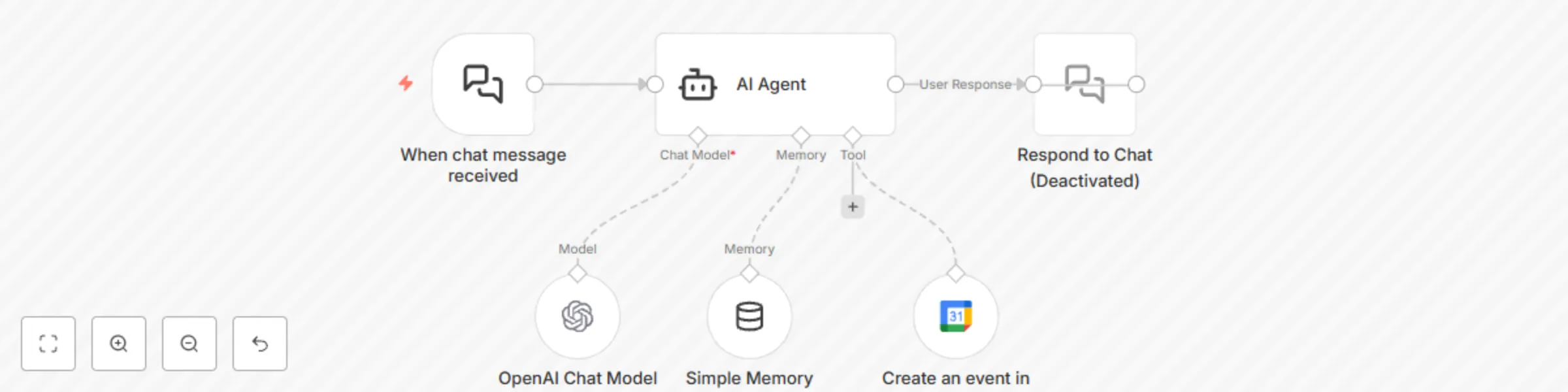
Workflow preview: Create Google Calendar events from natural language chat using GPT
Free intermediate

Create Google Calendar events from natural language chat using GPT

# **What It Does** This workflow lets users create Google Calendar events through natural chat messages — no forms, no clicking around, just type like you're talking to a friend. For example, you can say: “Lunch with John tomorrow at 12:30” and it’ll auto-create a calendar event with the correct title, time, and duration. # **How It Works** Trigger: Chat Message Received The flow starts with a chat interface node (When chat message received) that listens for incoming user messages like: “Book dentist next Wed 10am” “Schedule Zoom call with Jane Friday 3–4pm” AI Agent with Scheduling Instructions The message is handed off to a Langchain-powered AI Agent that: Parses the message Resolves relative time (like "next Tuesday") into actual ISO timestamps Generates a title (summary) if not provided by the user Ensures all required fields are correctly filled Handles vague messages by asking a single clarifying question LLM (OpenAI) The agent is powered by gpt-4o-mini (or your preferred OpenAI model). You can customize this or swap it out. Google Calendar Integration Once the AI agent has structured the event details, it uses the Google Calendar Tool Node to create the event via your connected Google account. (Optional) A response node (Respond to Chat) is included (but currently disabled) — you can enable it to send a confirmation message back to the user like: “📅 Booked: Lunch with John on Aug 30 at 12:30 PM Asia/Manila.” # **Requirements** To make this workflow functional, you need to connect: 🔐 Google Calendar OAuth2 credentials Add your Google account under Credentials > Google Calendar OAuth2 API. 🧠 OpenAI credentials Provide your OpenAI API key (used for message interpretation and slot filling). # **Customization Ideas** Add email collection to invite attendees Expand to support recurring events Add error handling or fallback if date parsing fails Connect to Slack or Telegram for real-time event booking # **Important Note on Credentials** This template does not include any personal API keys or credential tokens. You’ll need to connect your own Google and OpenAI credentials after import.

L
Loren Brabante
AI Chatbot
26 Aug 2025
577
0