Block 1 - Search web
- Type / Role
- n8n-nodes-base.jinaAi - jinaAi
- Config choices
- Version 1


 Early Deal
This workflow is provided as-is. Please review and test before using in production.
Automated AI Research Assistant: From Query to Polished Report with Jina & Gemini Turn a single research question into a comprehensive, multi source report with proper citations. This workflow auto...
n8n-nodes-base.jinaai, @n8n/n8n-nodes-langchain.chattrigger, n8n-nodes-base.splitinbatches, n8n-nodes-base.code, n8n-nodes-base.wait, @n8n/n8n-nodes-langchain.outputparserstructured, n8n-nodes-base.stickynote, @n8n/n8n-nodes-langchain.agent
This workflow is cataloged by N8N Workflows and links back to its original n8n.io source page by AppStoneLab Technologies LLP.
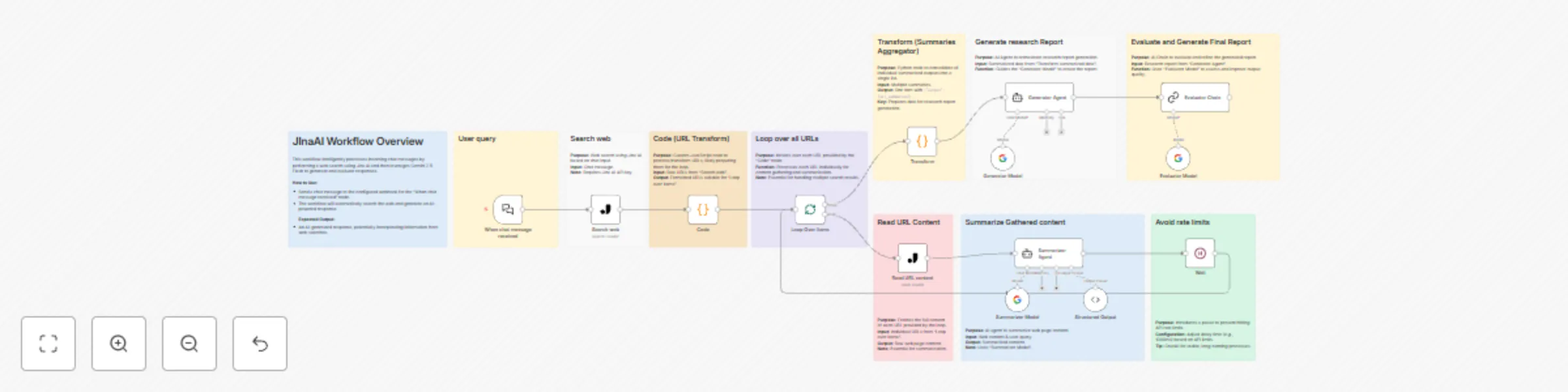
Original n8n.io sourceTurn a single research question into a comprehensive, multi-source report with proper citations. This workflow automates the entire research process by leveraging the web-crawling power of Jina AI and the advanced reasoning capabilities of Google's Gemini models. Simply input your query, and this AI-powered assembly line will search the web, scrape relevant sources, summarize the content, draft a structured research paper, and finally, evaluate and polish the report for accuracy and formatting.
Wait node to ensure stable execution when dealing with multiple API calls.This workflow is designed to be your personal research assistant. It addresses the time-consuming process of gathering, reading, and synthesizing information from multiple online sources. Instead of spending hours manually searching, reading, and citing, you can delegate the entire task to this workflow and receive a well-structured and cited report as the final output. It's perfect for students, researchers, content creators, and analysts who need to quickly compile information on any given topic.
Chat Trigger node.Jina AI node, which performs a web search and returns the top 10 most relevant URLs.Jina AI node scrapes the full text content from the URL.Summarizer Agent powered by Google Gemini reads the scraped content and the original user query, then generates a concise summary.Code node gathers all 10 individual summaries into a single, neatly structured list.Generator Agent. Following a detailed prompt, this Gemini-powered agent writes a full research report, structuring it with headings and adding inline citations for every piece of information it uses.Evaluator Chain. This agent acts as a quality control supervisor. It verifies that all claims are correctly cited, refines the content for clarity and academic tone, and polishes the markdown formatting to produce the final, ready-to-use report.Search web and Read URL content nodes. Get your key from here: JinaAI API KeySummarizer Model, Generator Model, and Evaluator Model nodes. Get your key from here: Gemini API KeyWhen chat message received node.Evaluator Chain, to find your completed and polished research report.Chat TriggerJina AICode (Python)Split in Batches (Looping)WaitAI AgentBasic LLM ChainGoogle Gemini Chat ModelThis catalog entry is organized from the workflow JSON. The node-level section below shows the executable blocks available for review before importing the template.
Showing the first 24 of 25 workflow blocks. Download the JSON for the full node graph.
| Workflow | Create comprehensive research reports with Jina AI & Gemini 2.5 Flash |
|---|---|
| Complexity | advanced |
| Nodes | 25 |
| Categories | Content Creation, AI RAG |
| Author | AppStoneLab Technologies LLP |
| Published | 30 Jun 2025 |
Use the JSON export at /data/workflows/5463/5463.json as the source template for this automation.
Open n8n, import the downloaded JSON, and review each node before activating the workflow.
Replace placeholder credentials, API keys, webhook URLs, account IDs, and environment-specific values with your own settings.
Run the workflow manually or in a staging workspace, inspect node output, and confirm downstream systems receive the expected data.
Enable the workflow only after testing, then monitor executions, errors, and rate limits during the first production runs.
Review imported nodes carefully before activation. This catalog entry is intended to help you inspect the workflow structure, understand required services, and find related templates faster.
Node names, credentials, schedules, webhook paths, and external service limits may need adjustment for your workspace.
Automated AI Research Assistant: From Query to Polished Report with Jina & Gemini Turn a single research question into a comprehensive, multi source report with proper citations. This workflow auto...
Review the workflow JSON, configure any required credentials in n8n, and test the automation in a safe workspace before using it in production.
Yes. Use the block-by-block analysis and the downloadable JSON to inspect each node, then adjust credentials, prompts, schedules, filters, or destinations for your Content Creation, AI RAG use case.