
Create branded LinkedIn carousels with GPT-4o-mini, Figma templates & templated

Workflow preview

Workflow preview
100%
Create branded LinkedIn carousels with GPT-4o-mini, Figma templates & templated preview
Open on n8n.io

Important notice

This workflow is provided as-is. Please review and test before using in production.

1. Workflow Overview

AI Powered LinkedIn Post Automation with Figma Templates How It Works This workflow automatically generates professional, branded LinkedIn posts using your custom Figma designs. Perfect for m...

Best for

  • Social Media automation workflows
  • Multimodal AI automation workflows
  • advanced n8n builders looking for reusable templates

Tools used

n8n-nodes-base.extractfromfile, n8n-nodes-base.wait, n8n-nodes-base.switch, n8n-nodes-base.set, @n8n/n8n-nodes-langchain.memorybufferwindow, n8n-nodes-base.perplexitytool, @n8n/n8n-nodes-langchain.toolthink, n8n-nodes-base.datetimetool

Source and attribution

This workflow is cataloged by N8N Workflows and links back to its original n8n.io source page by Ronalds Palacis.

Original n8n.io source

1.1 Workflow description

Title
Create branded LinkedIn carousels with GPT-4o-mini, Figma templates & templated
Workflow name
Create branded LinkedIn carousels with GPT-4o-mini, Figma templates & templated

πŸš€ AI-Powered LinkedIn Post Automation with Figma Templates

🧩 How It Works

This workflow automatically generates professional, branded LinkedIn posts using your custom Figma designs. Perfect for marketers, agencies, content creators, and businesses who want to maintain consistent branding while automating social media content creation.

Key Features:

  • Design-first approach using Figma templates
  • AI-powered content generation (optional)
  • High-quality image generation from templates
  • Automatic LinkedIn publishing
  • Telegram notifications for success/failure tracking

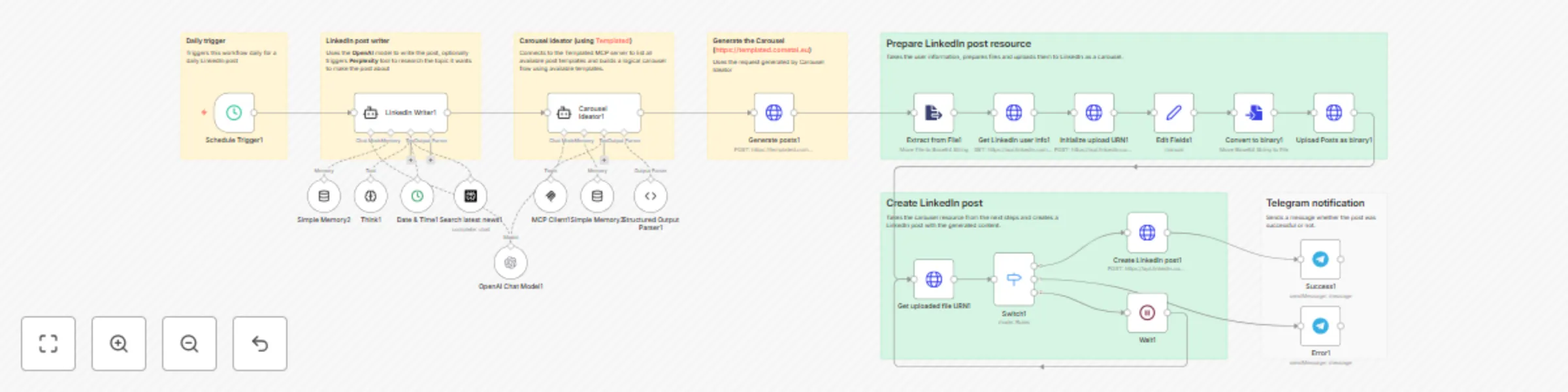
High-Level Workflow:

  1. Template Selection: Fetch your pre-designed Figma templates from Templated
  2. Content Preparation: Set static content or configure the prompts in the agents to generate with AI (ChatGPT/Claude)
  3. Image Generation: Create branded images with dynamic content via Templated MCP server
  4. LinkedIn Publishing: Automatically post text and image to your LinkedIn profile or company page (single image or carousel post)
  5. Notification: Receive Telegram alert on success/failure (optional)

βš™οΈ Set Up Steps (Quick Overview)

πŸ• Estimated Setup Time: ~15 minutes

  1. Create Templated Account: Sign up at templated.cometai.eu, import Figma designs, generate API key
  2. Configure LinkedIn OAuth: Set up LinkedIn Developer app with OAuth2 credentials for automatic posting
  3. Connect Templated MCP: Add API key authentication to MCP server nodes for template and image generation
  4. Set Up Telegram (Optional): Create bot for workflow notifications
  5. Customize Content: Add static fields or configure AI nodes for dynamic content generation
  6. Schedule & Activate: Set posting schedule (daily, weekly, etc.) and activate workflow

πŸ’‘ Important Notes

  • Figma Integration: Uses real Figma files as templates - maintain professional design quality without manual recreation
  • Template Variables: Supports dynamic placeholders in Figma text layers for content replacement
  • Character Limits: Respects maxLength settings to ensure text fits your design
  • Rate Limits: LinkedIn allows 25 posts/day (personal), 100/day (company pages)
  • AI-Ready: Easily integrate ChatGPT, Claude, or other AI models for content generation
  • Batch Generation: Generate multiple posts at once with different templates

πŸ›  Detailed Node Breakdown

1. Schedule Trigger

  • Action: Triggers the workflow on a schedule (daily, weekly, custom cron)
  • Configuration: Set your desired posting frequency
  • Alternative: Use manual trigger for on-demand posts

2. LinkedIn Post Writer (OpenAI Chat Model)

  • Action: AI generates engaging LinkedIn post content based on your topic/prompt
  • Tools: Simple Memory, Think, Date & Time, Search latest news
  • Output: Professional post text ready for publication

3. Carousel Ideator (Templated MCP Client)

  • Action: Connects to Templated MCP server to fetch available templates
  • Configuration: Uses your Templated API key for authentication
  • Output: Available template IDs and configurations for carousel generation

4. Generate the Carousel (POST to Templated MCP)

  • Action: Sends content to Templated server with template ID and field data
  • Input: Template selection, content fields (title, subtitle, etc.)
  • Output: Encoded carousel images generated from Figma templates

5. Extract from File

  • Action: Extracts generated image data from the MCP response
  • Process: Parses the encoded image string for LinkedIn upload

6. Get LinkedIn User Info (HTTP Request)

  • Action: Fetches your LinkedIn profile URN for post attribution
  • Authentication: OAuth2 LinkedIn credentials
  • Output: User ID required for posting

7. Initialize Upload URN

  • Action: Requests upload URL from LinkedIn for carousel document upload
  • Process: Prepares LinkedIn's upload mechanism for multi-image posts

8. Edit Fields

  • Action: Maps and formats data for LinkedIn API requirements
  • Process: Structures image data and post metadata correctly

9. Convert to Binary

  • Action: Converts image data to binary format
  • Key: Required format for LinkedIn document upload API

10. Upload Posts as Binary

  • Action: Uploads the carousel document to LinkedIn's servers
  • Process: Multi-part upload of generated images

11. Get Uploaded File URN

  • Action: Retrieves LinkedIn's asset ID for the uploaded content
  • Output: Asset URN needed for post creation

12. Switch (Conditional Logic)

  • Action: Handles success/error routing
  • Routes: Directs to LinkedIn post creation on success, error notification on failure

13. Create LinkedIn Post (HTTP Request)

  • Action: Creates the final LinkedIn post with carousel and text
  • Authentication: OAuth2 with LinkedIn posting permissions
  • Result: Published carousel post on your LinkedIn feed

14. Success/Error Notifications (Telegram)

  • Action: Sends notification about workflow execution status
  • Success: Confirms post published with details
  • Error: Alerts you to failures with error message and debugging info

⏱ Execution Time Breakdown

Total Estimated Execution Time: ~10–30 seconds per workflow run

  • Template Fetch: ~1–2 seconds
  • Content Preparation: ~1–2 seconds
  • Image Generation: ~5–15 seconds
  • LinkedIn Post Upload: ~2–5 seconds
  • Telegram Notification: ~1–2 seconds

Note: AI content generation (if added) adds ~5-10 seconds


πŸš€ Ready to Get Started?

What You'll Need:

  • Free Templated account at templated.cometai.eu
  • Figma designs with placeholder text
  • LinkedIn Developer app (free)
  • n8n instance (cloud or self-hosted)

Quick Start:

  1. Import this workflow to your n8n instance
  2. Follow the setup guide in the workflow notes
  3. Test with a single post
  4. Schedule for automatic posting
  5. Sit back and watch your LinkedIn feed grow! πŸŽ‰

πŸ“ Notes & Customizations

Template Customization

  • Create multiple templates in Figma for different content types (quotes, announcements, tips, etc.)
  • Rotate templates for visual variety
  • Use template descriptions to guide AI content generation
  • Set character limits per placeholder to prevent overflow

Content Generation Options

  • Static Mode: Define fields manually for recurring post types
  • AI Mode: Connect ChatGPT/Claude for dynamic, topic-based content
  • Hybrid Mode: Mix static brand elements with AI-generated copy
  • Scheduled Variety: Rotate between templates and content styles

Advanced Features

  • Multi-Platform: Duplicate workflow for Twitter, Instagram, Facebook
  • A/B Testing: Track performance across different templates
  • Content Calendar: Pull scheduled posts from Notion/Airtable
  • Analytics Integration: Log post IDs for engagement tracking
1.2 Logical Blocks

This catalog entry is organized from the workflow JSON. The node-level section below shows the executable blocks available for review before importing the template.

2. Block-by-Block Analysis

Block 1 - Extract from File1

Type / Role
n8n-nodes-base.extractFromFile - extractFromFile
Config choices
Version 1

Block 2 - Wait1

Type / Role
n8n-nodes-base.wait - wait
Config choices
Version 1.1

Block 3 - Switch1

Type / Role
n8n-nodes-base.switch - switch
Config choices
Version 3.2

Block 4 - Edit Fields1

Type / Role
n8n-nodes-base.set - set
Config choices
Version 3.4

Block 5 - Simple Memory2

Type / Role
@n8n/n8n-nodes-langchain.memoryBufferWindow - memoryBufferWindow
Config choices
Version 1.3

Block 6 - Search latest news1

Type / Role
n8n-nodes-base.perplexityTool - perplexityTool
Config choices
Version 1

Block 7 - Think1

Type / Role
@n8n/n8n-nodes-langchain.toolThink - toolThink
Config choices
Version 1.1

Block 8 - Date & Time1

Type / Role
n8n-nodes-base.dateTimeTool - dateTimeTool
Config choices
Version 2

Block 9 - OpenAI Chat Model1

Type / Role
@n8n/n8n-nodes-langchain.lmChatOpenAi - lmChatOpenAi
Config choices
Version 1.2

Block 10 - Structured Output Parser1

Type / Role
@n8n/n8n-nodes-langchain.outputParserStructured - outputParserStructured
Config choices
Version 1.3

Block 11 - Sticky Note7

Type / Role
n8n-nodes-base.stickyNote - stickyNote
Config choices
Version 1

Block 12 - Simple Memory3

Type / Role
@n8n/n8n-nodes-langchain.memoryBufferWindow - memoryBufferWindow
Config choices
Version 1.3

Block 13 - Schedule Trigger1

Type / Role
n8n-nodes-base.scheduleTrigger - scheduleTrigger
Config choices
Version 1.2

Block 14 - MCP Client1

Type / Role
@n8n/n8n-nodes-langchain.mcpClientTool - mcpClientTool
Config choices
Version 1.2

Block 15 - Generate posts1

Type / Role
n8n-nodes-base.httpRequest - httpRequest
Config choices
Version 4.2

Block 16 - Get Linkedin user info1

Type / Role
n8n-nodes-base.httpRequest - httpRequest
Config choices
Version 4.2

Block 17 - Initialize upload URN1

Type / Role
n8n-nodes-base.httpRequest - httpRequest
Config choices
Version 4.2

Block 18 - Upload Posts as binary1

Type / Role
n8n-nodes-base.httpRequest - httpRequest
Config choices
Version 4.2

Block 19 - Convert to binary1

Type / Role
n8n-nodes-base.convertToFile - convertToFile
Config choices
Version 1.1

Block 20 - Create Linkedin post1

Type / Role
n8n-nodes-base.httpRequest - httpRequest
Config choices
Version 4.2

Block 21 - Get uploaded file URN1

Type / Role
n8n-nodes-base.httpRequest - httpRequest
Config choices
Version 4.2

Block 22 - Sticky Note8

Type / Role
n8n-nodes-base.stickyNote - stickyNote
Config choices
Version 1

Block 23 - Sticky Note9

Type / Role
n8n-nodes-base.stickyNote - stickyNote
Config choices
Version 1

Block 24 - Sticky Note10

Type / Role
n8n-nodes-base.stickyNote - stickyNote
Config choices
Version 1

Showing the first 24 of 31 workflow blocks. Download the JSON for the full node graph.

3. Summary Table

Workflow Create branded LinkedIn carousels with GPT-4o-mini, Figma templates & templated
Complexity advanced
Nodes 31
Categories Social Media, Multimodal AI
Author Ronalds Palacis
Published 10 Oct 2025

4. Reproducing the Workflow from Scratch

  1. 1. Download the workflow JSON

    Use the JSON export at /data/workflows/9455/9455.json as the source template for this automation.

  2. 2. Import the template into n8n

    Open n8n, import the downloaded JSON, and review each node before activating the workflow.

  3. 3. Configure credentials and variables

    Replace placeholder credentials, API keys, webhook URLs, account IDs, and environment-specific values with your own settings.

  4. 4. Test with sample data

    Run the workflow manually or in a staging workspace, inspect node output, and confirm downstream systems receive the expected data.

  5. 5. Activate and monitor

    Enable the workflow only after testing, then monitor executions, errors, and rate limits during the first production runs.

5. General Notes & Resources

Review imported nodes carefully before activation. This catalog entry is intended to help you inspect the workflow structure, understand required services, and find related templates faster.

Node names, credentials, schedules, webhook paths, and external service limits may need adjustment for your workspace.

Frequently asked questions

What does Create branded LinkedIn carousels with GPT-4o-mini, Figma templates & templated do?

AI Powered LinkedIn Post Automation with Figma Templates How It Works This workflow automatically generates professional, branded LinkedIn posts using your custom Figma designs. Perfect for m...

What do I need before importing this workflow?

Review the workflow JSON, configure any required credentials in n8n, and test the automation in a safe workspace before using it in production.

Can I customize this workflow?

Yes. Use the block-by-block analysis and the downloadable JSON to inspect each node, then adjust credentials, prompts, schedules, filters, or destinations for your Social Media, Multimodal AI use case.



