Block 1 - When clicking ‘Test workflow’
- Type / Role
- n8n-nodes-base.manualTrigger - manualTrigger
- Config choices
- Version 1


 Early Deal
This workflow is provided as-is. Please review and test before using in production.
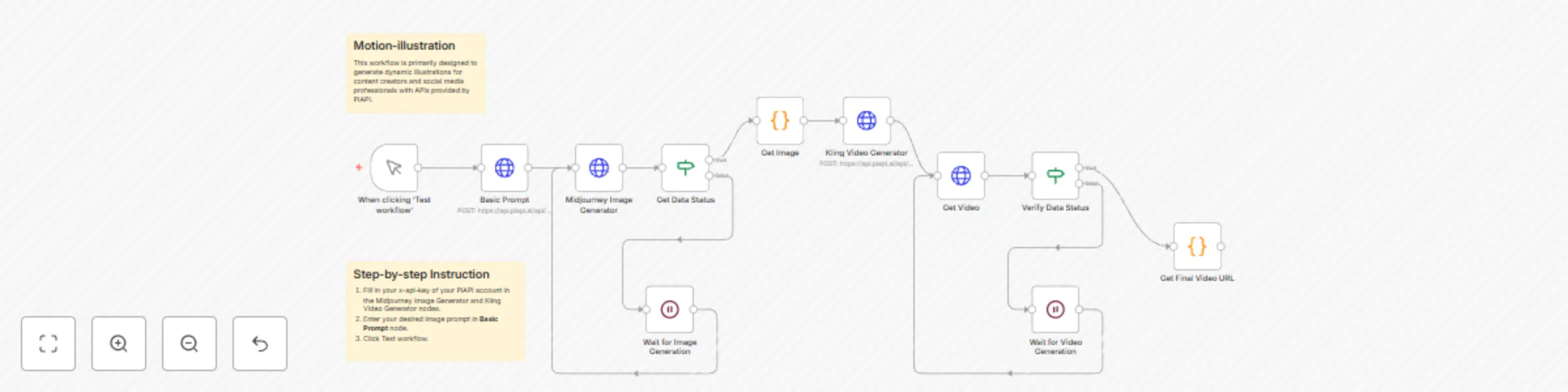
What does the workflow do? This workflow is primarily designed to generate animated illustrations for content creators and social media professionals with Midjourney (unoffcial) and Kling (unoffici...
n8n-nodes-base.manualtrigger, n8n-nodes-base.httprequest, n8n-nodes-base.code, n8n-nodes-base.if, n8n-nodes-base.wait, n8n-nodes-base.stickynote
This workflow is cataloged by N8N Workflows and links back to its original n8n.io source page by PiAPI.
Original n8n.io sourceThis workflow is primarily designed to generate animated illustrations for content creators and social media professionals with Midjourney (unoffcial) and Kling (unofficial) API served by PiAPI. PiAPI is an API platform which provides professional API service. With service provided by PiAPI, users could generate a fantastic animated artwork simply using workflow on n8n without complex settings among various AI models.
An animated illustration is a digitally enhanced artwork that combines traditional illustration styles with subtle, purposeful motion to enrich storytelling while preserving its original artistic essence.
To simplify workflow settings, usually users just need to change basic prompt of the image and the motion of the final video following the instrution below:
For more complex or customization settings, users could also add more nodes to get more output images and generate more videos. Also, they could change the target image to gain a better result. As for recommendation, users could change the video models for which we would recommend live-wallpaper LoRA of Wanx. Users could check API doc to see more use cases of video models and image models for best practice.
Input Prompt A gentle girl and a fluffy rabbit explore a sunlit forest together, playing by a sparkling stream. Butterflies flutter around them as golden sunlight filters through green leaves. Warm and peaceful atmosphere, 4K nature documentary style. --s 500 --sref 4028286908 --niji 6
Output Video
This catalog entry is organized from the workflow JSON. The node-level section below shows the executable blocks available for review before importing the template.
| Workflow | Create animated illustrations from text prompts with Midjourney and Kling API |
|---|---|
| Complexity | intermediate |
| Nodes | 13 |
| Categories | Content Creation, Multimodal AI |
| Author | PiAPI |
| Published | 21 Apr 2025 |
Use the JSON export at /data/workflows/3626/3626.json as the source template for this automation.
Open n8n, import the downloaded JSON, and review each node before activating the workflow.
Replace placeholder credentials, API keys, webhook URLs, account IDs, and environment-specific values with your own settings.
Run the workflow manually or in a staging workspace, inspect node output, and confirm downstream systems receive the expected data.
Enable the workflow only after testing, then monitor executions, errors, and rate limits during the first production runs.
Review imported nodes carefully before activation. This catalog entry is intended to help you inspect the workflow structure, understand required services, and find related templates faster.
Node names, credentials, schedules, webhook paths, and external service limits may need adjustment for your workspace.
What does the workflow do? This workflow is primarily designed to generate animated illustrations for content creators and social media professionals with Midjourney (unoffcial) and Kling (unoffici...
Review the workflow JSON, configure any required credentials in n8n, and test the automation in a safe workspace before using it in production.
Yes. Use the block-by-block analysis and the downloadable JSON to inspect each node, then adjust credentials, prompts, schedules, filters, or destinations for your Content Creation, Multimodal AI use case.