Block 1 - When clicking 'Test workflow'
- Type / Role
- n8n-nodes-base.manualTrigger - manualTrigger
- Config choices
- Version 1


 Early Deal
This workflow is provided as-is. Please review and test before using in production.
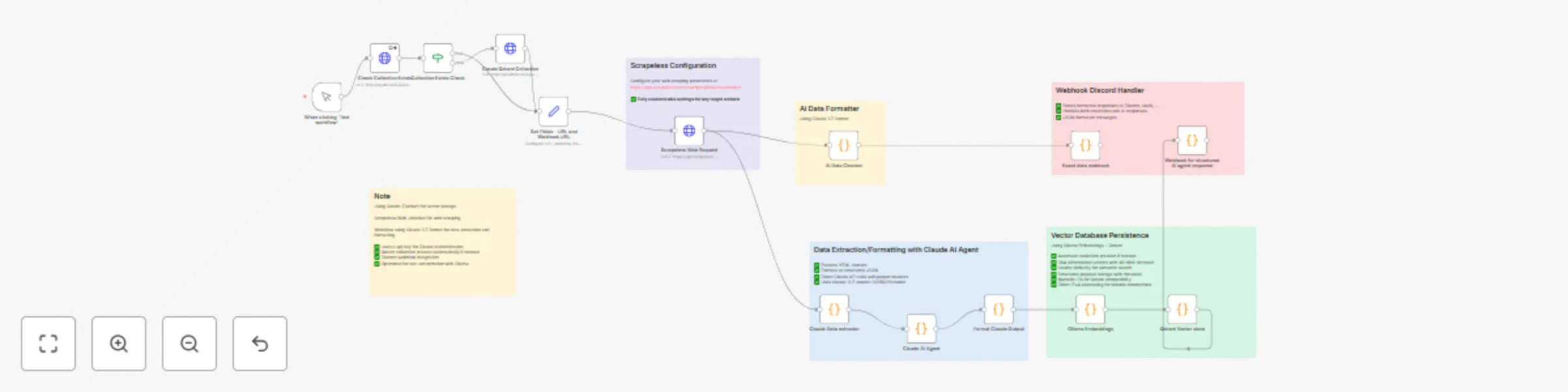
AI Powered Web Data Pipeline with n8n How It Works This workflow builds an AI powered web data pipeline that automates the entire process of: Ex...
n8n-nodes-base.manualtrigger, n8n-nodes-base.stickynote, n8n-nodes-base.set, n8n-nodes-base.httprequest, n8n-nodes-base.code, n8n-nodes-base.if
This workflow is cataloged by N8N Workflows and links back to its original n8n.io source page by scrapeless official.
Original n8n.io sourceThis n8n workflow builds an AI-powered web data pipeline that automates the entire process of:
It integrates multiple advanced tools to transform messy web pages into clean, searchable vector databases.
Scrapeless
Bypasses JavaScript-heavy websites and anti-bot protections to reliably extract HTML content.
Claude AI
Uses LLMs to analyze unstructured HTML and generate clean, structured JSON data.
Ollama Embeddings
Generates local vector embeddings from structured text using the all-minilm model.
Qdrant Vector DB
Stores semantic vector data for fast and meaningful search capabilities.
Webhook Notifications
Sends real-time updates when workflows complete or errors occur.
From messy webpages to structured vector data — this pipeline is perfect for building intelligent agents, knowledge bases, or research automation tools.
> Requires Node.js v18 / v20 / v22
npm install -g n8n
n8n
After installation, access the n8n interface via:
HTTP Request node labeled "Scrapeless Web Request"Claude ExtractorAI Data CheckerClaude AI Agentbrew install ollama
curl -fsSL https://ollama.com/install.sh | sh
Windows Download the installer from: https://ollama.com
ollama serve
ollama pull all-minilm
docker pull qdrant/qdrant

docker run -d \
  --name qdrant-server \
  -p 6333:6333 -p 6334:6334 \
  -v $(pwd)/qdrant_storage:/qdrant/storage \
  qdrant/qdrant
Test if Qdrant is running:
curl http://localhost:6333/healthz
Modify the Trigger (Manual or Scheduled)
Input your Target URLs and Collection Name in the designated nodes
Paste all required API Tokens / Keys into their corresponding nodes
Ensure your Qdrant and Ollama services are running
Custom AI Chatbots
Private Search Engines
Research Tools
Internal Knowledge Bases
Content Monitoring Pipelines
This catalog entry is organized from the workflow JSON. The node-level section below shows the executable blocks available for review before importing the template.
| Workflow | Create AI-ready vector datasets from web content with Claude, Ollama & Qdrant |
|---|---|
| Complexity | advanced |
| Nodes | 20 |
| Categories | Document Extraction, AI RAG |
| Author | scrapeless official |
| Published | 19 May 2025 |
Use the JSON export at /data/workflows/4219/4219.json as the source template for this automation.
Open n8n, import the downloaded JSON, and review each node before activating the workflow.
Replace placeholder credentials, API keys, webhook URLs, account IDs, and environment-specific values with your own settings.
Run the workflow manually or in a staging workspace, inspect node output, and confirm downstream systems receive the expected data.
Enable the workflow only after testing, then monitor executions, errors, and rate limits during the first production runs.
Review imported nodes carefully before activation. This catalog entry is intended to help you inspect the workflow structure, understand required services, and find related templates faster.
Node names, credentials, schedules, webhook paths, and external service limits may need adjustment for your workspace.
AI Powered Web Data Pipeline with n8n How It Works This workflow builds an AI powered web data pipeline that automates the entire process of: Ex...
Review the workflow JSON, configure any required credentials in n8n, and test the automation in a safe workspace before using it in production.
Yes. Use the block-by-block analysis and the downloadable JSON to inspect each node, then adjust credentials, prompts, schedules, filters, or destinations for your Document Extraction, AI RAG use case.