Create AI-powered YouTube shorts with OpenAI, ElevenLabs, 0CodeKit!

Workflow preview

Workflow preview
100%
Create AI-powered YouTube shorts with OpenAI, ElevenLabs, 0CodeKit! preview
Open on n8n.io

Important notice

This workflow is provided as-is. Please review and test before using in production.

1. Workflow Overview

YouTube Shorts Automation with AI Powered Video Generation Overview This workflow automates the creation of engaging YouTube Shorts by leveraging AI tools to generate scripts, audio, images, and vi...

Best for

  • Content Creation automation workflows
  • Multimodal AI automation workflows
  • advanced n8n builders looking for reusable templates

Tools used

n8n-nodes-base.manualtrigger, @n8n/n8n-nodes-langchain.openai, n8n-nodes-base.set, n8n-nodes-base.httprequest, n8n-nodes-base.splitout, n8n-nodes-base.wait, n8n-nodes-base.aggregate, n8n-nodes-base.merge

Source and attribution

This workflow is cataloged by N8N Workflows and links back to its original n8n.io source page by dada.

Original n8n.io source

1.1 Workflow description

Title
Create AI-powered YouTube shorts with OpenAI, ElevenLabs, 0CodeKit!
Workflow name
Create AI-powered YouTube shorts with OpenAI, ElevenLabs, 0CodeKit!

YouTube Shorts Automation with AI-Powered Video Generation

Overview

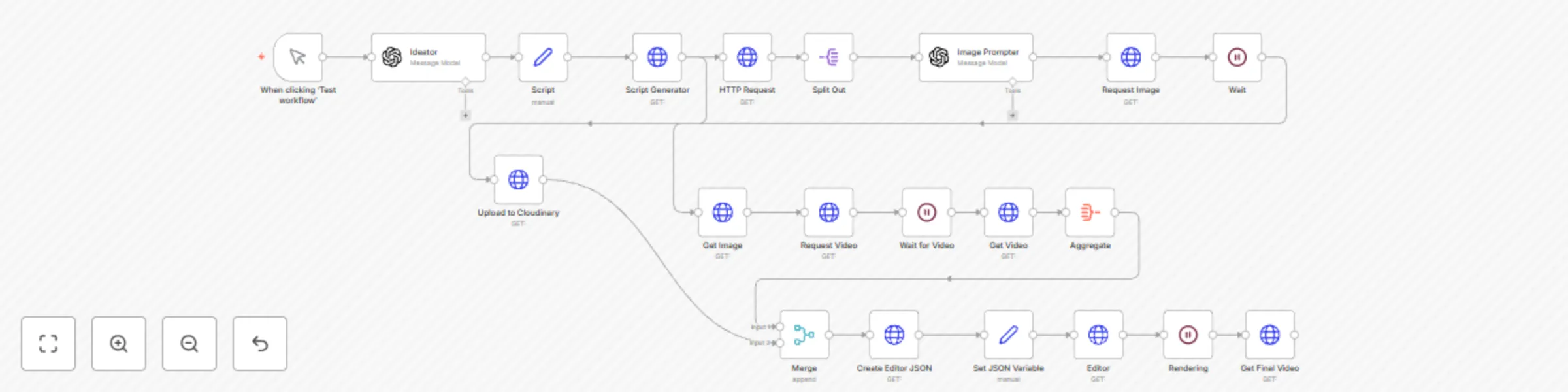
This workflow automates the creation of engaging YouTube Shorts by leveraging AI tools to generate scripts, audio, images, and videos, then compiles them into a final video ready for upload. It uses OpenAI for script and image prompt generation, ElevenLabs for text-to-speech, Replicate for image and video generation, Cloudinary for audio storage, and Creatomate for final video rendering. The workflow segments the script into 6-second clips, creates corresponding visuals, and combines them with audio, adding smooth transitions for a polished result.

Why is this workflow useful?

Creating YouTube Shorts manually is time-consuming, requiring scriptwriting, voiceovers, and video editing. This workflow automates the entire process, enabling creators to produce high-quality, engaging Shorts in minutes. It’s ideal for content creators, marketers, or businesses looking to maintain a consistent social media presence with minimal effort.

Who is this workflow for?

  • Content Creators: YouTubers or TikTok creators aiming to produce viral Shorts quickly.
  • Digital Marketers: Businesses promoting products or services through short-form video content.
  • Hobbyists: Individuals experimenting with AI-driven video production without advanced editing skills.

What will you need to use this workflow?

  • n8n Account: Free or paid, hosted on n8n Cloud or self-hosted.
  • OpenAI API Key: For generating scripts and image prompts (GPT-4o-mini model).
  • ElevenLabs API Key: For text-to-speech conversion.
  • Replicate API Key: For generating images and videos.
  • Cloudinary Account: For storing audio files.
  • Creatomate API Key: For rendering the final video.
  • Basic JSON Knowledge: To understand and tweak the workflow output if needed.

How does this workflow work?

  1. Trigger: The workflow starts manually via the "Test Workflow" button.
  2. Script Generation: OpenAI (GPT-4o-mini) generates a script with an intro (40-70 chars), base (280-350 chars), and CTA (55 chars), plus a title and description with hashtags.
  3. Text-to-Speech: ElevenLabs converts the script into an MP3 audio file with timestamps.
  4. Audio Upload: The audio is uploaded to Cloudinary for storage.
  5. Script Segmentation: A Python script segments the audio into 6-second clips, creating transcription chunks.
  6. Image Prompt Generation: OpenAI generates a visual prompt for each segment in the style of CNSTLL, ensuring simple, animatable visuals.
  7. Image Generation: Replicate creates a 9:16 image for each segment based on the prompt.
  8. Video Generation: Replicate’s Minimax model generates 5-second video clips from the images.
  9. Video Compilation: Creatomate combines the video clips with the audio, adding fade transitions and a final black shape for a smooth close.
  10. Final Output: The rendered video is retrieved from Creatomate, ready for YouTube Shorts.

Setup instructions

  1. Import the Workflow: Copy the provided JSON into n8n and import it as a new workflow.
  2. Add Credentials:
    • Configure OpenAI API credentials for the "Ideator" and "Image Prompter" nodes.
    • Set up ElevenLabs API key in the "Script Generator" node.
    • Add Replicate API key for the "Request Image," "Request Video," and "Get Video" nodes.
    • Configure Cloudinary credentials for the "Upload to Cloudinary" node.
    • Set Creatomate API key for the "Editor" and "Get Final Video" nodes.
  3. Test the Workflow:
    • Click "Test Workflow" to run it manually.
    • Replace <user-query> in the "Ideator" node with your video topic (e.g., "Fitness tips for beginners").
  4. Verify Outputs: Check each node’s output, ensuring audio, images, and videos are generated correctly.
  5. Customize (Optional):
    • Adjust segment duration in the "HTTP Request" node’s Python code (default: 6 seconds).
    • Modify fade duration or video resolution in the "Create Editor JSON" node.
  6. Save and Activate: Save the workflow and activate it for regular use.

Tips for getting the most out of this workflow

  • Optimize Prompts: Use specific, concise queries in the "Ideator" node for better script quality (e.g., "Minimalist home decor ideas").
  • Check API Limits: Ensure your API accounts (OpenAI, ElevenLabs, Replicate, Creatomate) have sufficient credits.
  • Experiment with Styles: Tweak the CNSTLL style in the "Image Prompter" node for unique visuals, but keep prompts simple to avoid AI generation errors.
  • Monitor Rendering Time: Video rendering in Creatomate may take up to 70 seconds; adjust the "Rendering" node’s wait time if needed.
  • Add Hashtags: Enhance the generated description with trending hashtags like #YouTubeShorts, #AI, or niche-specific tags.

Troubleshooting

  • Error in Script Generation: Verify your OpenAI API key and ensure the query is clear.
  • Audio Issues: Check ElevenLabs API key and confirm the script length fits within API limits.
  • Image/Video Failures: Ensure Replicate API key is valid and prompts are simple (avoid complex scenes or humans).
  • Rendering Errors: Confirm Creatomate API key and check JSON structure in the "Create Editor JSON" node.
  • Contact Support: Reach out to n8n Community Forum or respective API providers for persistent issues.

Built with

  • n8n Nodes: Manual Trigger, OpenAI, HTTP Request, Set, Split Out, Aggregate, Merge, Wait.
  • External Services: OpenAI (GPT-4o-mini), ElevenLabs (Multilingual v2), Replicate (Flux-Cinestill, Minimax Video-01), Cloudinary, Creatomate.
  • Custom Code: Python for audio segmentation and JSON rendering.

Example output

For a query like "Morning routine hacks":

  • Script:
    • Intro: "Struggling to start your day right?"
    • Base: "Try these 3 morning hacks: 5-min meditation to clear your mind, a quick stretch routine to boost energy, and a cold shower to stay alert. Set your day up for success!"
    • CTA: "Save this and try it tomorrow!"
  • Title: "3 Morning Hacks You NEED to Try!"
  • Description: "Kickstart your day with these easy hacks! 🧘‍♀️🚿 #MorningRoutine #Productivity #YouTubeShorts"
  • Video: A 15-second Short with three 5-second clips (meditation scene, stretching POV, cold shower close-up), synced with audio and fade transitions.

1.2 Logical Blocks

This catalog entry is organized from the workflow JSON. The node-level section below shows the executable blocks available for review before importing the template.

2. Block-by-Block Analysis

Block 1 - When clicking ‘Test workflow’

Type / Role
n8n-nodes-base.manualTrigger - manualTrigger
Config choices
Version 1

Block 2 - Ideator

Type / Role
@n8n/n8n-nodes-langchain.openAi - openAi
Config choices
Version 1.8

Block 3 - Script

Type / Role
n8n-nodes-base.set - set
Config choices
Version 3.4

Block 4 - Script Generator

Type / Role
n8n-nodes-base.httpRequest - httpRequest
Config choices
Version 4.2

Block 5 - HTTP Request

Type / Role
n8n-nodes-base.httpRequest - httpRequest
Config choices
Version 4.2

Block 6 - Split Out

Type / Role
n8n-nodes-base.splitOut - splitOut
Config choices
Version 1

Block 7 - Image Prompter

Type / Role
@n8n/n8n-nodes-langchain.openAi - openAi
Config choices
Version 1.8

Block 8 - Request Image

Type / Role
n8n-nodes-base.httpRequest - httpRequest
Config choices
Version 4.2

Block 9 - Wait

Type / Role
n8n-nodes-base.wait - wait
Config choices
Version 1.1

Block 10 - Get Image

Type / Role
n8n-nodes-base.httpRequest - httpRequest
Config choices
Version 4.2

Block 11 - Request Video

Type / Role
n8n-nodes-base.httpRequest - httpRequest
Config choices
Version 4.2

Block 12 - Wait for Video

Type / Role
n8n-nodes-base.wait - wait
Config choices
Version 1.1

Block 13 - Get Video

Type / Role
n8n-nodes-base.httpRequest - httpRequest
Config choices
Version 4.2

Block 14 - Upload to Cloudinary

Type / Role
n8n-nodes-base.httpRequest - httpRequest
Config choices
Version 4.2

Block 15 - Aggregate

Type / Role
n8n-nodes-base.aggregate - aggregate
Config choices
Version 1

Block 16 - Merge

Type / Role
n8n-nodes-base.merge - merge
Config choices
Version 3.1

Block 17 - Create Editor JSON

Type / Role
n8n-nodes-base.httpRequest - httpRequest
Config choices
Version 4.2

Block 18 - Set JSON Variable

Type / Role
n8n-nodes-base.set - set
Config choices
Version 3.4

Block 19 - Editor

Type / Role
n8n-nodes-base.httpRequest - httpRequest
Config choices
Version 4.2

Block 20 - Rendering

Type / Role
n8n-nodes-base.wait - wait
Config choices
Version 1.1

Block 21 - Get Final Video

Type / Role
n8n-nodes-base.httpRequest - httpRequest
Config choices
Version 4.2

3. Summary Table

Workflow Create AI-powered YouTube shorts with OpenAI, ElevenLabs, 0CodeKit!
Complexity advanced
Nodes 21
Categories Content Creation, Multimodal AI
Author dada
Published 17 Apr 2025

4. Reproducing the Workflow from Scratch

  1. 1. Download the workflow JSON

    Use the JSON export at /data/workflows/3584/3584.json as the source template for this automation.

  2. 2. Import the template into n8n

    Open n8n, import the downloaded JSON, and review each node before activating the workflow.

  3. 3. Configure credentials and variables

    Replace placeholder credentials, API keys, webhook URLs, account IDs, and environment-specific values with your own settings.

  4. 4. Test with sample data

    Run the workflow manually or in a staging workspace, inspect node output, and confirm downstream systems receive the expected data.

  5. 5. Activate and monitor

    Enable the workflow only after testing, then monitor executions, errors, and rate limits during the first production runs.

5. General Notes & Resources

Review imported nodes carefully before activation. This catalog entry is intended to help you inspect the workflow structure, understand required services, and find related templates faster.

Node names, credentials, schedules, webhook paths, and external service limits may need adjustment for your workspace.

Frequently asked questions

What does Create AI-powered YouTube shorts with OpenAI, ElevenLabs, 0CodeKit! do?

YouTube Shorts Automation with AI Powered Video Generation Overview This workflow automates the creation of engaging YouTube Shorts by leveraging AI tools to generate scripts, audio, images, and vi...

What do I need before importing this workflow?

Review the workflow JSON, configure any required credentials in n8n, and test the automation in a safe workspace before using it in production.

Can I customize this workflow?

Yes. Use the block-by-block analysis and the downloadable JSON to inspect each node, then adjust credentials, prompts, schedules, filters, or destinations for your Content Creation, Multimodal AI use case.