D

dada

1
Workflow

Workflows by dada

Workflow preview: Create AI-powered YouTube shorts with OpenAI, ElevenLabs, 0CodeKit!
Free advanced

Create AI-powered YouTube shorts with OpenAI, ElevenLabs, 0CodeKit!

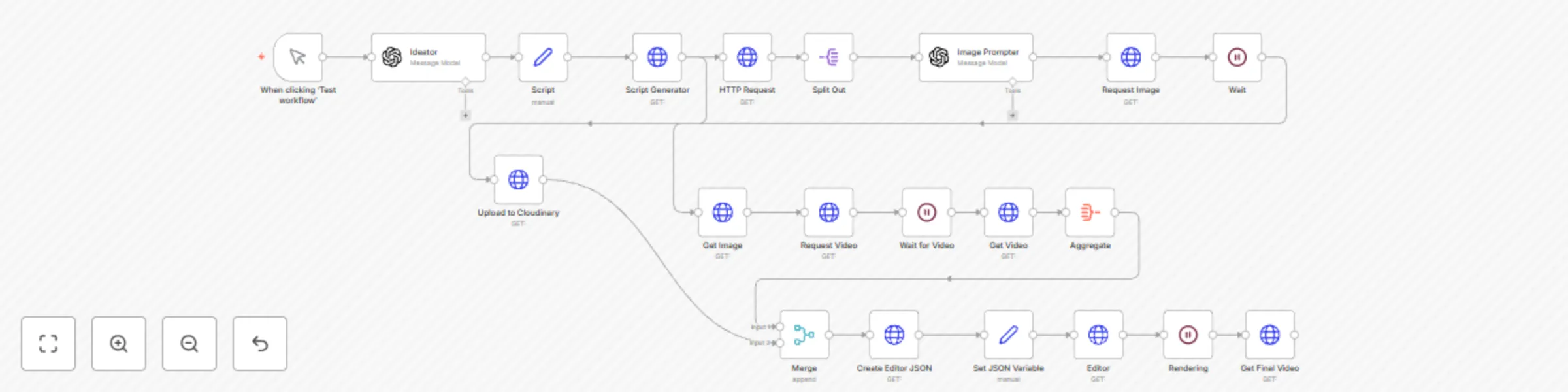
# YouTube Shorts Automation with AI-Powered Video Generation ## Overview This workflow automates the creation of engaging YouTube Shorts by leveraging AI tools to generate scripts, audio, images, and videos, then compiles them into a final video ready for upload. It uses OpenAI for script and image prompt generation, ElevenLabs for text-to-speech, Replicate for image and video generation, Cloudinary for audio storage, and Creatomate for final video rendering. The workflow segments the script into 6-second clips, creates corresponding visuals, and combines them with audio, adding smooth transitions for a polished result. ## Why is this workflow useful? Creating YouTube Shorts manually is time-consuming, requiring scriptwriting, voiceovers, and video editing. This workflow automates the entire process, enabling creators to produce high-quality, engaging Shorts in minutes. It’s ideal for content creators, marketers, or businesses looking to maintain a consistent social media presence with minimal effort. ## Who is this workflow for? - **Content Creators**: YouTubers or TikTok creators aiming to produce viral Shorts quickly. - **Digital Marketers**: Businesses promoting products or services through short-form video content. - **Hobbyists**: Individuals experimenting with AI-driven video production without advanced editing skills. ## What will you need to use this workflow? - **n8n Account**: Free or paid, hosted on n8n Cloud or self-hosted. - **OpenAI API Key**: For generating scripts and image prompts (GPT-4o-mini model). - **ElevenLabs API Key**: For text-to-speech conversion. - **Replicate API Key**: For generating images and videos. - **Cloudinary Account**: For storing audio files. - **Creatomate API Key**: For rendering the final video. - **Basic JSON Knowledge**: To understand and tweak the workflow output if needed. ## How does this workflow work? 1. **Trigger**: The workflow starts manually via the "Test Workflow" button. 2. **Script Generation**: OpenAI (GPT-4o-mini) generates a script with an intro (40-70 chars), base (280-350 chars), and CTA (55 chars), plus a title and description with hashtags. 3. **Text-to-Speech**: ElevenLabs converts the script into an MP3 audio file with timestamps. 4. **Audio Upload**: The audio is uploaded to Cloudinary for storage. 5. **Script Segmentation**: A Python script segments the audio into 6-second clips, creating transcription chunks. 6. **Image Prompt Generation**: OpenAI generates a visual prompt for each segment in the style of CNSTLL, ensuring simple, animatable visuals. 7. **Image Generation**: Replicate creates a 9:16 image for each segment based on the prompt. 8. **Video Generation**: Replicate’s Minimax model generates 5-second video clips from the images. 9. **Video Compilation**: Creatomate combines the video clips with the audio, adding fade transitions and a final black shape for a smooth close. 10. **Final Output**: The rendered video is retrieved from Creatomate, ready for YouTube Shorts. ## Setup instructions 1. **Import the Workflow**: Copy the provided JSON into n8n and import it as a new workflow. 2. **Add Credentials**: - Configure OpenAI API credentials for the "Ideator" and "Image Prompter" nodes. - Set up ElevenLabs API key in the "Script Generator" node. - Add Replicate API key for the "Request Image," "Request Video," and "Get Video" nodes. - Configure Cloudinary credentials for the "Upload to Cloudinary" node. - Set Creatomate API key for the "Editor" and "Get Final Video" nodes. 3. **Test the Workflow**: - Click "Test Workflow" to run it manually. - Replace `<user-query>` in the "Ideator" node with your video topic (e.g., "Fitness tips for beginners"). 4. **Verify Outputs**: Check each node’s output, ensuring audio, images, and videos are generated correctly. 5. **Customize (Optional)**: - Adjust segment duration in the "HTTP Request" node’s Python code (default: 6 seconds). - Modify fade duration or video resolution in the "Create Editor JSON" node. 6. **Save and Activate**: Save the workflow and activate it for regular use. ## Tips for getting the most out of this workflow - **Optimize Prompts**: Use specific, concise queries in the "Ideator" node for better script quality (e.g., "Minimalist home decor ideas"). - **Check API Limits**: Ensure your API accounts (OpenAI, ElevenLabs, Replicate, Creatomate) have sufficient credits. - **Experiment with Styles**: Tweak the CNSTLL style in the "Image Prompter" node for unique visuals, but keep prompts simple to avoid AI generation errors. - **Monitor Rendering Time**: Video rendering in Creatomate may take up to 70 seconds; adjust the "Rendering" node’s wait time if needed. - **Add Hashtags**: Enhance the generated description with trending hashtags like #YouTubeShorts, #AI, or niche-specific tags. ## Troubleshooting - **Error in Script Generation**: Verify your OpenAI API key and ensure the query is clear. - **Audio Issues**: Check ElevenLabs API key and confirm the script length fits within API limits. - **Image/Video Failures**: Ensure Replicate API key is valid and prompts are simple (avoid complex scenes or humans). - **Rendering Errors**: Confirm Creatomate API key and check JSON structure in the "Create Editor JSON" node. - **Contact Support**: Reach out to n8n Community Forum or respective API providers for persistent issues. ## Built with - **n8n Nodes**: Manual Trigger, OpenAI, HTTP Request, Set, Split Out, Aggregate, Merge, Wait. - **External Services**: OpenAI (GPT-4o-mini), ElevenLabs (Multilingual v2), Replicate (Flux-Cinestill, Minimax Video-01), Cloudinary, Creatomate. - **Custom Code**: Python for audio segmentation and JSON rendering. ## Example output For a query like "Morning routine hacks": - **Script**: - **Intro**: "Struggling to start your day right?" - **Base**: "Try these 3 morning hacks: 5-min meditation to clear your mind, a quick stretch routine to boost energy, and a cold shower to stay alert. Set your day up for success!" - **CTA**: "Save this and try it tomorrow!" - **Title**: "3 Morning Hacks You NEED to Try!" - **Description**: "Kickstart your day with these easy hacks! 🧘‍♀️🚿 #MorningRoutine #Productivity #YouTubeShorts" - **Video**: A 15-second Short with three 5-second clips (meditation scene, stretching POV, cold shower close-up), synced with audio and fade transitions.

d
dada
Content Creation
17 Apr 2025
733
0