Block 1 - Structured Output Parser1
- Type / Role
- @n8n/n8n-nodes-langchain.outputParserStructured - outputParserStructured
- Config choices
- Version 1.3


 Early Deal
Video → Newsletter AI Agent This n8n workflow converts a YouTube video into a polished, email ready newsletter. It scrapes the transcript, extracts a thumbnail/logo and brand color theme, uses mult...
@n8n/n8n-nodes-langchain.outputparserstructured, @n8n/n8n-nodes-langchain.agent, n8n-nodes-base.gmail, n8n-nodes-base.formtrigger, n8n-nodes-base.httprequest, n8n-nodes-base.merge, n8n-nodes-base.aggregate, n8n-nodes-base.splitinbatches
This workflow is cataloged by N8N Workflows and links back to its original n8n.io source page by Pratyush Kumar Jha.
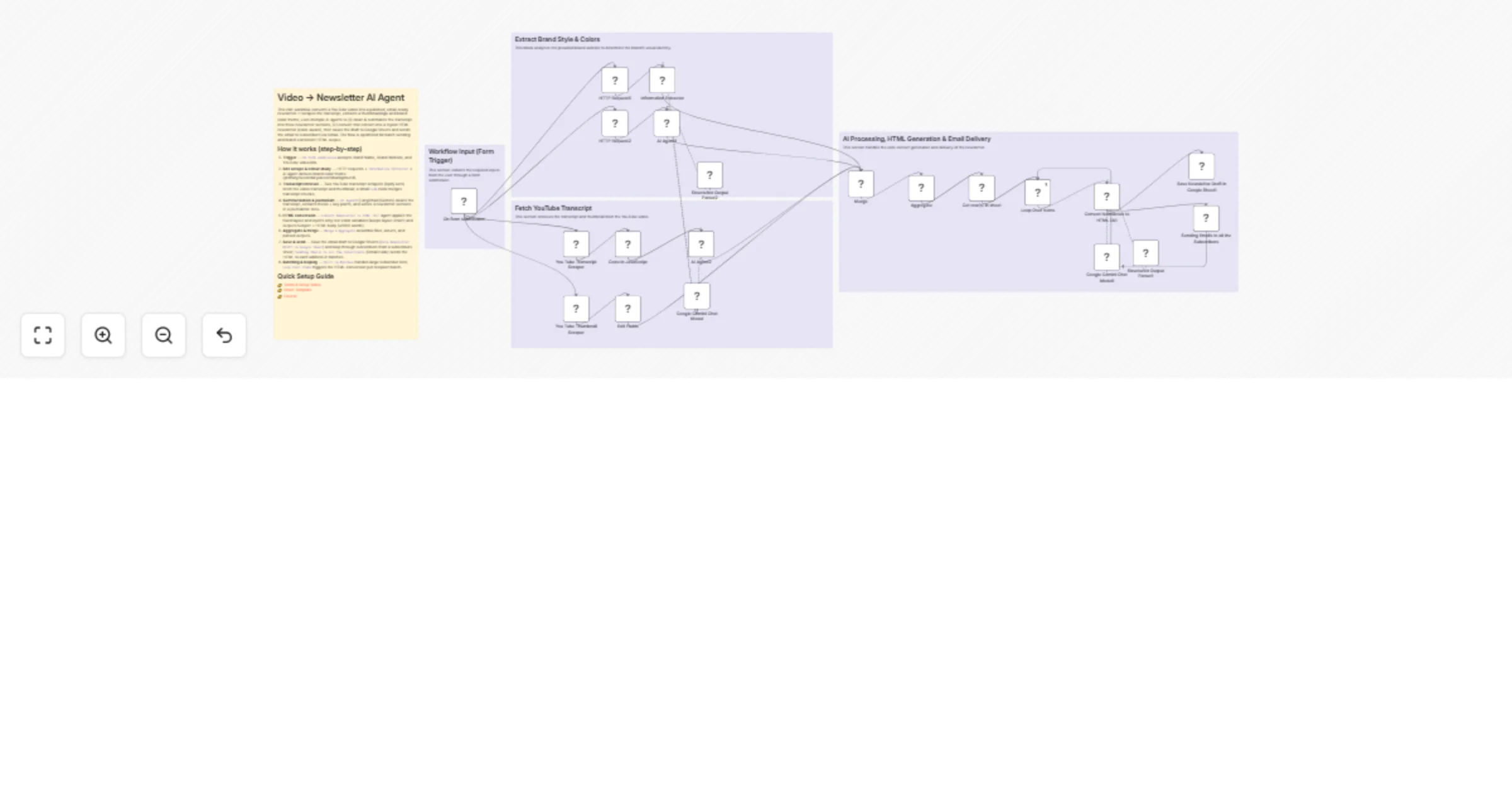
Original n8n.io sourceThis n8n workflow converts a YouTube video into a polished, email-ready newsletter. It scrapes the transcript, extracts a thumbnail/logo and brand color theme, uses multiple AI agents to (1) clean & summarize the transcript into three newsletter sections, (2) convert that content into a styled HTML newsletter (color-aware), then saves the draft to Google Sheets and sends the email to subscribers via Gmail. The flow is optimized for batch sending and brand-consistent HTML output.
On form submission accepts Brand Name, Brand Website, and YouTube video link. Information Extractor → AI agent derives brand color theme (primary/secondary/accent/background). Code node merges transcript chunks. AI Agent2 (LangChain/Gemini) cleans the transcript, extracts thesis + key points, and writes 3 newsletter sections in a journalistic tone. Convert Newsletter to HTML (AI) agent applies the fixed layout and injects only text color variables (keeps layout intact) and outputs Subject + HTML body (≤1000 words). Merge + Aggregate assemble files, assets, and parsed outputs. Save Newsletter Draft in Google Sheet) and loop through subscribers from a subscribers sheet; Sending Emails to all the Subscribers (Gmail node) sends the HTML to each address in batches. Split In Batches handles large subscriber lists; Loop Over Items triggers the HTML-conversion per recipient batch.👉 Demo & Setup Video 👉 Sheet Template 👉 Course
On form submission (formTrigger) — entry point for video + brand inputs. You Tube Transcript Scraper, You Tube Transcript Scraper1 (HTTP Request → Apify) — transcript + thumbnail fetching. Information Extractor & AI Agent1 — website color/theme extraction. Code in JavaScript — merges transcript pieces into a single text payload. AI Agent2 (LangChain agent + Gemini Chat Model) — transcript → journalist-style newsletter sections. Convert Newsletter to HTML (AI) (LangChain agent + Structured Output Parser) — builds constrained, brand-aware HTML email and subject. Structured Output Parser1/2 — enforce schemas for color theme / structured outputs. Get row(s) in sheet & Save Newsletter Draft in Google Sheet (Google Sheets) — subscriber list + draft storage. Loop Over Items / Split In Batches — batch processing for sends. Sending Emails to all the Subscribers (Gmail) — SMTP/OAuth send. OpenRouter Chat Model — LM compute provider configured in the workflow.Split In Batches to a conservative batch size (e.g., 50–200) and add delays between batches to avoid provider rate limits and Gmail throttling. max_output_tokens (or equivalent) to avoid runaway costs; enforce the 1000-word HTML hard limit in the prompt. Structured Output Parser nodes with strict JSON schemas to prevent malformed outputs. n8n newsletter youtube transcript langchain gemini apify gmail google-sheets html-email automation batching ai content-ops
This catalog entry is organized from the workflow JSON. The node-level section below shows the executable blocks available for review before importing the template.
Showing the first 24 of 26 workflow blocks. Download the JSON for the full node graph.
| Workflow | Create AI newsletters from YouTube with LangChain, Gemini, Apify & Gmail |
|---|---|
| Complexity | advanced |
| Nodes | 26 |
| Categories | Social Media, Multimodal AI |
| Author | Pratyush Kumar Jha |
| Published | 12 Mar 2026 |
Use the JSON export at /data/workflows/14012/14012.json as the source template for this automation.
Open n8n, import the downloaded JSON, and review each node before activating the workflow.
Replace placeholder credentials, API keys, webhook URLs, account IDs, and environment-specific values with your own settings.
Run the workflow manually or in a staging workspace, inspect node output, and confirm downstream systems receive the expected data.
Enable the workflow only after testing, then monitor executions, errors, and rate limits during the first production runs.
Review imported nodes carefully before activation. This catalog entry is intended to help you inspect the workflow structure, understand required services, and find related templates faster.
Node names, credentials, schedules, webhook paths, and external service limits may need adjustment for your workspace.
Video → Newsletter AI Agent This n8n workflow converts a YouTube video into a polished, email ready newsletter. It scrapes the transcript, extracts a thumbnail/logo and brand color theme, uses mult...
Review the workflow JSON, configure any required credentials in n8n, and test the automation in a safe workspace before using it in production.
Yes. Use the block-by-block analysis and the downloadable JSON to inspect each node, then adjust credentials, prompts, schedules, filters, or destinations for your Social Media, Multimodal AI use case.