Create AI news video content ideas for social media with Perplexity & OpenAI

Workflow preview

Workflow preview
100%
Create AI news video content ideas for social media with Perplexity & OpenAI preview
Open on n8n.io

Important notice

This workflow is provided as-is. Please review and test before using in production.

1. Workflow Overview

AI Latest News Content Script Writer Overview This workflow automates the daily generation of viral short form video content ideas tailored for founders and business leaders. It scrapes fresh AI re...

Best for

  • Content Creation automation workflows
  • Multimodal AI automation workflows
  • advanced n8n builders looking for reusable templates

Tools used

n8n-nodes-base.scheduletrigger, n8n-nodes-base.merge, n8n-nodes-base.splitinbatches, n8n-nodes-base.set, @n8n/n8n-nodes-langchain.openai, n8n-nodes-base.httprequest, n8n-nodes-base.code, n8n-nodes-base.googlesheets

Source and attribution

This workflow is cataloged by N8N Workflows and links back to its original n8n.io source page by Gain FLow AI.

Original n8n.io source

1.1 Workflow description

Title
Create AI news video content ideas for social media with Perplexity & OpenAI
Workflow name
Create AI news video content ideas for social media with Perplexity & OpenAI

AI Latest News Content Script Writer

Overview

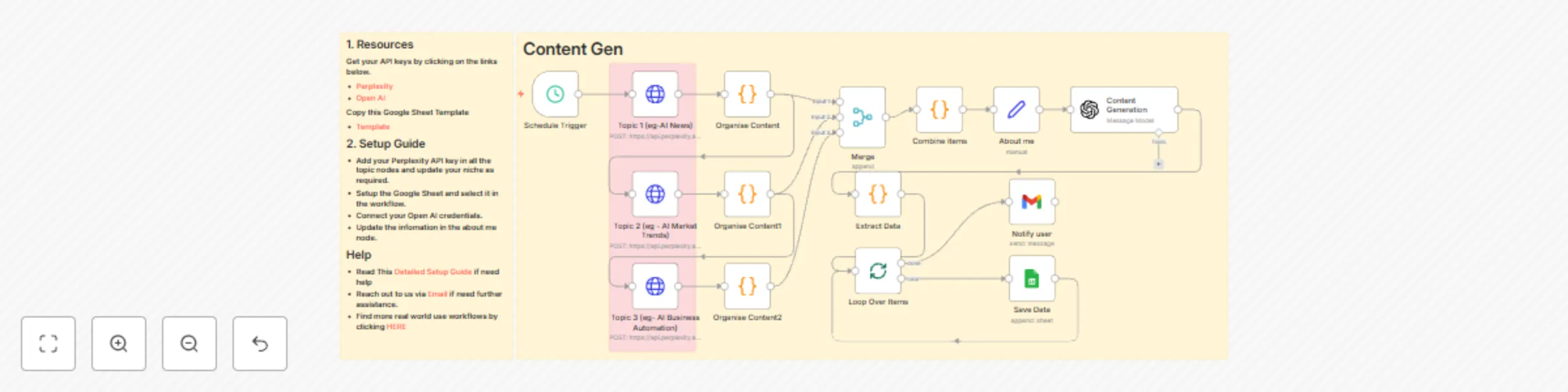
This workflow automates the daily generation of viral short-form video content ideas tailored for founders and business leaders. It scrapes fresh AI-related news and trends from various topics, synthesizes the information, and then uses AI to craft complete content packages—including video scripts, captivating captions, and punchy text overlays. All generated content is saved to a Google Sheet, ready for your review and use.

Use Case

This workflow is perfect for:

  • Founders & Entrepreneurs: Consistently produce engaging content to build authority and attract inbound leads without a dedicated content team.
  • AI Thought Leaders: Stay on top of the latest AI news and effortlessly create shareable insights.
  • Content Marketing Teams: Automate the ideation and initial drafting phases for short-form video strategies.
  • Agencies: Offer a unique AI-powered content generation service to your clients.

How It Works

  1. Scheduled Daily Trigger: The workflow runs automatically every day at 6 AM IST, ensuring you always have fresh content ideas to start your day.
  2. AI-Powered News Gathering: It uses Perplexity AI to fetch the latest, most interesting, and relevant stories across three key AI topics:
    • Topic 1: General AI News
    • Topic 2: AI Market and Industry Trends
    • Topic 3: AI Business Automation
  3. Organize and Combine Content: The information from each topic is organized, and then all content and their respective citations are combined into a single, comprehensive input.
  4. Personalize "About Me": Crucially, a configurable "About me" node allows you to define the personal brand of the founder (e.g., Name, Niche, Business Name, Business Type). This context is fed to the AI to ensure generated content aligns perfectly with your persona and business objectives.
  5. Generate Content Packages: Leveraging OpenAI (acting as "CreatorAI"), the workflow takes the combined news and your "About me" information to:
    • Identify a Unique Angle: Finds a distinct, engaging angle from the input that aligns with key content pillars (e.g., AI solving business pain points, future of work with AI).
    • Craft Video Scripts: Generates concise video scripts (under 700 characters) with powerful hooks, mini-narratives (problem → AI solution → impact), and a focus on tangible business benefits. It subtly references your business as a thought leader, not a direct pitch.
    • Write Captions: Creates friendly, expert-toned captions with engaging hooks, more context, a clear call to action (e.g., "Comment 'Workflow' for more"), and relevant hashtags.
    • Design Text Overlays: Produces short, punchy text overlays (3-7 words, ALL CAPS or Title Case) perfect for video thumbnails or initial screens.
  6. Save to Google Sheet: Each generated content package (Text Overlay, Video Script, Caption) is appended as a new row in your designated Google Sheet ("Content Idea" sheet within "Video Automation (Vansh)").
  7. Notify User: Finally, you'll receive an email notification confirming that new content ideas have been generated and saved to your Google Sheet.

How to Set It Up

To set up this AI Viral Content Generator, follow these steps:

  1. API Keys & Credentials:
    • Perplexity AI API Key: Obtain your API key from Perplexity AI and replace the Bearer token in the "Topic 1", "Topic 2", and "Topic 3" HTTP Request nodes.
    • OpenAI API Key: Connect your OpenAI API key in n8n and link it to the "Content Generation" node.
    • Google Sheets Account: Ensure your Google Sheets OAuth2 API credentials are set up and connected to the "Save Data" node.
    • Gmail Account: Connect your Gmail OAuth2 credentials to the "Notify user" node.
  2. Google Sheet Setup:
    • Copy the Google Sheet Template provided. This template has predefined columns for "Text Overlay", "Video Script", "Caption", "Approval", and "Published".
    • Update the documentId in the "Save Data" Google Sheets node with the ID of your copied template.
  3. Personalize "About me":
    • Open the "About me" node.
    • Fill in your Name, Niche, Business Name, Business Type, Website, and detailed Key Services & Products. This is crucial for the AI to generate relevant and personalized content.
  4. Configure Notification Email:
    • In the "Notify user" node, update the sendTo field with your email address where you want to receive notifications.
  5. Set Schedule:
    • The "Schedule Trigger" is set to run daily at 6 AM IST. You can adjust the time to your preference.
  6. Activate and Monitor:
    • Activate the workflow. It will now automatically generate content ideas daily.
    • Check your Google Sheet regularly to review the new content, mark it for approval, and track its publication status.

This workflow is your secret weapon for consistently creating engaging, AI-driven short-form video content!

1.2 Logical Blocks

This catalog entry is organized from the workflow JSON. The node-level section below shows the executable blocks available for review before importing the template.

2. Block-by-Block Analysis

Block 1 - Schedule Trigger

Type / Role
n8n-nodes-base.scheduleTrigger - scheduleTrigger
Config choices
Version 1.2

Block 2 - Merge

Type / Role
n8n-nodes-base.merge - merge
Config choices
Version 3.1

Block 3 - Loop Over Items

Type / Role
n8n-nodes-base.splitInBatches - splitInBatches
Config choices
Version 3

Block 4 - About me

Type / Role
n8n-nodes-base.set - set
Config choices
Version 3.4

Block 5 - Content Generation

Type / Role
@n8n/n8n-nodes-langchain.openAi - openAi
Config choices
Version 1.8

Block 6 - Topic 1 (eg-AI News)

Type / Role
n8n-nodes-base.httpRequest - httpRequest
Config choices
Version 4.1

Block 7 - Topic 2 (eg - AI Market Trends)

Type / Role
n8n-nodes-base.httpRequest - httpRequest
Config choices
Version 4.1

Block 8 - Topic 3 (eg- AI Business Automation)

Type / Role
n8n-nodes-base.httpRequest - httpRequest
Config choices
Version 4.1

Block 9 - Organise Content

Type / Role
n8n-nodes-base.code - code
Config choices
Version 2

Block 10 - Organise Content1

Type / Role
n8n-nodes-base.code - code
Config choices
Version 2

Block 11 - Organise Content2

Type / Role
n8n-nodes-base.code - code
Config choices
Version 2

Block 12 - Combine items

Type / Role
n8n-nodes-base.code - code
Config choices
Version 2

Block 13 - Extract Data

Type / Role
n8n-nodes-base.code - code
Config choices
Version 2

Block 14 - Save Data

Type / Role
n8n-nodes-base.googleSheets - googleSheets
Config choices
Version 4.6

Block 15 - Sticky Note

Type / Role
n8n-nodes-base.stickyNote - stickyNote
Config choices
Version 1

Block 16 - Notify user

Type / Role
n8n-nodes-base.gmail - gmail
Config choices
Version 2.1

Block 17 - Sticky Note1

Type / Role
n8n-nodes-base.stickyNote - stickyNote
Config choices
Version 1

Block 18 - Sticky Note2

Type / Role
n8n-nodes-base.stickyNote - stickyNote
Config choices
Version 1

3. Summary Table

Workflow Create AI news video content ideas for social media with Perplexity & OpenAI
Complexity advanced
Nodes 18
Categories Content Creation, Multimodal AI
Author Gain FLow AI
Published 14 Jul 2025

4. Reproducing the Workflow from Scratch

  1. 1. Download the workflow JSON

    Use the JSON export at /data/workflows/5995/5995.json as the source template for this automation.

  2. 2. Import the template into n8n

    Open n8n, import the downloaded JSON, and review each node before activating the workflow.

  3. 3. Configure credentials and variables

    Replace placeholder credentials, API keys, webhook URLs, account IDs, and environment-specific values with your own settings.

  4. 4. Test with sample data

    Run the workflow manually or in a staging workspace, inspect node output, and confirm downstream systems receive the expected data.

  5. 5. Activate and monitor

    Enable the workflow only after testing, then monitor executions, errors, and rate limits during the first production runs.

5. General Notes & Resources

Review imported nodes carefully before activation. This catalog entry is intended to help you inspect the workflow structure, understand required services, and find related templates faster.

Node names, credentials, schedules, webhook paths, and external service limits may need adjustment for your workspace.

Frequently asked questions

What does Create AI news video content ideas for social media with Perplexity & OpenAI do?

AI Latest News Content Script Writer Overview This workflow automates the daily generation of viral short form video content ideas tailored for founders and business leaders. It scrapes fresh AI re...

What do I need before importing this workflow?

Review the workflow JSON, configure any required credentials in n8n, and test the automation in a safe workspace before using it in production.

Can I customize this workflow?

Yes. Use the block-by-block analysis and the downloadable JSON to inspect each node, then adjust credentials, prompts, schedules, filters, or destinations for your Content Creation, Multimodal AI use case.