Create AI-generated meta ad campaigns from product URLs with OpenAI & Firecrawl

Workflow preview

Workflow preview
100%
Create AI-generated meta ad campaigns from product URLs with OpenAI & Firecrawl preview
Open on n8n.io

Important notice

This workflow is provided as-is. Please review and test before using in production.

1. Workflow Overview

AI Powered Meta Ads Builder (Facebook & Instagram) Turn any product page into ready to run Meta ads—fast, consistent, and client friendly. Category: Marketing Automation / Ads / AI Price: \$25 (one...

Best for

  • Social Media automation workflows
  • Multimodal AI automation workflows
  • advanced n8n builders looking for reusable templates

Tools used

n8n-nodes-base.splitout, n8n-nodes-base.code, n8n-nodes-base.splitinbatches, n8n-nodes-base.wait, n8n-nodes-base.formtrigger, n8n-nodes-base.httprequest, n8n-nodes-base.converttofile, @n8n/n8n-nodes-langchain.openai

Source and attribution

This workflow is cataloged by N8N Workflows and links back to its original n8n.io source page by Abdellah Homrani.

Original n8n.io source

1.1 Workflow description

Title
Create AI-generated meta ad campaigns from product URLs with OpenAI & Firecrawl
Workflow name
Create AI-generated meta ad campaigns from product URLs with OpenAI & Firecrawl

AI-Powered Meta Ads Builder (Facebook & Instagram)

Turn any product page into ready-to-run Meta ads—fast, consistent, and client-friendly.

  • Category: Marketing Automation / Ads / AI
  • Price: $25 (one-time)
  • Integrations: Meta (Facebook & Instagram), OpenAI, Firecrawl, n8n
  • Output: Campaign → Ad Sets → Creatives → 1:1 Images (created in PAUSED status)

Description

This template takes a product URL and produces publish-ready Meta ads without the busywork. Your client fills a clean form; the workflow scrapes product data, writes a creative brief, generates ad-set variations, produces 1:1 images with OpenAI, and builds Campaign → Ad Set(s) → Ad(s) in PAUSED for review.

Perfect for: agencies, performance marketers, founders who need repeatable creative and less manual setup.

Highlights

  • Form-based intake (client-friendly)
  • Schema-clean product extraction (no made-up facts)
  • Vision cues for on-brand visuals
  • Platform-safe 1:1 images and copy lengths
  • Auto placements by default (or customize)
  • Creates assets in PAUSED so you stay in control

What’s inside

  • Form Trigger: “AI Ad Creation”
  • Firecrawl: scrape product content + images
  • OpenAI (LLM + Vision): clean JSON + aesthetic/emotion cues
  • Creative Brief Builder: merges product facts with tone/goals
  • Campaign JSON Generator: campaign + ad_sets as strict schema
  • OpenAI Images: 1:1 creatives (1024×1024 by default)
  • Meta Graph API: upload assets, create creatives, campaign, ad sets, and ads (PAUSED)
  • Split / Batch / Wait / If / Set / Merge: stable, scalable processing

How it works

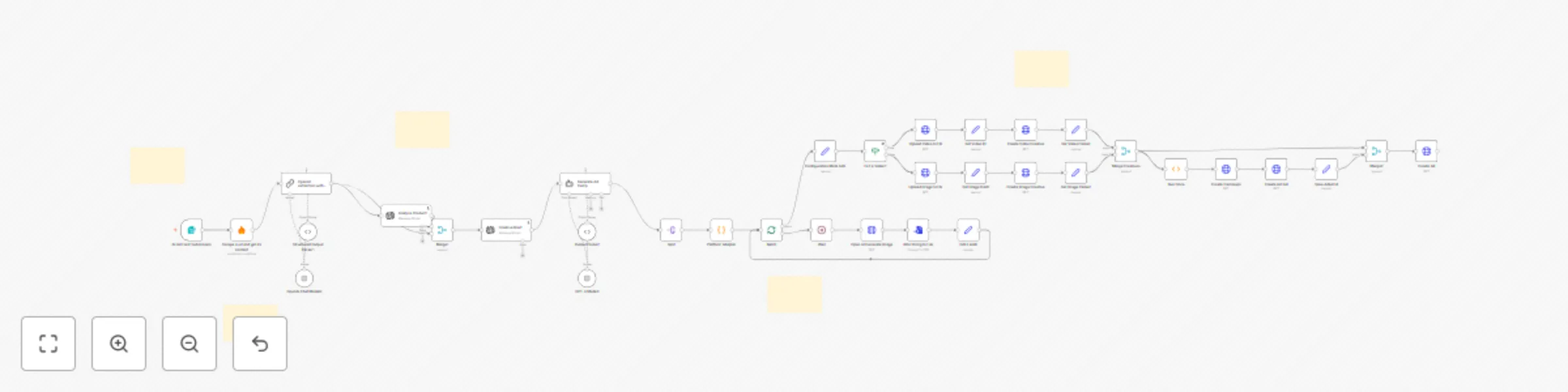
Form → Firecrawl scrape → Product JSON (LLM) → Vision style cues → Creative brief
→ Campaign JSON (LLM) → Split into ad sets → For each ad set:
→ Generate image → Upload to Meta → Create Creative → Create Campaign → Create Ad Set → Create Ad (PAUSED)

What changed in this version

  • 🔐 No hardcoded API keys — all auth uses n8n Credentials
  • 📌 PinData removed — the template ships clean (no sample data)
  • 🧩 Clean placeholders for IDs/links in “Configuration Meta Ads” (your_ad_account_id, etc.)

Requirements

  • OpenAI credential (Chat + Images)
  • Facebook Graph API credential (with ads_management permissions)
  • Firecrawl credential (API key)
  • Your Ad Account ID, Facebook Page ID, Pixel ID, Destination URL

Quick setup (5 steps)

  1. Import the JSON in n8n.

  2. Create Credentials for OpenAI, Facebook Graph API, Firecrawl.

  3. Open “Configuration Meta Ads” node and set:

    • ad_account_id, facebook_page_id, pixel_id, website_link
  4. Open the Form Trigger URL and submit a real product URL.

  5. In Ads Manager, review campaign/ad sets/ads (they’re PAUSED), then enable.


Inputs (Form)

  • Product URL (required)
  • Campaign Type (Launch, Seasonal, Awareness, Retargeting, LTO)
  • Target Platform (Facebook, Instagram)
  • Number Of Variation (integer)
  • Target Audience
  • Key Message / Offer
  • Emotional Tone (multi-select: Joy, Trust, Fear, Surprise, Sadness, Disgust, Anger)

Outputs

  • Creative Brief (concise, platform-aware)

  • Campaign JSON with:

    • Ad sets (audience, placements, schedule/budget placeholders)
    • Creative (primary_text, headline, description, CTA, UTM defaults, reference image)
    • AdConcept (imageName, prompt, emotional hook, 1:1 safe zones)
  • Meta assets created: uploads → creatives → campaign → ad set(s) → ad(s) (PAUSED)


Sticky notes (mandatory)

> Credentials > > * Use OpenAI, Facebook Graph API, and Firecrawl credentials in n8n. > * ⚠️ No hardcoded keys anywhere (HTTP node or otherwise).

> Form Testing > > * Use a real product URL with at least one image. > * Start with 1–2 variations; scale after review. > * If scraping fails, verify Firecrawl key and the site’s policies.

> Meta Upload > > * Set ad_account_id, facebook_page_id, pixel_id, website_link. > * If uploads fail, check account permissions and app scopes.

> OpenAI Images > > * Default: 1:1, 1024×1024. > * You can change size in the Images node (keep FB/IG safe zones). > * Prompts should avoid policy-sensitive claims.

> Safety & Review > > * Everything is created PAUSED. > * Review copy, claims, and targeting for compliance. > * Enable after quality checks.


Security & compliance

  • Secrets live in n8n Credentials or environment variables—never in nodes.
  • Follow Meta ad policies (no restricted claims, no before/after, etc.).
  • Product facts only; unknown fields remain null/empty arrays.

Performance tips

  • Start with auto placements; test Feed/Reels later if needed.
  • Keep primary text 125–200 chars; headline short (testimonial-style in quotes).
  • Use the best product image as reference.
  • Scale carefully: tune Batch and Wait for your throughput.

FAQ

Does it publish automatically? No. Ads are created PAUSED for review.

Instagram-only campaigns? Yes. Set placements to IG (or keep auto and let Meta optimize).

Thin product pages? Extractor returns null for missing fields; the brief adapts without inventing data.

Bring my own audiences? Swap the generated audience block for your saved audiences or static lists.

Change image model/size? Yes—edit the OpenAI Images node (model/size). Keep 1:1 for FB/IG.

1.2 Logical Blocks

This catalog entry is organized from the workflow JSON. The node-level section below shows the executable blocks available for review before importing the template.

2. Block-by-Block Analysis

Block 1 - Split

Type / Role
n8n-nodes-base.splitOut - splitOut
Config choices
Version 1

Block 2 - Platform Adapter

Type / Role
n8n-nodes-base.code - code
Config choices
Version 2

Block 3 - Batch

Type / Role
n8n-nodes-base.splitInBatches - splitInBatches
Config choices
Version 3

Block 4 - Wait

Type / Role
n8n-nodes-base.wait - wait
Config choices
Version 1.1

Block 5 - AI Ad Form Submission

Type / Role
n8n-nodes-base.formTrigger - formTrigger
Config choices
Version 2.2

Block 6 - Open AI Generate Image

Type / Role
n8n-nodes-base.httpRequest - httpRequest
Config choices
Version 4.2

Block 7 - B64 String to File

Type / Role
n8n-nodes-base.convertToFile - convertToFile
Config choices
Version 1.1

Block 8 - Creative Brief

Type / Role
@n8n/n8n-nodes-langchain.openAi - openAi
Config choices
Version 1.8

Block 9 - Scrape a url and get its content

Type / Role
@mendable/n8n-nodes-firecrawl.firecrawl - firecrawl
Config choices
Version 1

Block 10 - OpenAI Chat Model2

Type / Role
@n8n/n8n-nodes-langchain.lmChatOpenAi - lmChatOpenAi
Config choices
Version 1.2

Block 11 - Structured Output Parser1

Type / Role
@n8n/n8n-nodes-langchain.outputParserStructured - outputParserStructured
Config choices
Version 1.3

Block 12 - OpenAI extraction with JSON Schema

Type / Role
@n8n/n8n-nodes-langchain.chainLlm - chainLlm
Config choices
Version 1.7

Block 13 - Analyze Product1

Type / Role
@n8n/n8n-nodes-langchain.openAi - openAi
Config choices
Version 1.8

Block 14 - Merge1

Type / Role
n8n-nodes-base.merge - merge
Config choices
Version 3.2

Block 15 - Upload Video to FB

Type / Role
n8n-nodes-base.httpRequest - httpRequest
Config choices
Version 3

Block 16 - Create Video Creative

Type / Role
n8n-nodes-base.httpRequest - httpRequest
Config choices
Version 3

Block 17 - Is it a Video?

Type / Role
n8n-nodes-base.if - if
Config choices
Version 1

Block 18 - Upload Image to FB

Type / Role
n8n-nodes-base.httpRequest - httpRequest
Config choices
Version 3

Block 19 - Create Image Creative

Type / Role
n8n-nodes-base.httpRequest - httpRequest
Config choices
Version 3

Block 20 - Merge Creatives

Type / Role
n8n-nodes-base.merge - merge
Config choices
Version 1

Block 21 - Create Campaign

Type / Role
n8n-nodes-base.httpRequest - httpRequest
Config choices
Version 3

Block 22 - Run Once

Type / Role
n8n-nodes-base.function - function
Config choices
Version 1

Block 23 - Create Ad Set

Type / Role
n8n-nodes-base.httpRequest - httpRequest
Config choices
Version 3

Block 24 - Create Ad

Type / Role
n8n-nodes-base.httpRequest - httpRequest
Config choices
Version 3

Showing the first 24 of 40 workflow blocks. Download the JSON for the full node graph.

3. Summary Table

Workflow Create AI-generated meta ad campaigns from product URLs with OpenAI & Firecrawl
Complexity advanced
Nodes 40
Categories Social Media, Multimodal AI
Author Abdellah Homrani
Published 17 Sept 2025

4. Reproducing the Workflow from Scratch

  1. 1. Download the workflow JSON

    Use the JSON export at /data/workflows/8681/8681.json as the source template for this automation.

  2. 2. Import the template into n8n

    Open n8n, import the downloaded JSON, and review each node before activating the workflow.

  3. 3. Configure credentials and variables

    Replace placeholder credentials, API keys, webhook URLs, account IDs, and environment-specific values with your own settings.

  4. 4. Test with sample data

    Run the workflow manually or in a staging workspace, inspect node output, and confirm downstream systems receive the expected data.

  5. 5. Activate and monitor

    Enable the workflow only after testing, then monitor executions, errors, and rate limits during the first production runs.

5. General Notes & Resources

Review imported nodes carefully before activation. This catalog entry is intended to help you inspect the workflow structure, understand required services, and find related templates faster.

Node names, credentials, schedules, webhook paths, and external service limits may need adjustment for your workspace.

Frequently asked questions

What does Create AI-generated meta ad campaigns from product URLs with OpenAI & Firecrawl do?

AI Powered Meta Ads Builder (Facebook & Instagram) Turn any product page into ready to run Meta ads—fast, consistent, and client friendly. Category: Marketing Automation / Ads / AI Price: \$25 (one...

What do I need before importing this workflow?

Review the workflow JSON, configure any required credentials in n8n, and test the automation in a safe workspace before using it in production.

Can I customize this workflow?

Yes. Use the block-by-block analysis and the downloadable JSON to inspect each node, then adjust credentials, prompts, schedules, filters, or destinations for your Social Media, Multimodal AI use case.