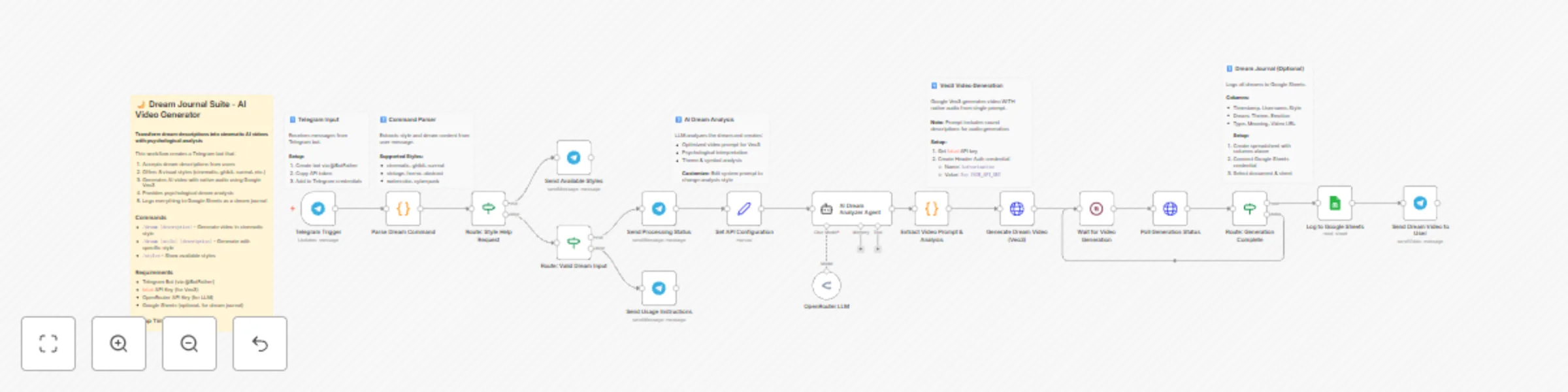
Create AI dream videos with analysis using Veo3 and Telegram

Workflow preview

Workflow preview
100%
Create AI dream videos with analysis using Veo3 and Telegram preview
Open on n8n.io

Important notice

This workflow is provided as-is. Please review and test before using in production.

1. Workflow Overview

Who is this for? Dream journaling enthusiasts who want to visualize and record their dreams Self improvement practitioners interested in dream analysis and psychology Content creators looking for u...

Best for

  • Content Creation automation workflows
  • Multimodal AI automation workflows
  • advanced n8n builders looking for reusable templates

Tools used

n8n-nodes-base.stickynote, n8n-nodes-base.telegramtrigger, n8n-nodes-base.code, n8n-nodes-base.if, n8n-nodes-base.telegram, n8n-nodes-base.set, @n8n/n8n-nodes-langchain.agent, @n8n/n8n-nodes-langchain.lmchatopenrouter

Source and attribution

This workflow is cataloged by N8N Workflows and links back to its original n8n.io source page by 福壽一貴.

Original n8n.io source

1.1 Workflow description

Title
Create AI dream videos with analysis using Veo3 and Telegram
Workflow name
Create AI dream videos with analysis using Veo3 and Telegram

Who is this for?

  • Dream journaling enthusiasts who want to visualize and record their dreams
  • Self-improvement practitioners interested in dream analysis and psychology
  • Content creators looking for unique, AI-generated dream-based content
  • Wellness coaches and therapists who use dream work with clients

What it does

  1. Receives dream descriptions via Telegram bot commands
  2. Parses visual style selection from 8 options (cinematic, ghibli, surreal, vintage, horror, abstract, watercolor, cyberpunk)
  3. Analyzes the dream using AI to extract themes, symbols, and psychological meaning
  4. Generates optimized video prompt tailored to the selected style with audio descriptions
  5. Creates AI video with native audio using Google Veo3 (single API call)
  6. Logs to Google Sheets as a searchable dream journal
  7. Sends video + analysis back to user via Telegram

How to set up

Estimated setup time: 15 minutes

Step 1: Create Telegram Bot

  1. Message @BotFather on Telegram
  2. Send /newbot and follow prompts
  3. Copy the API token

Step 2: Get fal.ai API Key

  1. Sign up at fal.ai
  2. Generate API key from dashboard
  3. In n8n, create Header Auth credential:
    • Name: Authorization
    • Value: Key YOUR_FAL_API_KEY

Step 3: Get OpenRouter API Key

  1. Sign up at openrouter.ai
  2. Generate API key
  3. Add to n8n as OpenRouter credential

Step 4: Set up Google Sheets (Optional)

  1. Create new spreadsheet with columns: Timestamp, Username, Style, Dream, Theme, Emotion, Type, Meaning, Video URL
  2. Connect Google Sheets credential in n8n
  3. Select your document and sheet in the "Log to Google Sheets" node

Step 5: Connect Credentials

  1. Add Telegram credential to all Telegram nodes
  2. Add fal.ai Header Auth to both HTTP Request nodes
  3. Add OpenRouter credential to the LLM node

Requirements

Service Purpose Cost
Telegram Bot User interface Free
fal.ai (Veo3) Video + audio generation ~$0.10-0.15/video
OpenRouter LLM for dream analysis ~$0.01-0.03/request
Google Sheets Dream journal storage Free

How to customize

  • Change LLM: Replace OpenRouter with OpenAI, Anthropic, or other providers
  • Add styles: Edit the STYLES object in "Parse Dream Command" node
  • Modify analysis: Edit system prompt in "AI Dream Analyzer Agent" node
  • Change video model: Replace Veo3 URL with Kling, Luma, or other fal.ai models
  • Skip logging: Remove or disable the Google Sheets node

Commands

Command Description
/dream [text] Generate video in cinematic style
/dream [style] [text] Generate with specific style
/styles Show all available styles

Example

Input: /dream ghibli I was flying over a forest where the trees had glowing leaves

Output: 8-second AI video with magical Ghibli-style visuals, ambient soundtrack, plus psychological analysis of flight symbolism and nature connection themes.

1.2 Logical Blocks

This catalog entry is organized from the workflow JSON. The node-level section below shows the executable blocks available for review before importing the template.

2. Block-by-Block Analysis

Block 1 - Sticky Note

Type / Role
n8n-nodes-base.stickyNote - stickyNote
Config choices
Version 1

Block 2 - Sticky Note1

Type / Role
n8n-nodes-base.stickyNote - stickyNote
Config choices
Version 1

Block 3 - Sticky Note2

Type / Role
n8n-nodes-base.stickyNote - stickyNote
Config choices
Version 1

Block 4 - Sticky Note3

Type / Role
n8n-nodes-base.stickyNote - stickyNote
Config choices
Version 1

Block 5 - Sticky Note4

Type / Role
n8n-nodes-base.stickyNote - stickyNote
Config choices
Version 1

Block 6 - Sticky Note5

Type / Role
n8n-nodes-base.stickyNote - stickyNote
Config choices
Version 1

Block 7 - Telegram Trigger

Type / Role
n8n-nodes-base.telegramTrigger - telegramTrigger
Config choices
Version 1.2

Block 8 - Parse Dream Command

Type / Role
n8n-nodes-base.code - code
Config choices
Version 2

Block 9 - Route: Style Help Request

Type / Role
n8n-nodes-base.if - if
Config choices
Version 2.2

Block 10 - Send Available Styles

Type / Role
n8n-nodes-base.telegram - telegram
Config choices
Version 1.2

Block 11 - Route: Valid Dream Input

Type / Role
n8n-nodes-base.if - if
Config choices
Version 2.2

Block 12 - Send Usage Instructions

Type / Role
n8n-nodes-base.telegram - telegram
Config choices
Version 1.2

Block 13 - Send Processing Status

Type / Role
n8n-nodes-base.telegram - telegram
Config choices
Version 1.2

Block 14 - Set API Configuration

Type / Role
n8n-nodes-base.set - set
Config choices
Version 3.4

Block 15 - AI Dream Analyzer Agent

Type / Role
@n8n/n8n-nodes-langchain.agent - agent
Config choices
Version 3

Block 16 - OpenRouter LLM

Type / Role
@n8n/n8n-nodes-langchain.lmChatOpenRouter - lmChatOpenRouter
Config choices
Version 1

Block 17 - Extract Video Prompt & Analysis

Type / Role
n8n-nodes-base.code - code
Config choices
Version 2

Block 18 - Generate Dream Video (Veo3)

Type / Role
n8n-nodes-base.httpRequest - httpRequest
Config choices
Version 4.3

Block 19 - Wait for Video Generation

Type / Role
n8n-nodes-base.wait - wait
Config choices
Version 1.1

Block 20 - Poll Generation Status

Type / Role
n8n-nodes-base.httpRequest - httpRequest
Config choices
Version 4.3

Block 21 - Route: Generation Complete

Type / Role
n8n-nodes-base.if - if
Config choices
Version 2.2

Block 22 - Log to Google Sheets

Type / Role
n8n-nodes-base.googleSheets - googleSheets
Config choices
Version 4.5

Block 23 - Send Dream Video to User

Type / Role
n8n-nodes-base.telegram - telegram
Config choices
Version 1.2

3. Summary Table

Workflow Create AI dream videos with analysis using Veo3 and Telegram
Complexity advanced
Nodes 23
Categories Content Creation, Multimodal AI
Author 福壽一貴
Published 07 Dec 2025

4. Reproducing the Workflow from Scratch

  1. 1. Download the workflow JSON

    Use the JSON export at /data/workflows/11575/11575.json as the source template for this automation.

  2. 2. Import the template into n8n

    Open n8n, import the downloaded JSON, and review each node before activating the workflow.

  3. 3. Configure credentials and variables

    Replace placeholder credentials, API keys, webhook URLs, account IDs, and environment-specific values with your own settings.

  4. 4. Test with sample data

    Run the workflow manually or in a staging workspace, inspect node output, and confirm downstream systems receive the expected data.

  5. 5. Activate and monitor

    Enable the workflow only after testing, then monitor executions, errors, and rate limits during the first production runs.

5. General Notes & Resources

Review imported nodes carefully before activation. This catalog entry is intended to help you inspect the workflow structure, understand required services, and find related templates faster.

Node names, credentials, schedules, webhook paths, and external service limits may need adjustment for your workspace.

Frequently asked questions

What does Create AI dream videos with analysis using Veo3 and Telegram do?

Who is this for? Dream journaling enthusiasts who want to visualize and record their dreams Self improvement practitioners interested in dream analysis and psychology Content creators looking for u...

What do I need before importing this workflow?

Review the workflow JSON, configure any required credentials in n8n, and test the automation in a safe workspace before using it in production.

Can I customize this workflow?

Yes. Use the block-by-block analysis and the downloadable JSON to inspect each node, then adjust credentials, prompts, schedules, filters, or destinations for your Content Creation, Multimodal AI use case.