福壽一貴

3
Workflows

Workflows by 福壽一貴

Workflow preview: Create AI dream videos with analysis using Veo3 and Telegram
Free advanced

Create AI dream videos with analysis using Veo3 and Telegram

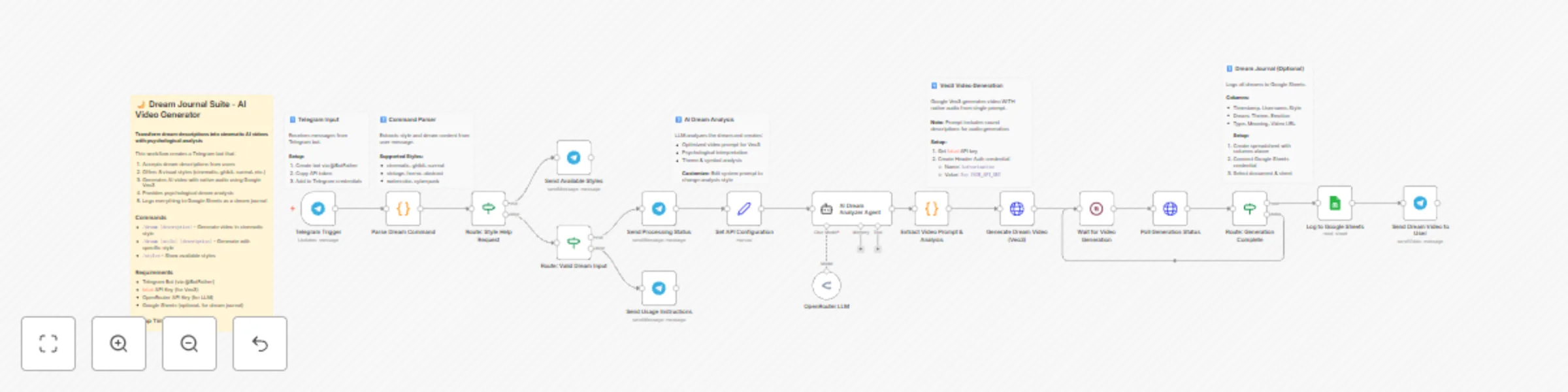
## Who is this for? - **Dream journaling enthusiasts** who want to visualize and record their dreams - **Self-improvement practitioners** interested in dream analysis and psychology - **Content creators** looking for unique, AI-generated dream-based content - **Wellness coaches and therapists** who use dream work with clients ## What it does 1. **Receives dream descriptions** via Telegram bot commands 2. **Parses visual style selection** from 8 options (cinematic, ghibli, surreal, vintage, horror, abstract, watercolor, cyberpunk) 3. **Analyzes the dream** using AI to extract themes, symbols, and psychological meaning 4. **Generates optimized video prompt** tailored to the selected style with audio descriptions 5. **Creates AI video with native audio** using Google Veo3 (single API call) 6. **Logs to Google Sheets** as a searchable dream journal 7. **Sends video + analysis** back to user via Telegram ## How to set up **Estimated setup time: 15 minutes** ### Step 1: Create Telegram Bot 1. Message @BotFather on Telegram 2. Send `/newbot` and follow prompts 3. Copy the API token ### Step 2: Get fal.ai API Key 1. Sign up at [fal.ai](https://fal.ai) 2. Generate API key from dashboard 3. In n8n, create **Header Auth** credential: - Name: `Authorization` - Value: `Key YOUR_FAL_API_KEY` ### Step 3: Get OpenRouter API Key 1. Sign up at [openrouter.ai](https://openrouter.ai) 2. Generate API key 3. Add to n8n as OpenRouter credential ### Step 4: Set up Google Sheets (Optional) 1. Create new spreadsheet with columns: Timestamp, Username, Style, Dream, Theme, Emotion, Type, Meaning, Video URL 2. Connect Google Sheets credential in n8n 3. Select your document and sheet in the "Log to Google Sheets" node ### Step 5: Connect Credentials 1. Add Telegram credential to all Telegram nodes 2. Add fal.ai Header Auth to both HTTP Request nodes 3. Add OpenRouter credential to the LLM node ## Requirements | Service | Purpose | Cost | |---------|---------|------| | Telegram Bot | User interface | Free | | fal.ai (Veo3) | Video + audio generation | ~$0.10-0.15/video | | OpenRouter | LLM for dream analysis | ~$0.01-0.03/request | | Google Sheets | Dream journal storage | Free | ## How to customize - **Change LLM**: Replace OpenRouter with OpenAI, Anthropic, or other providers - **Add styles**: Edit the `STYLES` object in "Parse Dream Command" node - **Modify analysis**: Edit system prompt in "AI Dream Analyzer Agent" node - **Change video model**: Replace Veo3 URL with Kling, Luma, or other fal.ai models - **Skip logging**: Remove or disable the Google Sheets node ## Commands | Command | Description | |---------|-------------| | `/dream [text]` | Generate video in cinematic style | | `/dream [style] [text]` | Generate with specific style | | `/styles` | Show all available styles | ## Example **Input:** `/dream ghibli I was flying over a forest where the trees had glowing leaves` **Output:** 8-second AI video with magical Ghibli-style visuals, ambient soundtrack, plus psychological analysis of flight symbolism and nature connection themes.

福壽一貴
Content Creation
7 Dec 2025
223
0
Workflow preview: Extract sales leads from Google Jobs, LinkedIn & Indeed with GPT-4o and Apify
Free advanced

Extract sales leads from Google Jobs, LinkedIn & Indeed with GPT-4o and Apify

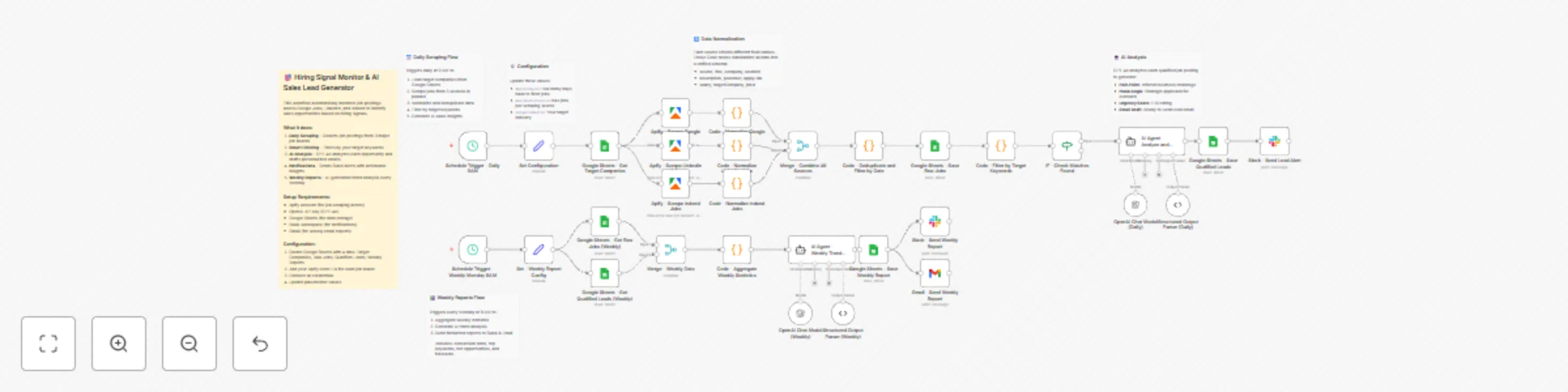
## Who is this for? This template is designed for B2B sales teams, recruiters, and business development professionals who want to identify sales opportunities by monitoring hiring signals from target companies. It's particularly useful for: - Sales teams selling HR tech, recruitment software, or staffing services - Consultancies offering technical talent or project-based work - Any B2B company that uses "intent data" from job postings to time their outreach ## What this workflow does This workflow automates the entire process of monitoring job postings and converting hiring signals into actionable sales leads: 1. **Daily Job Scraping**: Automatically scrapes job postings from Google Jobs, LinkedIn, and Indeed for your target companies using Apify actors 2. **Data Normalization**: Standardizes job data from multiple sources into a unified format 3. **Keyword Filtering**: Filters jobs based on your target keywords to identify relevant opportunities 4. **AI-Powered Analysis**: Uses GPT-4o to analyze each qualified job posting and generate: - Inferred pain points from the hiring signal - Strategic sales approach angles - Urgency scoring (1-10) - Ready-to-send cold email drafts 5. **Slack Notifications**: Sends real-time alerts with AI insights to your sales channel 6. **Weekly Reports**: Generates comprehensive trend analysis reports every Monday with AI-powered insights ## Setup 1. **Google Sheets**: Create a spreadsheet with 4 sheets: - `Target Companies` (columns: Company Name, Target Keywords, My Solution) - `Raw Jobs` (for all scraped jobs) - `Qualified Leads` (for filtered opportunities) - `Weekly Reports` (for trend analysis) 2. **Apify**: Set up accounts and get Actor IDs for: - Google Jobs Scraper - LinkedIn Jobs Scraper - Indeed Scraper 3. **Credentials**: Connect your Google Sheets, Slack, Gmail, OpenAI, and Apify credentials 4. **Configuration**: Update the placeholder values in the workflow for your specific IDs and channel names ## Requirements - n8n instance (self-hosted or cloud) - Apify account with credits - OpenAI API key (GPT-4o access) - Google Sheets access - Slack workspace (optional, for notifications) - Gmail account (optional, for email reports) ## Customization - Adjust `maxJobsPerSource` and `daysToCheck` in the Configuration node - Modify AI prompts to match your sales style and language preferences - Add or remove job sources based on your needs - Customize Slack message format and notification triggers

福壽一貴
Lead Generation
7 Dec 2025
212
0
Workflow preview: Analyze competitor visual content across Instagram and TikTok with GPT-4o Vision
Free advanced

Analyze competitor visual content across Instagram and TikTok with GPT-4o Vision

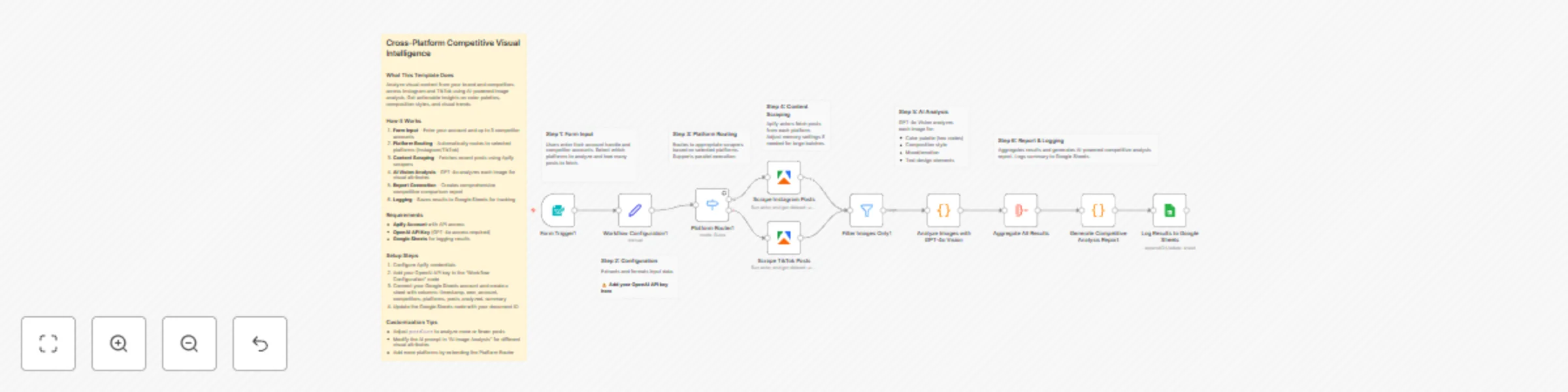
## Who Is This For Marketing teams, social media managers, and brand strategists who want to understand competitor visual strategies across multiple platforms. Perfect for agencies managing multiple client accounts or brands looking to benchmark their visual content. ## What This Template Does This workflow automates competitive visual intelligence gathering across Instagram and TikTok using AI-powered image analysis: 1. Collects recent posts from your account and up to 3 competitors via a simple form interface 2. Routes content to appropriate Apify scrapers based on selected platforms 3. Filters and processes image content from scraped posts 4. Analyzes each image using GPT-4o Vision to extract color palettes, composition styles, mood/emotion, and text design elements 5. Generates a comprehensive competitive analysis report with actionable recommendations 6. Logs all analysis results to Google Sheets for historical tracking ## Requirements - **Apify account** with API access (for Instagram and TikTok scraping) - **OpenAI API key** with GPT-4o access - **Google Sheets** connected for logging results ## How to Set Up 1. **Configure Apify credentials**: Connect your Apify account in the credential settings 2. **Add OpenAI API key**: Enter your API key in the "Workflow Configuration" node (replace `YOUR_OPENAI_API_KEY`) 3. **Set up Google Sheets**: - Create a new spreadsheet with columns: `timestamp`, `own_account`, `competitors`, `platforms`, `posts_analyzed`, `summary` - Update the "Log Results to Google Sheets" node with your document ID 4. **Activate the workflow** and access the form via the provided webhook URL ## How to Customize - **Adjust analysis depth**: Modify the `postsCount` variable to analyze more or fewer posts per account - **Customize AI prompts**: Edit the prompt in "Analyze Images with GPT-4o Vision" to extract different visual attributes - **Add more platforms**: Extend the Platform Router to include additional social networks - **Change report format**: Modify the prompt in "Generate Competitive Analysis Report" for different output structures

福壽一貴
Market Research
7 Dec 2025
208
0