Block 1 - RSS Feed: Times of India
- Type / Role
- n8n-nodes-base.rssFeedRead - rssFeedRead
- Config choices
- Version 1.1


 Early Deal
This workflow is provided as-is. Please review and test before using in production.
Create a Daily Digest of Todoist, Gmail, and RSS and Send via Gmail Overview This workflow is designed to automatically generate a daily digest by aggregating information from your Gmail, RSS feeds...
n8n-nodes-base.rssfeedread, n8n-nodes-base.gmail, n8n-nodes-base.todoist, n8n-nodes-base.code, n8n-nodes-base.scheduletrigger, n8n-nodes-base.merge
This workflow is cataloged by N8N Workflows and links back to its original n8n.io source page by AI Incarnation.
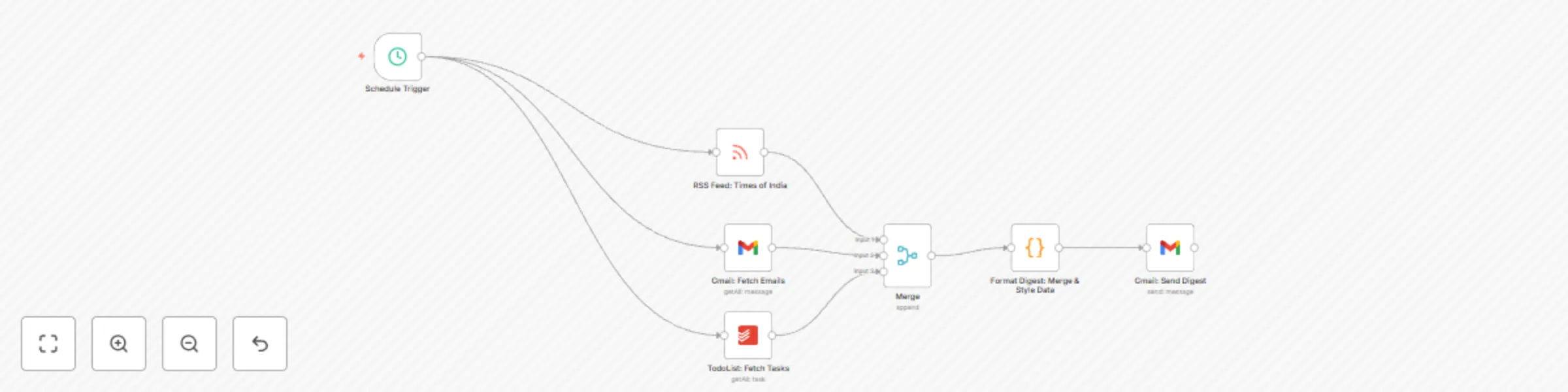
Original n8n.io sourceThis workflow is designed to automatically generate a daily digest by aggregating information from your Gmail, RSS feeds, and Todoist. The digest summarizes your latest emails, top news headlines, and pending tasks, then sends a beautifully formatted email directly to your inbox. With daily digest automation, you start your day with a concise summary of key information, helping you stay organized and informed.
Imagine starting your morning with an email that provides a quick snapshot of your day's most important emails, trending news, and task list. Whether you're a busy professional, entrepreneur, or team leader, this workflow takes the hassle out of manually checking multiple platforms. Instead, you receive a curated summary that enables you to prioritize your day effectively. This workflow is ideal for professionals who want to streamline their morning routine and ensure they never miss a critical update.
Make sure to change your email address in the To section of the final Gmail node to send out the daily digest.
Replace: [email protected] with your own email address.
daily digest automation, email summary, RSS integration, task management, Gmail automation, Todoist workflow, Cron trigger
By implementing this workflow, you harness the power of automation to simplify your morning routine, boost productivity, and ensure you are always up-to-date with your most important information. Enjoy a seamless, automated start to your day and take your productivity to the next level!
This catalog entry is organized from the workflow JSON. The node-level section below shows the executable blocks available for review before importing the template.
| Workflow | Create a daily digest from Gmail, RSS, and Todoist |
|---|---|
| Complexity | intermediate |
| Nodes | 7 |
| Categories | Personal Productivity |
| Author | AI Incarnation |
| Published | 11 Mar 2025 |
Use the JSON export at /data/workflows/3134/3134.json as the source template for this automation.
Open n8n, import the downloaded JSON, and review each node before activating the workflow.
Replace placeholder credentials, API keys, webhook URLs, account IDs, and environment-specific values with your own settings.
Run the workflow manually or in a staging workspace, inspect node output, and confirm downstream systems receive the expected data.
Enable the workflow only after testing, then monitor executions, errors, and rate limits during the first production runs.
Review imported nodes carefully before activation. This catalog entry is intended to help you inspect the workflow structure, understand required services, and find related templates faster.
Node names, credentials, schedules, webhook paths, and external service limits may need adjustment for your workspace.
Create a Daily Digest of Todoist, Gmail, and RSS and Send via Gmail Overview This workflow is designed to automatically generate a daily digest by aggregating information from your Gmail, RSS feeds...
Review the workflow JSON, configure any required credentials in n8n, and test the automation in a safe workspace before using it in production.
Yes. Use the block-by-block analysis and the downloadable JSON to inspect each node, then adjust credentials, prompts, schedules, filters, or destinations for your Personal Productivity use case.