AI Incarnation
Workflows by AI Incarnation
IT support chatbot with Google Drive, Pinecone & Gemini | AI doc processing
This n8n template empowers IT support teams by automating document ingestion and instant query resolution through a conversational AI. It integrates **Google Drive**, **Pinecone**, and a Chat AI agent (using Google Gemini/OpenRouter) to transform static support documents into an interactive, searchable knowledge base. With two interlinked workflows—one for processing support documents and one for handling chat queries—employees receive fast, context-aware answers directly from your support documentation. ## Overview ### Document Ingestion Workflow - **Google Drive Trigger:** Monitors a specified folder for new file uploads (e.g., updated support documents). - **File Download & Extraction:** Automatically downloads new files and extracts text content. - **Data Cleaning & Text Splitting:** Utilizes a Code node to remove line breaks, trim extra spaces, and strip special characters, while a text splitter segments the content into manageable chunks. - **Embedding & Storage:** Generates text embeddings using Google Gemini and stores them in a Pinecone vector store for rapid similarity search. ### Chat Query Workflow - **Chat Trigger:** Initiates when an employee sends a support query. - **Vector Search & Context Retrieval:** Retrieves the top relevant document segments from Pinecone based on similarity scores. - **Prompt Construction:** A Code node combines the retrieved document snippets with the user’s query into a detailed prompt. - **AI Agent Response:** The constructed prompt is sent to an AI agent (using OpenRouter Chat Model) to generate a clear, step-by-step solution. ## Key Benefits & Use Case Imagine a large organization where every IT support document—from troubleshooting guides to system configurations—is stored in a single Google Drive folder. When an employee encounters an issue (e.g., “How do I reset my VPN credentials?”), they simply type the query into a chat interface. Instantly, the workflow retrieves the most relevant context from the ingested documents and provides a detailed, actionable answer. This process reduces resolution times, enhances support consistency, and significantly lightens the load on IT staff. ## Prerequisites - A valid **Google Drive** account with access to the designated folder. - A **Pinecone** account for storing and retrieving text embeddings. - **Google Gemini** (or **OpenRouter**) credentials to power the Chat AI agent. - An operational **n8n** instance configured with the necessary nodes and credentials. ## Workflow Details ### 1 Document Ingestion Workflow - **Google Drive Trigger Node:** - Listens for file creation events in the specified folder. - **Google Drive Download Node:** - Downloads the newly added file. - **Extract from File Node:** - Extracts text content from the downloaded file. - **Code Node (Data Cleaning):** - Cleans the extracted text by removing line breaks, trimming spaces, and eliminating special characters. - **Recursive Text Splitter Node:** - Segments the cleaned text into manageable chunks. - **Pinecone Vector Store Node:** - Generates embeddings (via Google Gemini) and uploads the chunks to Pinecone. ### 2 Chat Query Workflow - **Chat Trigger Node:** - Receives incoming user queries. - **Pinecone Vector Store Node (Query):** - Searches for relevant document chunks based on the query. - **Code Node (Context Builder):** - Sorts the retrieved documents by relevance and constructs a prompt merging the context with the query. - **AI Agent Node:** - Sends the prompt to the Chat AI agent, which returns a detailed answer. ## How to Use 1. **Import the Template:** - Import the template into your n8n instance. 2. **Configure the Google Drive Trigger:** - Set the folder ID (e.g., `1RQvAHIw8cQbtwI9ZvdVV0k0x6TM6H12P`) and connect your Google Drive credentials. 3. **Set Up Pinecone Nodes:** - Enter your Pinecone index details and credentials. 4. **Configure the Chat AI Agent:** - Provide your Google Gemini (or OpenRouter) API credentials. 5. **Test the Workflows:** - Validate the document ingestion workflow by uploading a sample support document. - Validate the chat query workflow by sending a test query and verifying the returned support information. ## Additional Notes - Ensure all credentials (Google Drive, Pinecone, and Chat AI) are correctly set up and tested before deploying the workflows in production. - The template is fully customizable. Adjust the text cleaning, splitting parameters, or the number of document chunks retrieved based on your support documentation's size and structure. - This template not only enhances IT support efficiency but also offers a scalable solution for managing and leveraging growing volumes of support content.
Create a daily digest from Gmail, RSS, and Todoist
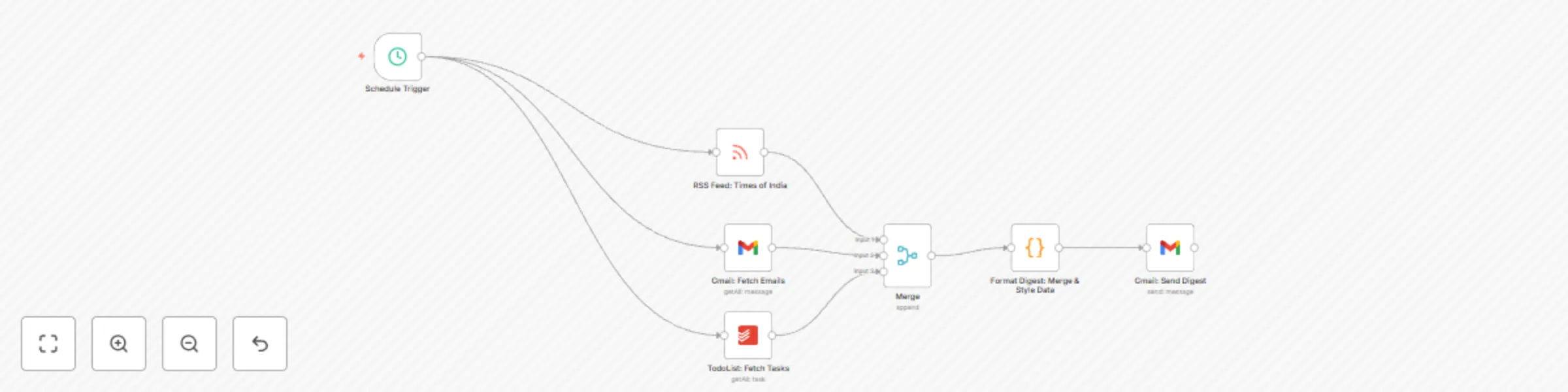
# Create a Daily Digest of Todoist, Gmail, and RSS and Send via Gmail ## Overview This workflow is designed to automatically generate a daily digest by aggregating information from your Gmail, RSS feeds, and Todoist. The digest summarizes your latest emails, top news headlines, and pending tasks, then sends a beautifully formatted email directly to your inbox. With daily digest automation, you start your day with a concise summary of key information, helping you stay organized and informed. ## Use Case Scenario Imagine starting your morning with an email that provides a quick snapshot of your day's most important emails, trending news, and task list. Whether you're a busy professional, entrepreneur, or team leader, this workflow takes the hassle out of manually checking multiple platforms. Instead, you receive a curated summary that enables you to prioritize your day effectively. This workflow is ideal for professionals who want to streamline their morning routine and ensure they never miss a critical update. ## Who This Is For - **Busy Professionals:** Stay on top of your emails, news, and tasks without juggling multiple apps. - **Entrepreneurs:** Get a daily overview of important business updates and personal tasks. - **Team Leaders:** Manage team tasks and communications efficiently with an automated digest. - **Productivity Enthusiasts:** Embrace automation to enhance your daily workflow and task management. ## Workflow Details - **Daily Trigger:** The workflow is set to run automatically every day using a Cron node configured to trigger at your desired time. This ensures your digest is delivered consistently each morning. - **Gmail Integration:** Retrieves your latest emails using the Gmail node, then compiles them into the digest. - **RSS Integration:** Pulls in top news headlines from your chosen RSS feed, ensuring you get the most up-to-date information. - **Todoist Integration:** Fetches your pending tasks from Todoist to help you manage your to-do list effectively. - **Merge & Code Nodes:** Combines the data from the different sources and uses a Code node to format the information into a well-structured HTML email. Inline CSS is used to style the digest for a clean, professional look. - **Email Summary:** The final digest, with dynamic subject lines and detailed content sections, is sent via Gmail, providing you with a comprehensive daily update. ## Note: Make sure to change your email address in the **To** section of the final Gmail node to send out the daily digest. Replace: **[email protected]** with your own email address. ## Keywords **daily digest automation**, **email summary**, **RSS integration**, **task management**, **Gmail automation**, **Todoist workflow**, **Cron trigger** By implementing this workflow, you harness the power of automation to simplify your morning routine, boost productivity, and ensure you are always up-to-date with your most important information. Enjoy a seamless, automated start to your day and take your productivity to the next level!