Block 1 - Overview
- Type / Role
- n8n-nodes-base.stickyNote - stickyNote
- Config choices
- Version 1


 Early Deal
This workflow is provided as-is. Please review and test before using in production.
Generate Secure User Authentication with One Webhook Streamline user onboarding and security for your applications using this n8n workflow. This template handles signup, login, and password resets ...
n8n-nodes-base.stickynote, n8n-nodes-base.webhook, n8n-nodes-base.switch, n8n-nodes-base.postgres, n8n-nodes-base.if, n8n-nodes-base.respondtowebhook
This workflow is cataloged by N8N Workflows and links back to its original n8n.io source page by Convosoft.
Original n8n.io sourceStreamline user onboarding and security for your applications using this n8n workflow. This template handles signup, login, and password resets through a single endpoint, making it ideal for developers building MVPs or scaling apps without a full authentication backend.
This workflow is designed for:
Developers, indie hackers, and teams building web, mobile, or API-driven applications. Those who need a quick and secure authentication layer. Anyone tired of writing custom auth code or managing third-party services like Auth0 for simple needs.
This template integrates seamlessly into your n8n setup.
Building authentication from scratch is time-consuming and complex:
User Management: Managing registration, credential verification, and password recovery can take weeks of development time. Security: Ensuring secure password hashing, case-insensitive email matching, and robust error handling adds significant complexity. Integration: Creating consistent APIs for apps (e.g., React Native, Next.js, Flutter) is challenging.
This workflow provides a battle-tested, webhook-based authentication system that is:
Database-agnostic (works with PostgreSQL/Supabase). Extensible—deploy once and integrate across all your apps.
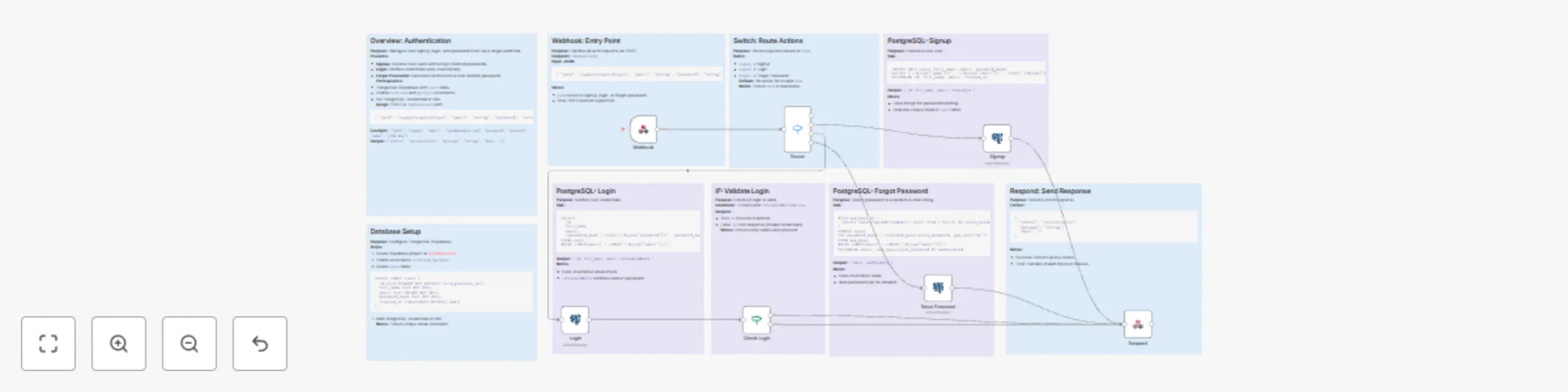
The workflow handles authentication tasks through a single webhook endpoint, offering the following functionality:
Webhook Entry:
Listens for POST requests at /webhook/auth. Processes a simple JSON payload, routing actions via a "path" parameter (signup, signin, forgot).
Signup:
Inserts new users into your database. Uses bcrypt-hashed passwords (via pgcrypto). Returns user details in the response.
Login:
Queries for case-insensitive email matches. Verifies passwords securely. Returns user information on successful login.
Forgot Password:
Generates a random 8-character password. Updates the password hash in the database. Returns the new password (suitable for email delivery).
Routing & Validation:
Uses n8n Switch and IF nodes to securely handle paths and credentials.
Standardized Responses:
Outputs clean JSON with status, message, and data for easy frontend parsing.
Error Handling:
Gracefully manages invalid inputs, duplicate entries, or database errors.
No more boilerplate—get authentication up and running in minutes!
Setup Instructions Follow these steps to set up the workflow:
Connect Your Accounts:
Use PostgreSQL or Supabase for user storage (free tiers are sufficient). Enable the following PostgreSQL extensions: uuid-ossp and pgcrypto.
Create the Users Table:
sqlCREATE TABLE users (
    id uuid PRIMARY KEY DEFAULT uuid_generate_v4(),
    full_name text NOT NULL,
    email text UNIQUE NOT NULL,
    password_hash text NOT NULL,
    created_at timestamptz DEFAULT now()
);
Configure Credentials :
Add PostgreSQL credentials to the n8n nodes ("Signup", "Login", "Reset Password"). Import the JSON workflow into n8n. Activate the workflow.
Test the Workflow:
Use Postman or curl to send requests to the auto-generated webhook URL.
How to Customize This Workflow
Extend the workflow to fit your specific needs with these modifications:
Add JWT Sessions:
Insert a node after successful login to generate and sign JWT tokens (e.g., using the Crypto node).
Email Integration:
Add a SendGrid or Mailgun node to the "Forgot Password" flow to automatically send new credentials.
Rate Limiting:
Include an HTTP Request node to check usage quotas before processing requests.
Multi-Database Support:
Replace PostgreSQL with MySQL or MongoDB by updating the query nodes.
Frontend Enhancements:
Extend JSON responses to include user avatars or roles by joining additional tables in SQL queries.
Triggers:
Add a Schedule node for batch user imports. Include a webhook for external authentication calls.
This catalog entry is organized from the workflow JSON. The node-level section below shows the executable blocks available for review before importing the template.
| Workflow | Create a complete user authentication system with PostgreSQL & webhooks |
|---|---|
| Complexity | advanced |
| Nodes | 16 |
| Categories | Engineering |
| Author | Convosoft |
| Published | 22 Oct 2025 |
Use the JSON export at /data/workflows/10040/10040.json as the source template for this automation.
Open n8n, import the downloaded JSON, and review each node before activating the workflow.
Replace placeholder credentials, API keys, webhook URLs, account IDs, and environment-specific values with your own settings.
Run the workflow manually or in a staging workspace, inspect node output, and confirm downstream systems receive the expected data.
Enable the workflow only after testing, then monitor executions, errors, and rate limits during the first production runs.
Review imported nodes carefully before activation. This catalog entry is intended to help you inspect the workflow structure, understand required services, and find related templates faster.
Node names, credentials, schedules, webhook paths, and external service limits may need adjustment for your workspace.
Generate Secure User Authentication with One Webhook Streamline user onboarding and security for your applications using this n8n workflow. This template handles signup, login, and password resets ...
Review the workflow JSON, configure any required credentials in n8n, and test the automation in a safe workspace before using it in production.
Yes. Use the block-by-block analysis and the downloadable JSON to inspect each node, then adjust credentials, prompts, schedules, filters, or destinations for your Engineering use case.