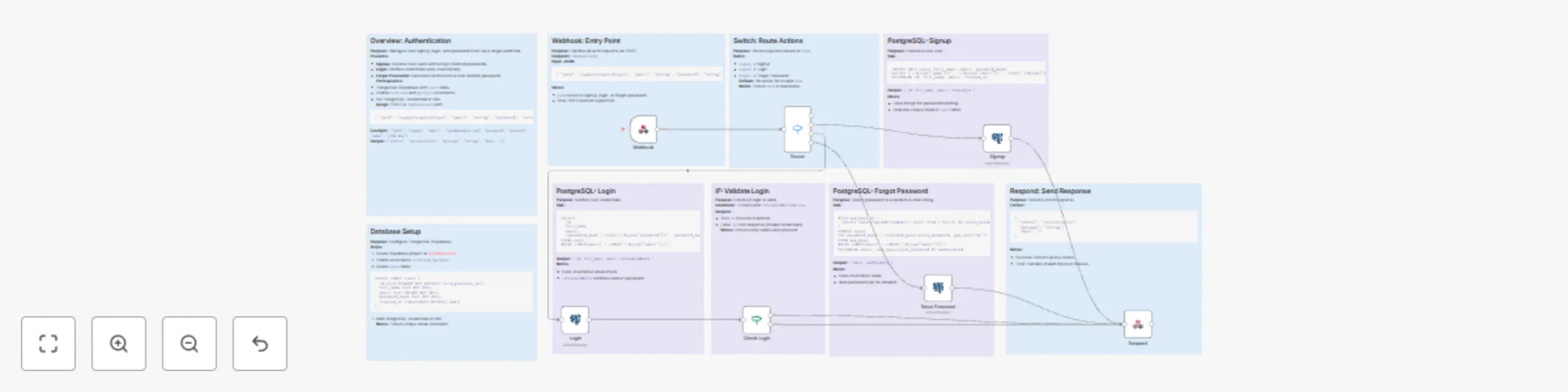
Create a complete user authentication system with PostgreSQL & webhooks
# Generate Secure User Authentication with One Webhook
Streamline user onboarding and security for your applications using this n8n workflow. This template handles signup, login, and password resets through a single endpoint, making it ideal for developers building MVPs or scaling apps without a full authentication backend.
## Who Is This For?
This workflow is designed for:
Developers, indie hackers, and teams building web, mobile, or API-driven applications.
Those who need a quick and secure authentication layer.
Anyone tired of writing custom auth code or managing third-party services like Auth0 for simple needs.
This template integrates seamlessly into your n8n setup.
## What Problem Does This Workflow Solve?
Building authentication from scratch is time-consuming and complex:
**User Management:** Managing registration, credential verification, and password recovery can take weeks of development time.
**Security:** Ensuring secure password hashing, case-insensitive email matching, and robust error handling adds significant complexity.
Integration: Creating consistent APIs for apps (e.g., React Native, Next.js, Flutter) is challenging.
**This workflow provides a battle-tested, webhook-based authentication system that is:**
Database-agnostic (works with PostgreSQL/Supabase).
Extensible—deploy once and integrate across all your apps.
## **What This Workflow Does**
The workflow handles authentication tasks through a single webhook endpoint, offering the following functionality:
**Webhook Entry:**
Listens for POST requests at /webhook/auth.
Processes a simple JSON payload, routing actions via a "path" parameter (signup, signin, forgot).
**Signup:**
Inserts new users into your database.
Uses bcrypt-hashed passwords (via pgcrypto).
Returns user details in the response.
**Login:**
Queries for case-insensitive email matches.
Verifies passwords securely.
Returns user information on successful login.
**Forgot Password:**
Generates a random 8-character password.
Updates the password hash in the database.
Returns the new password (suitable for email delivery).
**Routing & Validation:**
Uses n8n Switch and IF nodes to securely handle paths and credentials.
**Standardized Responses:**
Outputs clean JSON with status, message, and data for easy frontend parsing.
**Error Handling:**
Gracefully manages invalid inputs, duplicate entries, or database errors.
**No more boilerplate—get authentication up and running in minutes!**
**Setup Instructions**
Follow these steps to set up the workflow:
**Connect Your Accounts:**
Use PostgreSQL or Supabase for user storage (free tiers are sufficient).
Enable the following PostgreSQL extensions: uuid-ossp and pgcrypto.
**Create the Users Table:**
```
sqlCREATE TABLE users (
id uuid PRIMARY KEY DEFAULT uuid_generate_v4(),
full_name text NOT NULL,
email text UNIQUE NOT NULL,
password_hash text NOT NULL,
created_at timestamptz DEFAULT now()
);
```
**Configure Credentials :**
Add PostgreSQL credentials to the n8n nodes ("Signup", "Login", "Reset Password").
Import the JSON workflow into n8n.
Activate the workflow.
**Test the Workflow:**
Use Postman or curl to send requests to the auto-generated webhook URL.
**How to Customize This Workflow**
Extend the workflow to fit your specific needs with these modifications:
Add JWT Sessions:
Insert a node after successful login to generate and sign JWT tokens (e.g., using the Crypto node).
Email Integration:
Add a SendGrid or Mailgun node to the "Forgot Password" flow to automatically send new credentials.
Rate Limiting:
Include an HTTP Request node to check usage quotas before processing requests.
Multi-Database Support:
Replace PostgreSQL with MySQL or MongoDB by updating the query nodes.
Frontend Enhancements:
Extend JSON responses to include user avatars or roles by joining additional tables in SQL queries.
**Triggers:**
Add a Schedule node for batch user imports.
Include a webhook for external authentication calls.