Copyright infringement detector with ScrapeGraphAI and automated legal response

Workflow preview

Workflow preview
100%
Copyright infringement detector with ScrapeGraphAI and automated legal response preview
Open on n8n.io

Important notice

This workflow is provided as-is. Please review and test before using in production.

1. Workflow Overview

Copyright Infringement Detector with ScrapeGraphAI Analysis and Legal Action Automation Target Audience Intellectual property lawyers and legal teams Brand protection specialists Content creator...

Best for

  • Miscellaneous automation workflows
  • AI Summarization automation workflows
  • intermediate n8n builders looking for reusable templates

Tools used

n8n-nodes-base.scheduletrigger, n8n-nodes-scrapegraphai.scrapegraphai, n8n-nodes-base.code, n8n-nodes-base.if, n8n-nodes-base.telegram, n8n-nodes-base.stickynote

Source and attribution

This workflow is cataloged by N8N Workflows and links back to its original n8n.io source page by vinci-king-01.

Original n8n.io source

1.1 Workflow description

Title
Copyright infringement detector with ScrapeGraphAI and automated legal response
Workflow name
Copyright infringement detector with ScrapeGraphAI and automated legal response

Copyright Infringement Detector with ScrapeGraphAI Analysis and Legal Action Automation

🎯 Target Audience

  • Intellectual property lawyers and legal teams
  • Brand protection specialists
  • Content creators and publishers
  • Marketing and brand managers
  • Digital rights management teams
  • Copyright enforcement agencies
  • Media companies and publishers
  • E-commerce businesses with proprietary content
  • Software and technology companies
  • Creative agencies protecting client work

πŸš€ Problem Statement

Manual monitoring for copyright infringement is time-consuming, often reactive rather than proactive, and can miss critical violations that damage brand reputation and revenue. This template solves the challenge of automatically detecting copyright violations, analyzing infringement patterns, and providing immediate legal action recommendations using AI-powered web scraping and automated legal workflows.

πŸ”§ How it Works

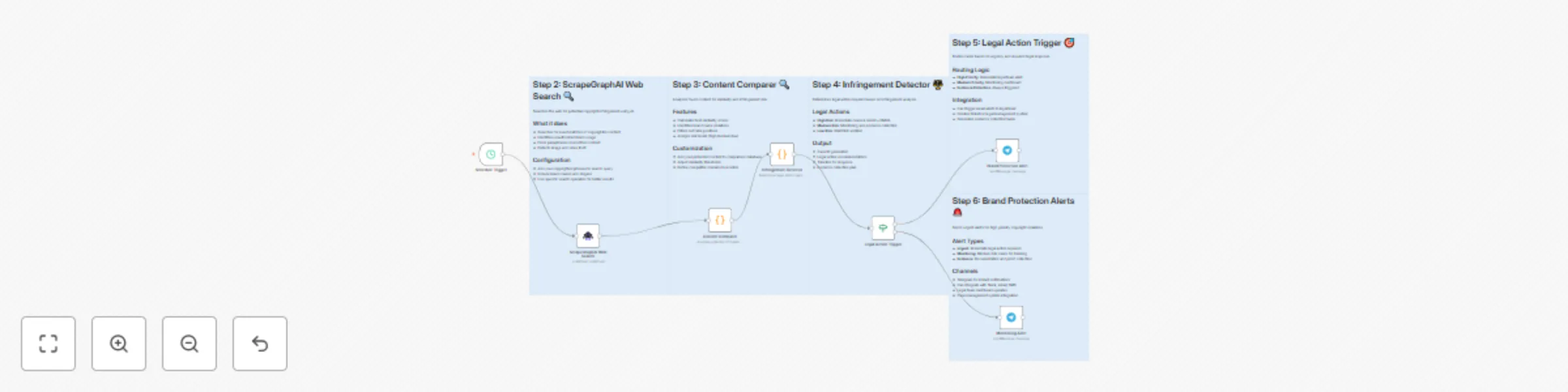
This workflow automatically scans the web for potential copyright violations using ScrapeGraphAI, analyzes content similarity, determines legal action requirements, and provides automated alerts for immediate response to protect intellectual property rights.

Key Components

  1. Schedule Trigger - Runs automatically every 24 hours to monitor for new infringements
  2. ScrapeGraphAI Web Search - Uses AI to search for potential copyright violations across the web
  3. Content Comparer - Analyzes potential infringements and calculates similarity scores
  4. Infringement Detector - Determines legal action required and creates case reports
  5. Legal Action Trigger - Routes cases based on severity and urgency
  6. Brand Protection Alert - Sends urgent alerts for high-priority violations
  7. Monitoring Alert - Tracks medium-risk cases for ongoing monitoring

πŸ“Š Detection and Analysis Specifications

The template monitors and analyzes the following infringement types:

Infringement Type Detection Method Risk Level Action Required
Exact Text Match High similarity score (>80%) High Immediate cease & desist
Paraphrased Content Moderate similarity (50-80%) Medium Monitoring & evidence collection
Unauthorized Brand Usage Brand name detection in content High Legal consultation
Competitor Usage Known competitor domain detection High DMCA takedown
Image/Video Theft Visual content analysis High Immediate action
Domain Infringement Suspicious domain patterns Medium Investigation

πŸ› οΈ Setup Instructions

Estimated setup time: 30-35 minutes

Prerequisites

  • n8n instance with community nodes enabled
  • ScrapeGraphAI API account and credentials
  • Telegram or other notification service credentials
  • Legal team contact information
  • Copyrighted content database

Step-by-Step Configuration

1. Install Community Nodes
# Install required community nodes
npm install n8n-nodes-scrapegraphai
2. Configure ScrapeGraphAI Credentials
  • Navigate to Credentials in your n8n instance
  • Add new ScrapeGraphAI API credentials
  • Enter your API key from ScrapeGraphAI dashboard
  • Test the connection to ensure it's working
3. Set up Schedule Trigger
  • Configure the monitoring frequency (default: every 24 hours)
  • Adjust timing to match your business hours
  • Set appropriate timezone for your legal team
4. Configure Copyrighted Content Database
  • Update the Content Comparer node with your protected content
  • Add brand names, slogans, and unique phrases
  • Include competitor and suspicious domain lists
  • Set similarity thresholds for different content types
5. Customize Legal Action Rules
  • Update the Infringement Detector node with your legal thresholds
  • Configure action plans for different infringement types
  • Set up case priority levels and response timelines
  • Define evidence collection requirements
6. Set up Alert System
  • Configure Telegram bot or other notification service
  • Set up different alert types for different severity levels
  • Configure legal team contact information
  • Test alert delivery and formatting
7. Test and Validate
  • Run the workflow manually with test search terms
  • Verify all detection steps complete successfully
  • Test alert system with sample infringement data
  • Validate legal action recommendations

πŸ”„ Workflow Customization Options

Modify Detection Parameters

  • Adjust similarity thresholds for different content types
  • Add more sophisticated text analysis algorithms
  • Include image and video content detection
  • Customize brand name detection patterns

Extend Legal Action Framework

  • Add more detailed legal action plans
  • Implement automated cease and desist generation
  • Include DMCA takedown automation
  • Add court filing preparation workflows

Customize Alert System

  • Add integration with legal case management systems
  • Implement tiered alert systems (urgent, high, medium, low)
  • Add automated evidence collection and documentation
  • Include reporting and analytics dashboards

Output Customization

  • Add integration with legal databases
  • Implement automated case tracking
  • Create compliance reporting systems
  • Add trend analysis and pattern recognition

πŸ“ˆ Use Cases

  • Brand Protection: Monitor unauthorized use of brand names and logos
  • Content Protection: Detect plagiarism and content theft
  • Legal Enforcement: Automate initial legal action processes
  • Competitive Intelligence: Monitor competitor content usage
  • Compliance Monitoring: Ensure proper attribution and licensing
  • Evidence Collection: Automatically document violations for legal proceedings

🚨 Important Notes

  • Respect website terms of service and robots.txt files
  • Implement appropriate delays between requests to avoid rate limiting
  • Regularly review and update copyrighted content database
  • Monitor API usage to manage costs effectively
  • Keep your credentials secure and rotate them regularly
  • Ensure compliance with local copyright laws and regulations
  • Consult with legal professionals before taking automated legal action
  • Maintain proper documentation for all detected violations

πŸ”§ Troubleshooting

Common Issues:

  • ScrapeGraphAI connection errors: Verify API key and account status
  • False positive detections: Adjust similarity thresholds and detection parameters
  • Alert delivery failures: Check notification service credentials
  • Legal action errors: Verify legal team contact information
  • Schedule trigger failures: Check timezone and interval settings
  • Content analysis errors: Review the Code node's JavaScript logic

Support Resources:

  • ScrapeGraphAI documentation and API reference
  • n8n community forums for workflow assistance
  • Copyright law resources and best practices
  • Legal automation and compliance guidelines
  • Brand protection and intellectual property resources

1.2 Logical Blocks

This catalog entry is organized from the workflow JSON. The node-level section below shows the executable blocks available for review before importing the template.

2. Block-by-Block Analysis

Block 1 - Schedule Trigger

Type / Role
n8n-nodes-base.scheduleTrigger - scheduleTrigger
Config choices
Version 1.2

Block 2 - ScrapeGraphAI Web Search

Type / Role
n8n-nodes-scrapegraphai.scrapegraphAi - scrapegraphAi
Config choices
Version 1

Block 3 - Content Comparer

Type / Role
n8n-nodes-base.code - code
Config choices
Version 2

Block 4 - Infringement Detector

Type / Role
n8n-nodes-base.code - code
Config choices
Version 2

Block 5 - Legal Action Trigger

Type / Role
n8n-nodes-base.if - if
Config choices
Version 2

Block 6 - Brand Protection Alert

Type / Role
n8n-nodes-base.telegram - telegram
Config choices
Version 1.2

Block 7 - Monitoring Alert

Type / Role
n8n-nodes-base.telegram - telegram
Config choices
Version 1.2

Block 8 - Sticky Note - Trigger

Type / Role
n8n-nodes-base.stickyNote - stickyNote
Config choices
Version 1

Block 9 - Sticky Note - Search

Type / Role
n8n-nodes-base.stickyNote - stickyNote
Config choices
Version 1

Block 10 - Sticky Note - Comparer

Type / Role
n8n-nodes-base.stickyNote - stickyNote
Config choices
Version 1

Block 11 - Sticky Note - Detector

Type / Role
n8n-nodes-base.stickyNote - stickyNote
Config choices
Version 1

Block 12 - Sticky Note - Alerts

Type / Role
n8n-nodes-base.stickyNote - stickyNote
Config choices
Version 1

3. Summary Table

Workflow Copyright infringement detector with ScrapeGraphAI and automated legal response
Complexity intermediate
Nodes 12
Categories Miscellaneous, AI Summarization
Author vinci-king-01
Published 29 Jul 2025

4. Reproducing the Workflow from Scratch

  1. 1. Download the workflow JSON

    Use the JSON export at /data/workflows/6642/6642.json as the source template for this automation.

  2. 2. Import the template into n8n

    Open n8n, import the downloaded JSON, and review each node before activating the workflow.

  3. 3. Configure credentials and variables

    Replace placeholder credentials, API keys, webhook URLs, account IDs, and environment-specific values with your own settings.

  4. 4. Test with sample data

    Run the workflow manually or in a staging workspace, inspect node output, and confirm downstream systems receive the expected data.

  5. 5. Activate and monitor

    Enable the workflow only after testing, then monitor executions, errors, and rate limits during the first production runs.

5. General Notes & Resources

Review imported nodes carefully before activation. This catalog entry is intended to help you inspect the workflow structure, understand required services, and find related templates faster.

Node names, credentials, schedules, webhook paths, and external service limits may need adjustment for your workspace.

Frequently asked questions

What does Copyright infringement detector with ScrapeGraphAI and automated legal response do?

Copyright Infringement Detector with ScrapeGraphAI Analysis and Legal Action Automation Target Audience Intellectual property lawyers and legal teams Brand protection specialists Content creator...

What do I need before importing this workflow?

Review the workflow JSON, configure any required credentials in n8n, and test the automation in a safe workspace before using it in production.

Can I customize this workflow?

Yes. Use the block-by-block analysis and the downloadable JSON to inspect each node, then adjust credentials, prompts, schedules, filters, or destinations for your Miscellaneous, AI Summarization use case.