Convert YouTube videos to SEO blog posts with Claude Sonnet and Bright Data

Workflow preview

Workflow preview
100%
Convert YouTube videos to SEO blog posts with Claude Sonnet and Bright Data preview
Open on n8n.io

1. Workflow Overview

Automatically scrape YouTube videos by keyword, generate SEO blog posts with Claude AI, and publish to Blogger with tracking. Convert YouTube videos to blog posts with Claude AI and Bright Data Aut...

Best for

  • Content Creation automation workflows
  • Multimodal AI automation workflows
  • advanced n8n builders looking for reusable templates

Tools used

n8n-nodes-base.formtrigger, n8n-nodes-base.httprequest, n8n-nodes-base.wait, n8n-nodes-base.if, n8n-nodes-base.splitinbatches, n8n-nodes-base.set, @n8n/n8n-nodes-langchain.agent, @n8n/n8n-nodes-langchain.lmchatanthropic

Source and attribution

This workflow is cataloged by N8N Workflows and links back to its original n8n.io source page by Incrementors.

Original n8n.io source

1.1 Workflow description

Title
Convert YouTube videos to SEO blog posts with Claude Sonnet and Bright Data
Workflow name
Convert YouTube videos to SEO blog posts with Claude Sonnet and Bright Data

Automatically scrape YouTube videos by keyword, generate SEO blog posts with Claude AI, and publish to Blogger with tracking.

Convert YouTube videos to blog posts with Claude AI and Bright Data

Automate the entire process of discovering YouTube videos, transforming them into professional blog content, and publishing to Blogger—all while tracking everything in Google Sheets.

Perfect for content marketers, bloggers, and businesses who want to scale their content production without manual effort.


What this workflow does

This automation handles four key tasks:

  1. Scrapes YouTube videos - Uses Bright Data to search YouTube by keyword and extract video titles, descriptions, and metadata
  2. Generates blog content - Claude AI transforms video information into 600+ word SEO-optimized blog posts
  3. Publishes automatically - Posts go live on your Blogger account without manual intervention
  4. Tracks everything - Logs video titles and published URLs to Google Sheets for easy monitoring

How it works

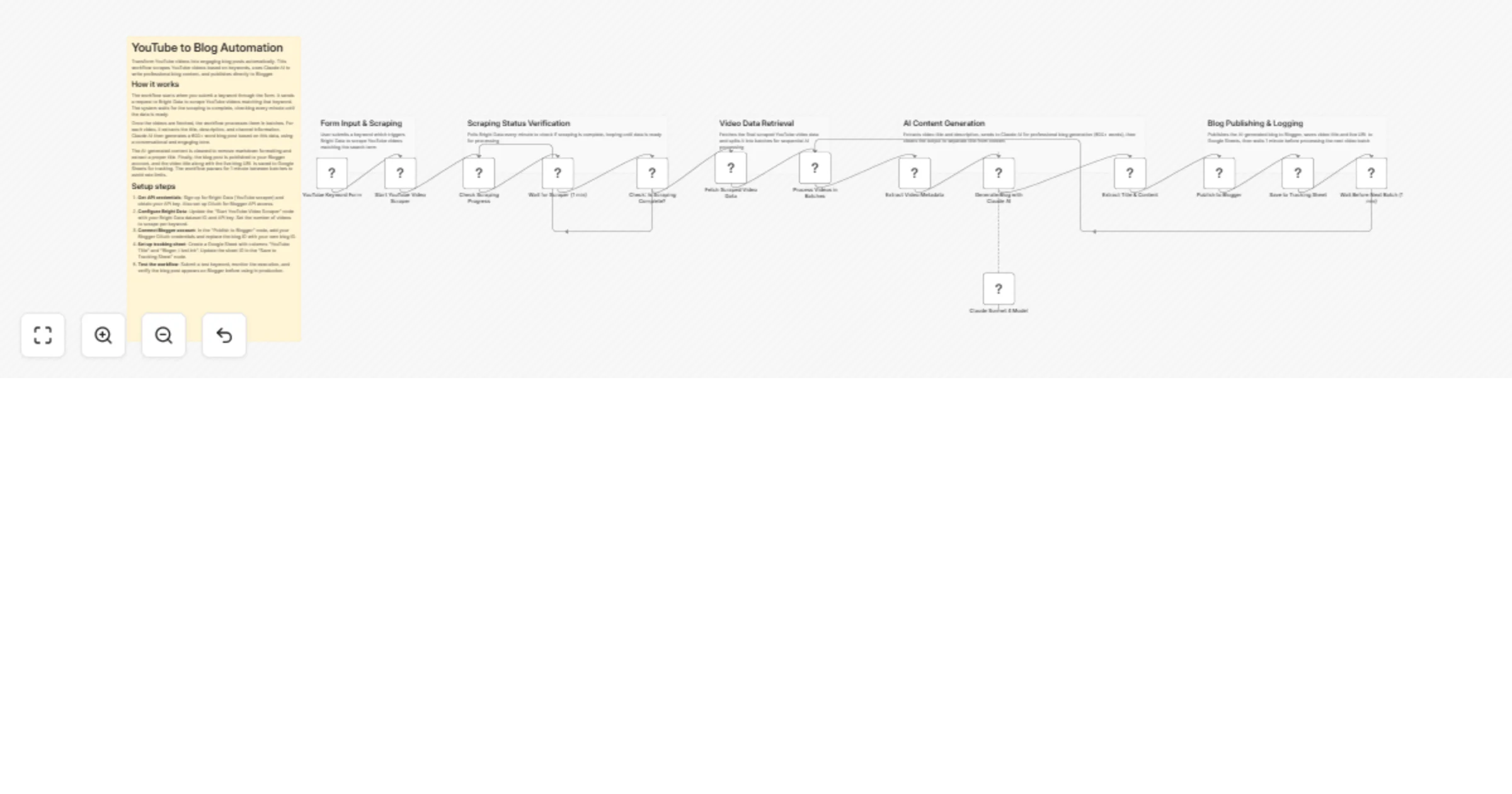
The workflow begins when you submit a keyword through a form. Bright Data searches YouTube and extracts video data matching your keyword. The system checks scraping progress every minute until data is ready.

Once videos are retrieved, the workflow processes them in batches. For each video, it extracts the title, description, and channel details. Claude AI then writes a professional blog post using a conversational tone suitable for publication.

The generated content is cleaned to remove markdown formatting. Finally, the blog publishes to Blogger and the workflow saves the video title plus live blog URL to Google Sheets. A 1-minute pause between batches prevents rate limiting.


Setup requirements

Accounts needed:

  • n8n instance (self-hosted or cloud)
  • Bright Data account with YouTube scraping access
  • Anthropic API key for Claude AI
  • Google account with Sheets and Blogger access

Estimated setup time: 10-15 minutes


Setup steps

1. Import workflow

  • Copy the workflow JSON
  • Open n8n → Workflows → Import from JSON
  • Paste and import
  • Verify all nodes are connected

2. Configure Bright Data

  • Add HTTP Header Auth credential
  • Set Authorization header: Bearer YOUR_API_KEY
  • Update "Start YouTube Video Scraper" node with your dataset ID
  • Test the connection

3. Set up Claude AI

  • Add Anthropic API credential
  • Enter your API key
  • Model is set to claude-sonnet-4-20250514
  • Test the connection

4. Connect Google services

  • Create a Google Sheet with columns: "YouTube Title" and "Bloger_LiveLink"
  • Add Google Sheets OAuth2 credential
  • Paste Sheet ID in "Save to Tracking Sheet" node
  • Enable Blogger API and add OAuth credential
  • Update "Publish to Blogger" node with your Blog ID

5. Test and activate

  • Submit a test keyword through the form
  • Check execution logs
  • Verify blog posts appear on Blogger
  • Confirm data logs to Google Sheets

What gets extracted and generated

YouTube data:

  • Video titles and descriptions
  • Channel information
  • Views, likes, and engagement metrics

AI-generated content:

  • 600+ word blog posts
  • SEO-optimized structure
  • Professional, conversational tone
  • Proper headings and formatting

Tracking data:

  • Video titles
  • Published blog URLs
  • Timestamps

Use cases

Content marketing: Repurpose trending videos into blog content at scale

Market research: Track competitor videos and generate analytical blog posts

Educational content: Convert tutorial videos into readable guides

SEO strategy: Build topical authority by covering trending keywords


Important notes

  • Replace all placeholder API keys before activation
  • Ensure credentials are tested successfully
  • Bright Data charges may apply based on usage
  • Each video generates one blog post
  • Processing time depends on video batch size

Webhook access

Access the workflow via webhook form at:

https://your-n8n-instance.com/webhook/youtube-blog-automation

Submit keywords to start the automation instantly.


Support

For questions or assistance:

1.2 Logical Blocks

This catalog entry is organized from the workflow JSON. The node-level section below shows the executable blocks available for review before importing the template.

2. Block-by-Block Analysis

Block 1 - YouTube Keyword Form

Type / Role
n8n-nodes-base.formTrigger - formTrigger
Config choices
Version 2.2

Block 2 - Start YouTube Video Scraper

Type / Role
n8n-nodes-base.httpRequest - httpRequest
Config choices
Version 4.2

Block 3 - Check Scraping Progress

Type / Role
n8n-nodes-base.httpRequest - httpRequest
Config choices
Version 4.2

Block 4 - Wait for Scraper (1 min)

Type / Role
n8n-nodes-base.wait - wait
Config choices
Version 1.1

Block 5 - Check: Is Scraping Complete?

Type / Role
n8n-nodes-base.if - if
Config choices
Version 2.2

Block 6 - Fetch Scraped Video Data

Type / Role
n8n-nodes-base.httpRequest - httpRequest
Config choices
Version 4.2

Block 7 - Process Videos in Batches

Type / Role
n8n-nodes-base.splitInBatches - splitInBatches
Config choices
Version 3

Block 8 - Extract Video Metadata

Type / Role
n8n-nodes-base.set - set
Config choices
Version 3.4

Block 9 - Generate Blog with Claude AI

Type / Role
@n8n/n8n-nodes-langchain.agent - agent
Config choices
Version 2

Block 10 - Claude Sonnet 4 Model

Type / Role
@n8n/n8n-nodes-langchain.lmChatAnthropic - lmChatAnthropic
Config choices
Version 1.3

Block 11 - Extract Title & Content

Type / Role
n8n-nodes-base.code - code
Config choices
Version 2

Block 12 - Publish to Blogger

Type / Role
n8n-nodes-base.httpRequest - httpRequest
Config choices
Version 4.2

Block 13 - Save to Tracking Sheet

Type / Role
n8n-nodes-base.googleSheets - googleSheets
Config choices
Version 4.6

Block 14 - Wait Before Next Batch (1 min)

Type / Role
n8n-nodes-base.wait - wait
Config choices
Version 1.1

Block 15 - Sticky Note

Type / Role
n8n-nodes-base.stickyNote - stickyNote
Config choices
Version 1

Block 16 - Sticky Note1

Type / Role
n8n-nodes-base.stickyNote - stickyNote
Config choices
Version 1

Block 17 - Sticky Note2

Type / Role
n8n-nodes-base.stickyNote - stickyNote
Config choices
Version 1

Block 18 - Sticky Note3

Type / Role
n8n-nodes-base.stickyNote - stickyNote
Config choices
Version 1

Block 19 - Sticky Note4

Type / Role
n8n-nodes-base.stickyNote - stickyNote
Config choices
Version 1

Block 20 - Sticky Note5

Type / Role
n8n-nodes-base.stickyNote - stickyNote
Config choices
Version 1

3. Summary Table

Workflow Convert YouTube videos to SEO blog posts with Claude Sonnet and Bright Data
Complexity advanced
Nodes 20
Categories Content Creation, Multimodal AI
Author Incrementors
Published 09 Jun 2025

4. Reproducing the Workflow from Scratch

  1. 1. Download the workflow JSON

    Use the JSON export at /data/workflows/4825/4825.json as the source template for this automation.

  2. 2. Import the template into n8n

    Open n8n, import the downloaded JSON, and review each node before activating the workflow.

  3. 3. Configure credentials and variables

    Replace placeholder credentials, API keys, webhook URLs, account IDs, and environment-specific values with your own settings.

  4. 4. Test with sample data

    Run the workflow manually or in a staging workspace, inspect node output, and confirm downstream systems receive the expected data.

  5. 5. Activate and monitor

    Enable the workflow only after testing, then monitor executions, errors, and rate limits during the first production runs.

5. General Notes & Resources

Review imported nodes carefully before activation. This catalog entry is intended to help you inspect the workflow structure, understand required services, and find related templates faster.

Node names, credentials, schedules, webhook paths, and external service limits may need adjustment for your workspace.

Frequently asked questions

What does Convert YouTube videos to SEO blog posts with Claude Sonnet and Bright Data do?

Automatically scrape YouTube videos by keyword, generate SEO blog posts with Claude AI, and publish to Blogger with tracking. Convert YouTube videos to blog posts with Claude AI and Bright Data Aut...

What do I need before importing this workflow?

Review the workflow JSON, configure any required credentials in n8n, and test the automation in a safe workspace before using it in production.

Can I customize this workflow?

Yes. Use the block-by-block analysis and the downloadable JSON to inspect each node, then adjust credentials, prompts, schedules, filters, or destinations for your Content Creation, Multimodal AI use case.