Convert YouTube videos into SEO blog posts with GPT-4o, Dumpling AI, and Flux

Workflow preview

Workflow preview
100%
Convert YouTube videos into SEO blog posts with GPT-4o, Dumpling AI, and Flux preview
Open on n8n.io

Important notice

This workflow is provided as-is. Please review and test before using in production.

1. Workflow Overview

Workflow Description This workflow helps content creators automatically repurpose YouTube videos into SEO friendly blog posts. It extracts the video transcript, uses AI to generate a full blog post...

Best for

  • Content Creation automation workflows
  • Multimodal AI automation workflows
  • advanced n8n builders looking for reusable templates

Tools used

n8n-nodes-base.manualtrigger, n8n-nodes-base.httprequest, n8n-nodes-base.stickynote, n8n-nodes-base.set, @n8n/n8n-nodes-langchain.openai, n8n-nodes-base.gmail, n8n-nodes-base.markdown

Source and attribution

This workflow is cataloged by N8N Workflows and links back to its original n8n.io source page by Yang.

Original n8n.io source

1.1 Workflow description

Title
Convert YouTube videos into SEO blog posts with GPT-4o, Dumpling AI, and Flux
Workflow name
Convert YouTube videos into SEO blog posts with GPT-4o, Dumpling AI, and Flux

Workflow Description

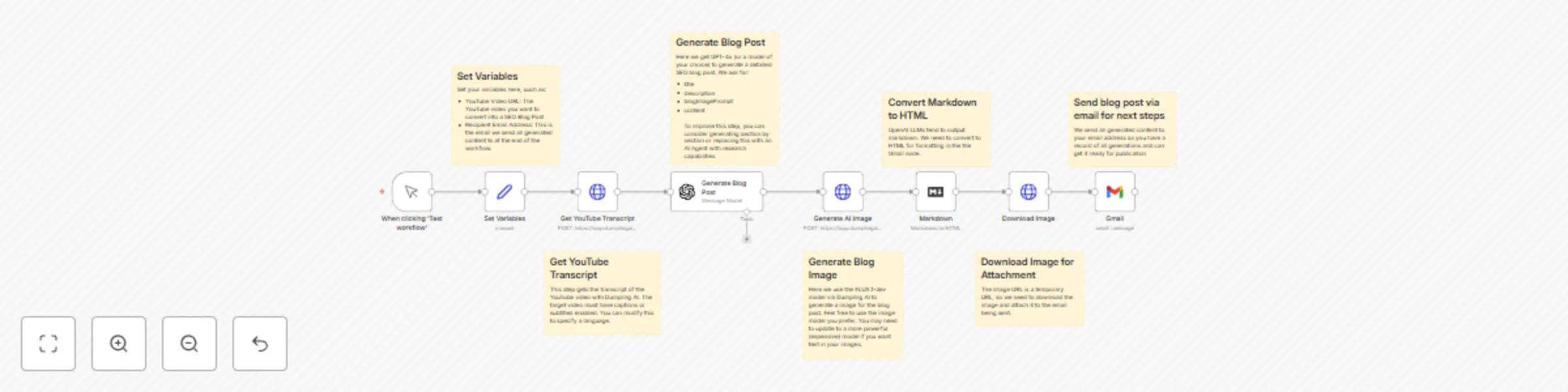
This workflow helps content creators automatically repurpose YouTube videos into SEO-friendly blog posts. It extracts the video transcript, uses AI to generate a full blog post with a relevant image, and sends the complete package via email, ready for publication.

Prerequisites/Requirements

This workflow relies on external AI services. You will need:

  1. OpenAI Account: Used for generating the blog post text (specifically mentioned using GPT-4o in the workflow notes).
    • Credentials: Requires an API key from OpenAI.
    • Cost: OpenAI API usage is typically paid based on the amount of text processed (tokens). Check OpenAI's current pricing.
    • Setup: Sign up at OpenAI and obtain your API key.
  2. Dumpling AI Account: Used for retrieving YouTube video transcript and generating the blog post image.
    • Credentials: Requires an API key from Dumpling AI.
    • Cost: Dumpling AI offers 250 free credits to start with and different plans for different levels of usage. Check the pricing page for more details.
    • Setup: Sign up at Dumpling AI and obtain your API key/credentials.
  3. Email Account: Credentials for the email service (e.g., Gmail) used to send the final result.

How it works

  1. Input Video Details: You provide the YouTube video URL and your email address.
  2. Get Transcript: The workflow fetches the transcript of the specified YouTube video.
  3. Generate Content: An AI model crafts a blog post (title, description, body) based on the transcript.
  4. Create Image: Another AI model generates a suitable image for the blog post.
  5. Format & Package: The blog post is converted to HTML, and the image is prepared for sending.
  6. Email Result: The final HTML blog post and image are emailed to you.


Set up steps

  1. Configure Variables: Enter the specific YouTube video URL and the recipient email address in the "Set Variables" node.
  2. Connect Credentials: Add your credentials for the services used (e.g., OpenAI for text generation, Dumpling AI for YouTube Transcript and AI image generation service).
  3. Connect Email Credentials: Authenticate your Gmail account (or chosen email provider) to allow the workflow to send the email.

Take it to the next level

  • Direct Publishing: Instead of emailing the result, connect directly to your CMS (like WordPress, Ghost, Webflow) to automatically create a draft or publish the blog post.
  • AI Agent Integration: Replace the single "Generate Blog Post" step with an AI Agent for more sophisticated content generation, potentially researching topics or structuring the post section by section based on the transcript.
  • Social Media Snippets: Add steps to generate companion social media posts (e.g., for Twitter, LinkedIn) summarizing the blog post.
  • Batch Processing: Modify the trigger to read multiple YouTube URLs from a spreadsheet or database to convert videos in bulk.
  • Enhanced SEO: Refine the AI prompts to specifically target keywords or incorporate SEO best practices more deeply into the generated content.
  • Multiple Image Options: Generate several image variations and include them in the email or draft post for selection.

1.2 Logical Blocks

This catalog entry is organized from the workflow JSON. The node-level section below shows the executable blocks available for review before importing the template.

2. Block-by-Block Analysis

Block 1 - When clicking ‘Test workflow’

Type / Role
n8n-nodes-base.manualTrigger - manualTrigger
Config choices
Version 1

Block 2 - Get YouTube Transcript

Type / Role
n8n-nodes-base.httpRequest - httpRequest
Config choices
Version 4.2

Block 3 - Sticky Note

Type / Role
n8n-nodes-base.stickyNote - stickyNote
Config choices
Version 1

Block 4 - Sticky Note1

Type / Role
n8n-nodes-base.stickyNote - stickyNote
Config choices
Version 1

Block 5 - Set Variables

Type / Role
n8n-nodes-base.set - set
Config choices
Version 3.4

Block 6 - Generate Blog Post

Type / Role
@n8n/n8n-nodes-langchain.openAi - openAi
Config choices
Version 1.8

Block 7 - Sticky Note2

Type / Role
n8n-nodes-base.stickyNote - stickyNote
Config choices
Version 1

Block 8 - Generate AI Image

Type / Role
n8n-nodes-base.httpRequest - httpRequest
Config choices
Version 4.2

Block 9 - Sticky Note3

Type / Role
n8n-nodes-base.stickyNote - stickyNote
Config choices
Version 1

Block 10 - Gmail

Type / Role
n8n-nodes-base.gmail - gmail
Config choices
Version 2.1

Block 11 - Markdown

Type / Role
n8n-nodes-base.markdown - markdown
Config choices
Version 1

Block 12 - Download Image

Type / Role
n8n-nodes-base.httpRequest - httpRequest
Config choices
Version 4.2

Block 13 - Sticky Note4

Type / Role
n8n-nodes-base.stickyNote - stickyNote
Config choices
Version 1

Block 14 - Sticky Note5

Type / Role
n8n-nodes-base.stickyNote - stickyNote
Config choices
Version 1

Block 15 - Sticky Note6

Type / Role
n8n-nodes-base.stickyNote - stickyNote
Config choices
Version 1

3. Summary Table

Workflow Convert YouTube videos into SEO blog posts with GPT-4o, Dumpling AI, and Flux
Complexity advanced
Nodes 15
Categories Content Creation, Multimodal AI
Author Yang
Published 13 Apr 2025

4. Reproducing the Workflow from Scratch

  1. 1. Download the workflow JSON

    Use the JSON export at /data/workflows/3531/3531.json as the source template for this automation.

  2. 2. Import the template into n8n

    Open n8n, import the downloaded JSON, and review each node before activating the workflow.

  3. 3. Configure credentials and variables

    Replace placeholder credentials, API keys, webhook URLs, account IDs, and environment-specific values with your own settings.

  4. 4. Test with sample data

    Run the workflow manually or in a staging workspace, inspect node output, and confirm downstream systems receive the expected data.

  5. 5. Activate and monitor

    Enable the workflow only after testing, then monitor executions, errors, and rate limits during the first production runs.

5. General Notes & Resources

Review imported nodes carefully before activation. This catalog entry is intended to help you inspect the workflow structure, understand required services, and find related templates faster.

Node names, credentials, schedules, webhook paths, and external service limits may need adjustment for your workspace.

Frequently asked questions

What does Convert YouTube videos into SEO blog posts with GPT-4o, Dumpling AI, and Flux do?

Workflow Description This workflow helps content creators automatically repurpose YouTube videos into SEO friendly blog posts. It extracts the video transcript, uses AI to generate a full blog post...

What do I need before importing this workflow?

Review the workflow JSON, configure any required credentials in n8n, and test the automation in a safe workspace before using it in production.

Can I customize this workflow?

Yes. Use the block-by-block analysis and the downloadable JSON to inspect each node, then adjust credentials, prompts, schedules, filters, or destinations for your Content Creation, Multimodal AI use case.