Block 1 - Wordpress
- Type / Role
- n8n-nodes-base.wordpress - wordpress
- Config choices
- Version 1


 Early Deal
This workflow is provided as-is. Please review and test before using in production.
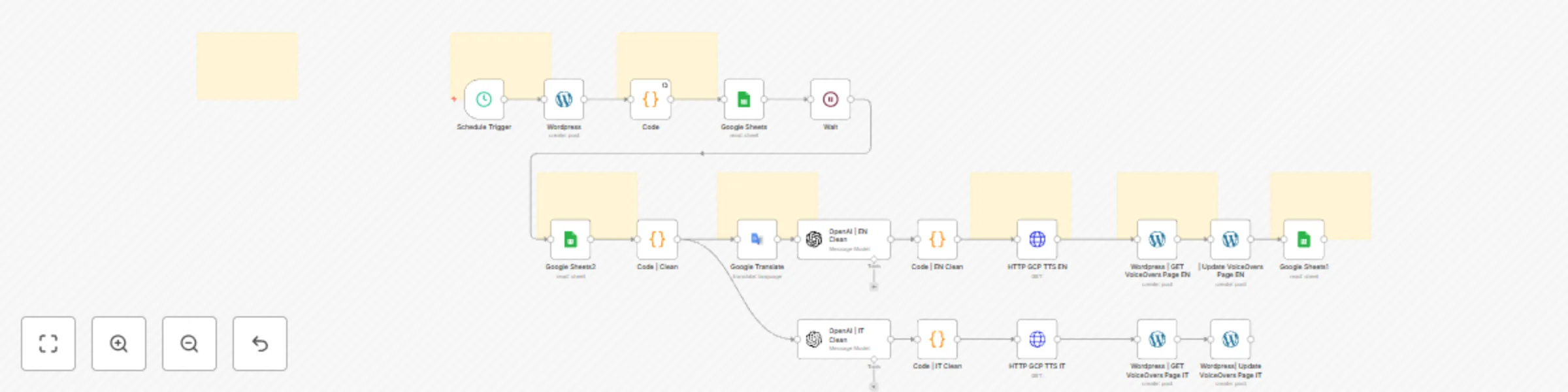
WordPress → AI VoiceOver Automation (n8n + Google Cloud) Automatically convert your WordPress articles into multilingual voiceovers with professional quality audio. Want to add audio versions of yo...
n8n-nodes-base.wordpress, n8n-nodes-base.code, n8n-nodes-base.googlesheets, n8n-nodes-base.scheduletrigger, @n8n/n8n-nodes-langchain.openai, n8n-nodes-base.httprequest, n8n-nodes-base.googletranslate, n8n-nodes-base.wait
This workflow is cataloged by N8N Workflows and links back to its original n8n.io source page by Paolo Ronco.
Original n8n.io sourceAutomatically convert your WordPress articles into multilingual voiceovers with professional-quality audio. Want to add audio versions of your WordPress posts? Looking for a workflow that is fully automated, scalable, and customizable? This complete automation system generates high-quality voiceovers in multiple languages (IT + EN by default), updates your WordPress site, and logs everything in Google Sheets — all without writing a single line of code.
This is a full end-to-end automation solution that integrates:
With just a few minutes of setup, this system can:
Uses Google’s Long Audio TTS to generate high-quality, natural speech — not the typical "robotic" TTS.
Includes an English translation pipeline by default (you can add more languages easily).
Every processed post is logged with: ID, Title, Date, Content, Link, Status (done).
Run the automation hourly, daily, or on any custom schedule inside n8n.
The workflow inserts the audio players directly into your WordPress VoiceOver page.
You can add:
1️⃣ Complete n8n Workflow (JSON) Ready to import into your n8n instance — fully structured and modular.
2️⃣ Google Cloud TTS Microservice (Full Code) Includes:
main.py (FastAPI long-TTS endpoint)Dockerfilerequirements.txt
Deployable on Cloud Run in minutes.3️⃣ Professional documentation (Notion + ZIP) Step-by-step setup guides for:
4️⃣ Lifetime documentation updates Whenever improvements or optimizations are released, you get access automatically.
Perfect for:
No coding or technical expertise required.
The setup guide walks you through every step.
Because it gives you:
You don’t need to build anything from scratch — everything is ready for you.
This catalog entry is organized from the workflow JSON. The node-level section below shows the executable blocks available for review before importing the template.
Showing the first 24 of 27 workflow blocks. Download the JSON for the full node graph.
| Workflow | Convert WordPress articles to multilingual voiceovers with Google TTS and OpenAI |
|---|---|
| Complexity | advanced |
| Nodes | 27 |
| Categories | Content Creation, Multimodal AI |
| Author | Paolo Ronco |
| Published | 14 Dec 2025 |
Use the JSON export at /data/workflows/11789/11789.json as the source template for this automation.
Open n8n, import the downloaded JSON, and review each node before activating the workflow.
Replace placeholder credentials, API keys, webhook URLs, account IDs, and environment-specific values with your own settings.
Run the workflow manually or in a staging workspace, inspect node output, and confirm downstream systems receive the expected data.
Enable the workflow only after testing, then monitor executions, errors, and rate limits during the first production runs.
Review imported nodes carefully before activation. This catalog entry is intended to help you inspect the workflow structure, understand required services, and find related templates faster.
Node names, credentials, schedules, webhook paths, and external service limits may need adjustment for your workspace.
WordPress → AI VoiceOver Automation (n8n + Google Cloud) Automatically convert your WordPress articles into multilingual voiceovers with professional quality audio. Want to add audio versions of yo...
Review the workflow JSON, configure any required credentials in n8n, and test the automation in a safe workspace before using it in production.
Yes. Use the block-by-block analysis and the downloadable JSON to inspect each node, then adjust credentials, prompts, schedules, filters, or destinations for your Content Creation, Multimodal AI use case.