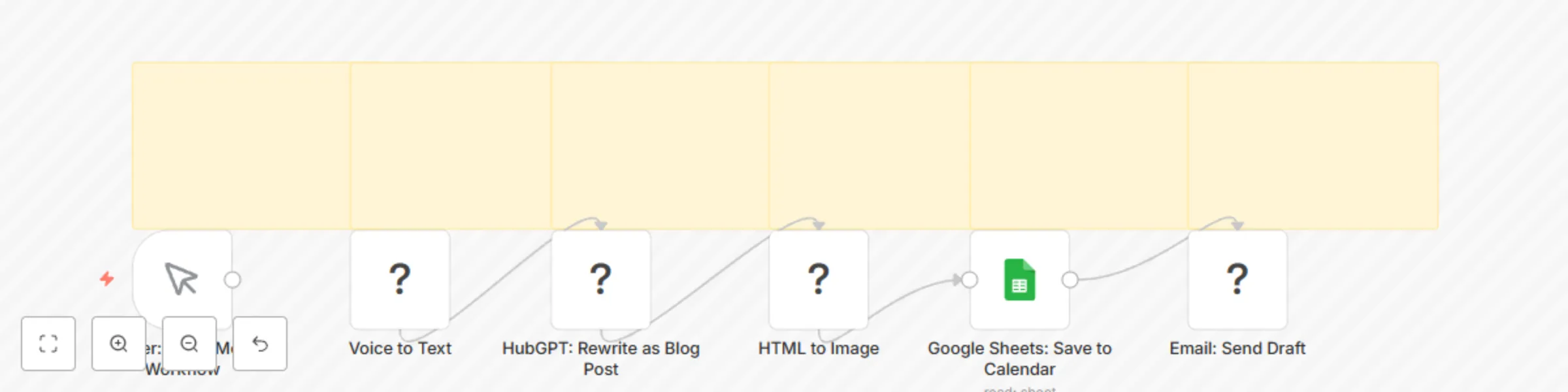
Block 1 - Trigger: Voice Memo Workflow
- Type / Role
- n8n-nodes-base.manualTrigger - manualTrigger
- Config choices
- Version 1


 Early Deal
This workflow is provided as-is. Please review and test before using in production.
Voice Memo to Blog Post with Deepgram, GPT 3.5 & Softr for Creators Turn Voice Memos into Published Blog Posts Using AI and Automation Stop letting great ideas vanish in your Notes app. This workfl...
n8n-nodes-base.manualtrigger, n8n-nodes-base.stickynote, n8n-nodes-base.voicetotext, n8n-nodes-base.hubgpt, n8n-nodes-base.htmltoimage, n8n-nodes-base.googlesheets, n8n-nodes-base.email
This workflow is cataloged by N8N Workflows and links back to its original n8n.io source page by Shelly-Ann Davy.
Original n8n.io sourceStop letting great ideas vanish in your Notes app. This workflow transforms your voice memos into polished blog posts, LinkedIn articles, or newsletters — automatically.
Perfect for:
The workflow:
No typing. No staring at a blank screen. Just speak — and publish.
Before using this workflow, ensure you have the following accounts:
| Service | Purpose | Free Tier Available? |
|---|---|---|
| n8n | Orchestrate the automation | Yes |
| Deepgram | Voice-to-text transcription | Yes (free tier) |
| OpenAI | AI writing (GPT-3.5 or GPT-4) | Yes |
| Google Sheets | Store blog drafts and metadata | Yes |
| SMTP Email | Send draft emails (e.g., Gmail) | Yes (via app password) |
| Softr | Build a visual content dashboard | Yes |
🔐 You’ll need API keys for: Deepgram, OpenAI, and SMTP
✅ All credentials should be stored securely in n8n
Your Google Sheet must have the following columns for the workflow to work correctly:
| Column Name | Purpose | Example |
|---|---|---|
Date |
When the post was created | 2025-09-05 |
Title |
Blog post title (AI-generated or custom) | "What I Learned About Boundaries" |
Content |
AI-generated post body | "Today, I realized..." |
Image_URL |
Link to generated featured image | https://.../image.png |
Status |
Publishing status | Draft, Published, Reviewed |
Audio_URL (optional) |
Link to original voice memo | https://.../memo.mp3 |
📌 Tip: Name your sheet "Content Calendar" and share it with your n8n service account or use OAuth.
For each service, go to Credentials > Add New:
🔐 Never hardcode keys — always use n8n’s secure credential system.
In the HubGPT: Rewrite as Blog Post node:
Rewrite this raw voice memo into a warm, engaging blog post:
{{ $json["text"] }}
Use short paragraphs, friendly tone, and end with a question to engage readers.
This catalog entry is organized from the workflow JSON. The node-level section below shows the executable blocks available for review before importing the template.
| Workflow | Convert voice memos to blog posts with Deepgram, GPT-3.5 & Google Sheets dashboard |
|---|---|
| Complexity | intermediate |
| Nodes | 12 |
| Categories | Content Creation, Multimodal AI |
| Author | Shelly-Ann Davy |
| Published | 04 Sept 2025 |
Use the JSON export at /data/workflows/8246/8246.json as the source template for this automation.
Open n8n, import the downloaded JSON, and review each node before activating the workflow.
Replace placeholder credentials, API keys, webhook URLs, account IDs, and environment-specific values with your own settings.
Run the workflow manually or in a staging workspace, inspect node output, and confirm downstream systems receive the expected data.
Enable the workflow only after testing, then monitor executions, errors, and rate limits during the first production runs.
Review imported nodes carefully before activation. This catalog entry is intended to help you inspect the workflow structure, understand required services, and find related templates faster.
Node names, credentials, schedules, webhook paths, and external service limits may need adjustment for your workspace.
Voice Memo to Blog Post with Deepgram, GPT 3.5 & Softr for Creators Turn Voice Memos into Published Blog Posts Using AI and Automation Stop letting great ideas vanish in your Notes app. This workfl...
Review the workflow JSON, configure any required credentials in n8n, and test the automation in a safe workspace before using it in production.
Yes. Use the block-by-block analysis and the downloadable JSON to inspect each node, then adjust credentials, prompts, schedules, filters, or destinations for your Content Creation, Multimodal AI use case.