Convert Venmo statement CSV file to QuickBooks CSV import
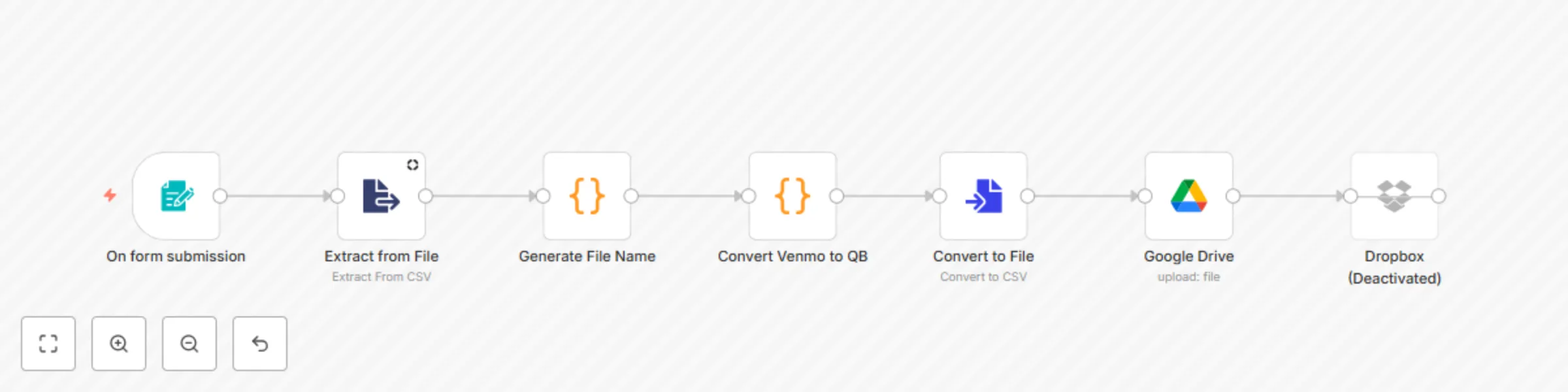
Workflow preview


 Early Deal
DISCOUNT 20%

Important notice
This workflow is provided as-is. Please review and test before using in production.
Overview
🧾 Say goodbye to manual Venmo-to-QuickBooks formatting! This automated workflow transforms raw Venmo CSV exports into QuickBooks-ready files and backs them up seamlessly to Google Drive or Dropbox.
⚙️ What This Workflow Does:
📤 1. Accepts a Venmo CSV Upload — Triggers on form submission to upload a .csv Venmo transaction file.
📂 2. Extracts Raw CSV Data — Reads the uploaded file and prepares it for processing.
🛠️ 3. Generates a Smart File Name — Dynamically names the output file using the transaction month and timestamp: QB_Venmo_YYYY-MM_HHMM.csv.
🔄 4. Converts Raw Venmo Data — Filters invalid rows and transforms valid transactions into QuickBooks-friendly format: • Standardizes field names (e.g., Amount (total) → Amount) • Builds descriptive transaction summaries based on context (e.g., transfers vs payments)
📝 5. Creates a New CSV File — Structures the processed data into a new downloadable CSV.
☁️ 6. Saves to Google Drive — Automatically uploads the finalized file to your selected folder in Google Drive.
📦 7. (Optional) Backs Up to Dropbox — Also configured to upload to Dropbox (currently disabled).