Convert training prescriptions to Intervals.icu workouts with Claude Opus AI

Workflow preview

Workflow preview
100%
Convert training prescriptions to Intervals.icu workouts with Claude Opus AI preview
Open on n8n.io

Important notice

This workflow is provided as-is. Please review and test before using in production.

1. Workflow Overview

Description Transform training prescriptions into perfectly formatted Intervals.icu workouts using AI. This workflow automatically converts free text workout descriptions into structured interval t...

Best for

  • Engineering automation workflows
  • AI Chatbot automation workflows
  • advanced n8n builders looking for reusable templates

Tools used

@n8n/n8n-nodes-langchain.lmchatanthropic, @n8n/n8n-nodes-langchain.outputparserstructured, @n8n/n8n-nodes-langchain.lmchatgooglegemini, n8n-nodes-base.set, n8n-nodes-base.formtrigger, n8n-nodes-base.httprequest, @n8n/n8n-nodes-langchain.agent, n8n-nodes-base.code

Source and attribution

This workflow is cataloged by N8N Workflows and links back to its original n8n.io source page by Martijn Kerver.

Original n8n.io source

1.1 Workflow description

Title
Convert training prescriptions to Intervals.icu workouts with Claude Opus AI
Workflow name
Convert training prescriptions to Intervals.icu workouts with Claude Opus AI

Description

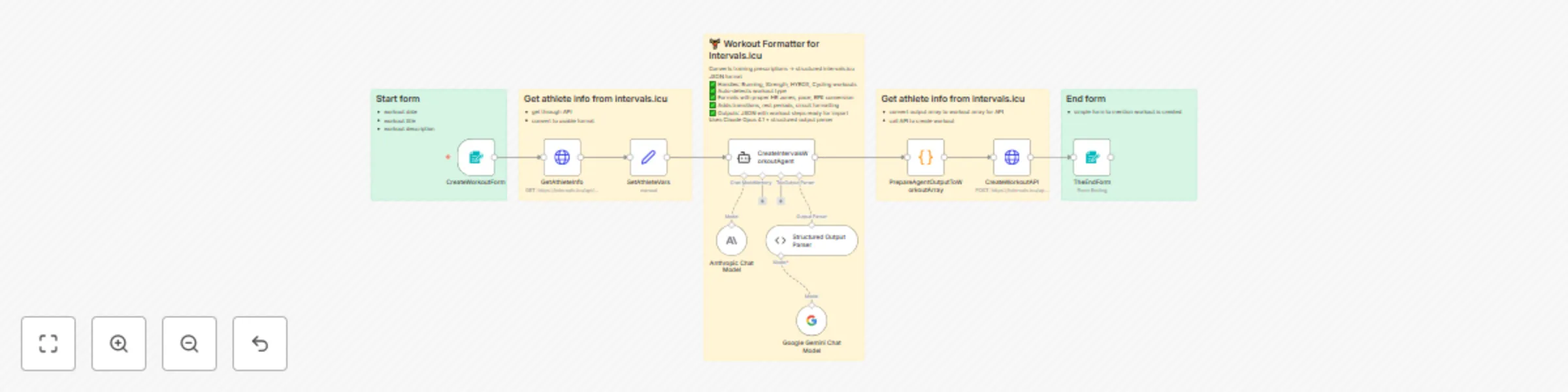
Transform training prescriptions into perfectly formatted Intervals.icu workouts using AI. This workflow automatically converts free-text workout descriptions into structured interval training sessions with proper heart rate zones, pace calculations, and exercise formatting.

What this workflow does

  1. Collects workout details via a web form (date, title, and workout description)
  2. Fetches athlete data from Intervals.icu (FTP, max HR, threshold pace, LTHR)
  3. Processes with AI using Claude Opus 4.1 to intelligently parse and format the workout
  4. Auto-detects workout type (Run, Ride, Strength, HYROX, CrossFit, etc.)
  5. Converts training zones - RPE → HR%, pace calculations, power zones
  6. Formats workout structure with proper transitions, rest periods, circuit formatting
  7. Creates the workout in Intervals.icu via API

Use cases

  • Coaches: Convert training plans from documents/spreadsheets into Intervals.icu format
  • Athletes: Quickly add structured workouts from coaching apps or training programs
  • Hybrid training: Handle complex HYROX, CrossFit, or multi-sport sessions with circuit formatting
  • Time savings: Eliminate manual workout entry and zone calculations

Supported workout types

Running, cycling, swimming, strength training, HYROX, CrossFit, indoor rowing, virtual training (Zwift), triathlon, and more.

Key features

✅ Intelligent workout type detection
✅ Automatic RPE to HR zone conversion using athlete-specific data
✅ Proper formatting for intervals, circuits, supersets, and progressions
✅ Adds transitions between exercises/machines
✅ Calculates exercise durations and pacing
✅ Handles warmup/cooldown sections
✅ Generates unique workout IDs

Setup requirements

  • Intervals.icu account with API access (API key required)
  • Anthropic API key for Claude AI
  • Athlete must have training zones configured in Intervals.icu (FTP, max HR, LTHR, threshold pace)

Setup instructions

Getting your Intervals.icu API key

  1. Log in to Intervals.icu
  2. Go to Settings (gear icon) → Developer Settings
  3. Click Generate API Key (or copy your existing key)
  4. Save the API key securely

Configuring credentials in n8n

For Intervals.icu (HTTP Basic Auth):

  1. In n8n, open the GetAthleteInfo or CreateWorkoutAPI node
  2. Click on CredentialsCreate New Credential
  3. Select HTTP Basic Auth
  4. Enter:
    • Username: API_KEY (literally type "API_KEY")
    • Password: Your actual API key from Intervals.icu
  5. Click Save
  6. Apply this credential to both HTTP Request nodes

For Anthropic:

  1. Open the Anthropic Chat Model node
  2. Click on CredentialsCreate New Credential
  3. Enter your Anthropic API key
  4. Click Save

Important: The Intervals.icu API uses HTTP Basic Authentication where the username is always the literal string "API_KEY" and the password is your actual API key.

How it works

The workflow uses a sophisticated AI agent with a detailed system prompt that understands training terminology, zones, and Intervals.icu formatting requirements. It applies sport-specific rules to ensure workouts are properly structured for tracking during training sessions.

1.2 Logical Blocks

This catalog entry is organized from the workflow JSON. The node-level section below shows the executable blocks available for review before importing the template.

2. Block-by-Block Analysis

Block 1 - Anthropic Chat Model

Type / Role
@n8n/n8n-nodes-langchain.lmChatAnthropic - lmChatAnthropic
Config choices
Version 1.3

Block 2 - Structured Output Parser

Type / Role
@n8n/n8n-nodes-langchain.outputParserStructured - outputParserStructured
Config choices
Version 1.3

Block 3 - Google Gemini Chat Model

Type / Role
@n8n/n8n-nodes-langchain.lmChatGoogleGemini - lmChatGoogleGemini
Config choices
Version 1

Block 4 - SetAthleteVars

Type / Role
n8n-nodes-base.set - set
Config choices
Version 3.4

Block 5 - CreateWorkoutForm

Type / Role
n8n-nodes-base.formTrigger - formTrigger
Config choices
Version 2.3

Block 6 - GetAthleteInfo

Type / Role
n8n-nodes-base.httpRequest - httpRequest
Config choices
Version 4.2

Block 7 - CreateIntervalsWorkoutAgent

Type / Role
@n8n/n8n-nodes-langchain.agent - agent
Config choices
Version 2.2

Block 8 - PrepareAgentOutputToWorkoutArray

Type / Role
n8n-nodes-base.code - code
Config choices
Version 2

Block 9 - Sticky Note

Type / Role
n8n-nodes-base.stickyNote - stickyNote
Config choices
Version 1

Block 10 - Sticky Note1

Type / Role
n8n-nodes-base.stickyNote - stickyNote
Config choices
Version 1

Block 11 - Sticky Note2

Type / Role
n8n-nodes-base.stickyNote - stickyNote
Config choices
Version 1

Block 12 - Sticky Note3

Type / Role
n8n-nodes-base.stickyNote - stickyNote
Config choices
Version 1

Block 13 - Sticky Note4

Type / Role
n8n-nodes-base.stickyNote - stickyNote
Config choices
Version 1

Block 14 - CreateWorkoutAPI

Type / Role
n8n-nodes-base.httpRequest - httpRequest
Config choices
Version 4.2

Block 15 - TheEndForm

Type / Role
n8n-nodes-base.form - form
Config choices
Version 2.3

3. Summary Table

Workflow Convert training prescriptions to Intervals.icu workouts with Claude Opus AI
Complexity advanced
Nodes 15
Categories Engineering, AI Chatbot
Author Martijn Kerver
Published 17 Oct 2025

4. Reproducing the Workflow from Scratch

  1. 1. Download the workflow JSON

    Use the JSON export at /data/workflows/9822/9822.json as the source template for this automation.

  2. 2. Import the template into n8n

    Open n8n, import the downloaded JSON, and review each node before activating the workflow.

  3. 3. Configure credentials and variables

    Replace placeholder credentials, API keys, webhook URLs, account IDs, and environment-specific values with your own settings.

  4. 4. Test with sample data

    Run the workflow manually or in a staging workspace, inspect node output, and confirm downstream systems receive the expected data.

  5. 5. Activate and monitor

    Enable the workflow only after testing, then monitor executions, errors, and rate limits during the first production runs.

5. General Notes & Resources

Review imported nodes carefully before activation. This catalog entry is intended to help you inspect the workflow structure, understand required services, and find related templates faster.

Node names, credentials, schedules, webhook paths, and external service limits may need adjustment for your workspace.

Frequently asked questions

What does Convert training prescriptions to Intervals.icu workouts with Claude Opus AI do?

Description Transform training prescriptions into perfectly formatted Intervals.icu workouts using AI. This workflow automatically converts free text workout descriptions into structured interval t...

What do I need before importing this workflow?

Review the workflow JSON, configure any required credentials in n8n, and test the automation in a safe workspace before using it in production.

Can I customize this workflow?

Yes. Use the block-by-block analysis and the downloadable JSON to inspect each node, then adjust credentials, prompts, schedules, filters, or destinations for your Engineering, AI Chatbot use case.