M

Martijn Kerver

2
Workflows

Workflows by Martijn Kerver
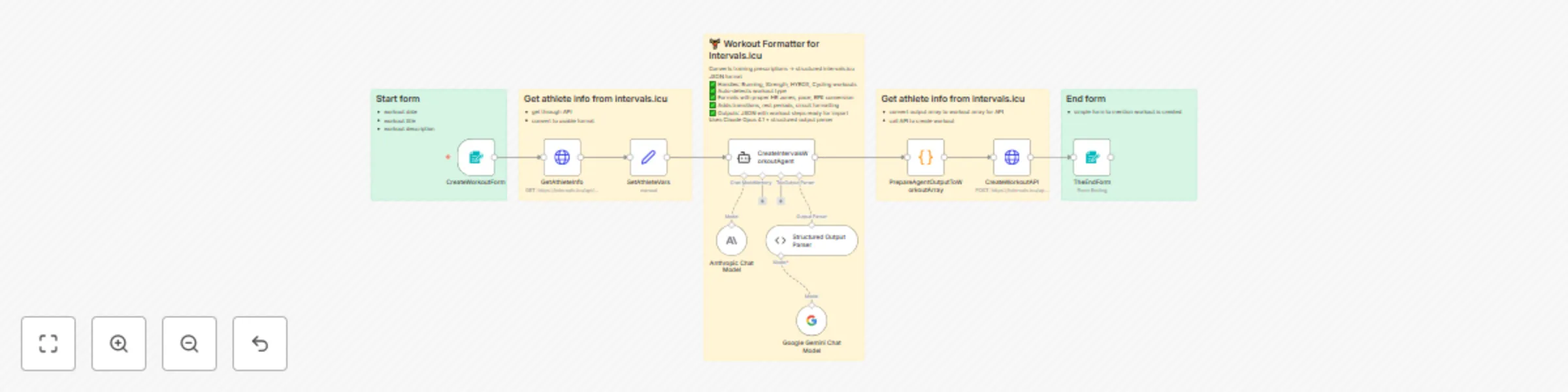
Workflow preview: Convert training prescriptions to Intervals.icu workouts with Claude Opus AI
Free advanced

Convert training prescriptions to Intervals.icu workouts with Claude Opus AI

# Description Transform training prescriptions into perfectly formatted Intervals.icu workouts using AI. This workflow automatically converts free-text workout descriptions into structured interval training sessions with proper heart rate zones, pace calculations, and exercise formatting. ## What this workflow does 1. **Collects workout details** via a web form (date, title, and workout description) 2. **Fetches athlete data** from Intervals.icu (FTP, max HR, threshold pace, LTHR) 3. **Processes with AI** using Claude Opus 4.1 to intelligently parse and format the workout 4. **Auto-detects workout type** (Run, Ride, Strength, HYROX, CrossFit, etc.) 5. **Converts training zones** - RPE → HR%, pace calculations, power zones 6. **Formats workout structure** with proper transitions, rest periods, circuit formatting 7. **Creates the workout** in Intervals.icu via API ## Use cases - **Coaches**: Convert training plans from documents/spreadsheets into Intervals.icu format - **Athletes**: Quickly add structured workouts from coaching apps or training programs - **Hybrid training**: Handle complex HYROX, CrossFit, or multi-sport sessions with circuit formatting - **Time savings**: Eliminate manual workout entry and zone calculations ## Supported workout types Running, cycling, swimming, strength training, HYROX, CrossFit, indoor rowing, virtual training (Zwift), triathlon, and more. ## Key features ✅ Intelligent workout type detection ✅ Automatic RPE to HR zone conversion using athlete-specific data ✅ Proper formatting for intervals, circuits, supersets, and progressions ✅ Adds transitions between exercises/machines ✅ Calculates exercise durations and pacing ✅ Handles warmup/cooldown sections ✅ Generates unique workout IDs ## Setup requirements - **Intervals.icu account** with API access (API key required) - **Anthropic API key** for Claude AI - Athlete must have training zones configured in Intervals.icu (FTP, max HR, LTHR, threshold pace) ## Setup instructions ### Getting your Intervals.icu API key 1. Log in to [Intervals.icu](https://intervals.icu) 2. Go to **Settings** (gear icon) → **Developer Settings** 3. Click **Generate API Key** (or copy your existing key) 4. Save the API key securely ### Configuring credentials in n8n **For Intervals.icu (HTTP Basic Auth):** 1. In n8n, open the **GetAthleteInfo** or **CreateWorkoutAPI** node 2. Click on **Credentials** → **Create New Credential** 3. Select **HTTP Basic Auth** 4. Enter: - **Username**: `API_KEY` (literally type "API_KEY") - **Password**: Your actual API key from Intervals.icu 5. Click **Save** 6. Apply this credential to both HTTP Request nodes **For Anthropic:** 1. Open the **Anthropic Chat Model** node 2. Click on **Credentials** → **Create New Credential** 3. Enter your Anthropic API key 4. Click **Save** **Important**: The Intervals.icu API uses HTTP Basic Authentication where the username is always the literal string "API_KEY" and the password is your actual API key. ## How it works The workflow uses a sophisticated AI agent with a detailed system prompt that understands training terminology, zones, and Intervals.icu formatting requirements. It applies sport-specific rules to ensure workouts are properly structured for tracking during training sessions.

M
Martijn Kerver
Engineering
17 Oct 2025
234
0

Workflow preview: Basic automatic Gmail email labelling with OpenAI and Gmail API
Free intermediate

Basic automatic Gmail email labelling with OpenAI and Gmail API

## Description This workflow automates email categorization in Gmail using the Gmail API and OpenAI's language model. It periodically checks for new emails, reads their content, and categorizes them based on existing Gmail labels. If no matching label is found, the workflow creates a new label and assigns it to the email. ## Key Features - **Polling for Emails**: The workflow triggers every 5 minutes to check for new emails using the Gmail Trigger node. - **Reading Labels**: Existing Gmail labels are fetched to determine the most relevant match for email categorization. - **Dynamic Labeling**: If no existing label matches, a new label is created dynamically based on the email's content. - **OpenAI Integration**: The workflow uses OpenAI's Chat model to analyze email content and suggest or create appropriate labels. - **Email Categorization**: Labels are applied to emails, ensuring they are organized in Gmail's structure. The workflow also removes less relevant emails (e.g., ads) from the inbox. ## Nodes in Use 1. **Gmail Trigger**: Polls Gmail every 5 minutes for new emails. 2. **Gmail - Read Labels**: Fetches all existing Gmail labels. 3. **Gmail - Get Message**: Retrieves the full content of a specific email. 4. **Gmail - Add Label to Message**: Assigns a chosen label to the email. 5. **Gmail - Create Label**: Creates a new label if necessary. 6. **OpenAI Chat Model**: Analyzes email content for categorization. 7. **Memory Buffer**: Retains context for email analysis across multiple iterations. 8. **Wait Node**: Adds a buffer period to manage email processing. ## Prerequisites - **Gmail API Setup**: Ensure Gmail OAuth2 credentials are configured in n8n. - **OpenAI API Key**: Configure OpenAI credentials for email analysis. - **Labeling Standards**: Maintain a consistent Gmail label structure for better organization. ## Instructions 1. Add your Gmail API credentials to the Gmail nodes. 2. Add your OpenAI API credentials to the OpenAI Chat Model node. 3. Activate the workflow. It will start polling for new emails every 5 minutes. 4. Monitor and refine the categorization logic if necessary to ensure alignment with Gmail's organizational needs. ## Use Case Ideal for individuals or teams handling high email volumes who want to maintain an organized inbox and automate repetitive categorization tasks. Note: You can improve the prompt to get better results from the agent by giving it more personal rules on how to categorize.

M
Martijn Kerver
Personal Productivity
17 Jan 2025
98348
0