Convert blog posts to audio content with Eleven Labs & GPT-4

Workflow preview

Workflow preview
100%
Convert blog posts to audio content with Eleven Labs & GPT-4 preview
Open on n8n.io

Important notice

This workflow is provided as-is. Please review and test before using in production.

1. Workflow Overview

How It Works: Your Automated Audio Content System This n8n workflow streamlines the entire process of turning your written articles into engaging audio, distributing them, and tracking their perfor...

Best for

  • Content Creation automation workflows
  • Multimodal AI automation workflows
  • intermediate n8n builders looking for reusable templates

Tools used

n8n-nodes-base.rssfeedreadtrigger, n8n-nodes-base.set, @elevenlabs/n8n-nodes-elevenlabs.elevenlabs, n8n-nodes-base.googledrive, @n8n/n8n-nodes-langchain.openai, n8n-nodes-base.googlesheets, n8n-nodes-base.if, n8n-nodes-base.gmail

Source and attribution

This workflow is cataloged by N8N Workflows and links back to its original n8n.io source page by Marth.

Original n8n.io source

1.1 Workflow description

Title
Convert blog posts to audio content with Eleven Labs & GPT-4
Workflow name
Convert blog posts to audio content with Eleven Labs & GPT-4

How It Works: Your Automated Audio Content System

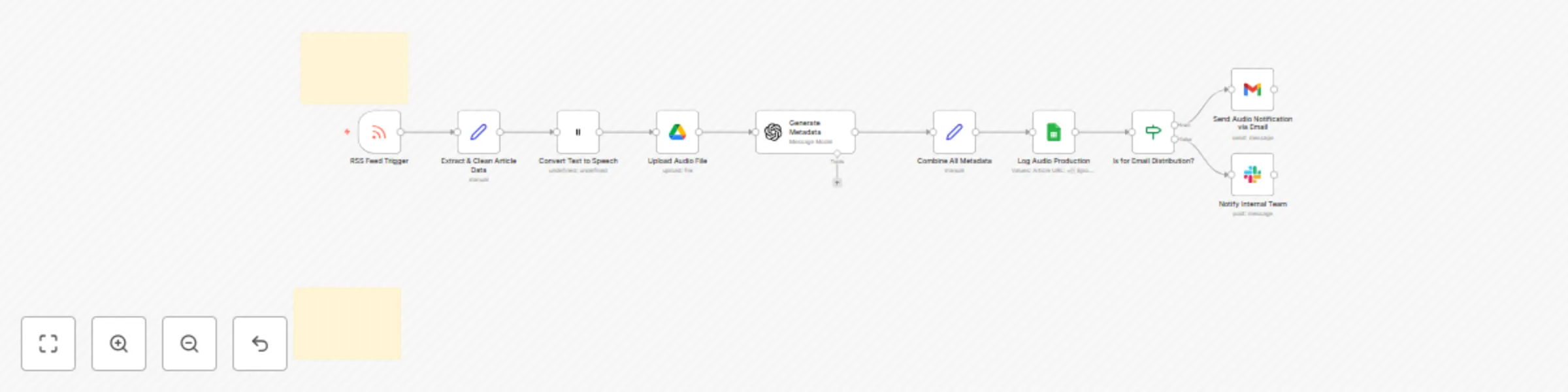
This n8n workflow streamlines the entire process of turning your written articles into engaging audio, distributing them, and tracking their performance. Here's a step-by-step breakdown:

  1. New Content Detection: The workflow starts by monitoring your blog's RSS feed. As soon as you publish a new article, the system automatically detects it.
  2. Text Extraction & Cleaning: It extracts the article's title and its main content directly from the RSS feed. Basic cleaning is performed to ensure the text is ready for high-quality voice synthesis.
  3. Audio Generation with Eleven Labs: The cleaned text is sent to Eleven Labs, a leading AI voice platform. Here, your article is transformed into a natural-sounding MP3 audio file using a voice of your choice.
  4. Secure Audio Storage: The newly generated MP3 audio file is then uploaded to your Google Drive. This provides a reliable, secure storage solution and generates a shareable public link for easy distribution.
  5. AI-Powered Metadata Creation: OpenAI steps in to generate compelling metadata for your audio. Based on your article's content, it automatically creates a catchy title, a concise description, and relevant tags or hashtags, perfect for podcast notes or social media captions.
  6. Centralized Logging: All essential details about the generated audio—including the original article's URL, the audio file's link, and the AI-generated metadata—are logged into a Google Sheet. This gives you a clear, centralized record for tracking and analysis.
  7. Automated Distribution: The workflow then proceeds to distribute your audio content. This can include sending an email notification (via Gmail) to your subscribers or marketing list with the audio link, or sending an internal alert via Slack to your team. The specific distribution channel can be configured based on your needs.
  8. Robust Error Handling: The entire workflow is built with Try/Catch blocks. If any part of the process encounters an error, the system will gracefully handle it and send an immediate notification to you via Slack, ensuring you're always aware of the workflow's status.

Setup Steps

To get this powerful automated audio content system up and running in your n8n instance, follow these steps:

  1. Prepare Your Cloud Services & API Credentials:

    • Eleven Labs: Create an account and obtain your API Key.
    • OpenAI: Get your API Key.
    • Google Drive: Ensure you have a Google account. In n8n, set up a Google Drive credential. Create a dedicated folder in your Google Drive for your audio files and note its Folder ID (found in the URL when you open the folder).
    • Google Sheets: Set up a Google Sheets credential in n8n. Create a new Google Sheet for logging with these exact column headers: Article URL, Article Title, Audio File URL, Generated Audio Title, Generated Audio Description, Generated Audio Tags, Status, Timestamp.
    • Gmail / SMTP: Set up your Gmail credential or a generic Email credential in n8n.
    • Slack: Set up your Slack credential in n8n. Identify the Channel IDs where you want to receive general updates and error alerts.
  2. Identify Your Text Content Source:

    • Ensure your blog or content platform has an accessible RSS Feed. The content within this feed (specifically the description or content field) should be relatively clean text, as this will be directly processed for audio generation.
  3. Build the n8n Workflow:

    • Open your n8n instance and create a new, blank workflow.
    • Add each node as described in the "How It Works" section and the previous detailed explanations. Connect them sequentially.
    • Configure Each Node's Parameters:
      • RSS Feed: Enter your blog's RSS feed URL.
      • Set (Extract & Clean Article Data): Use expressions to extract title, link, and clean the description or content from the RSS feed.
      • ElevenLabs: Select your Eleven Labs credential, specify your chosen Voice ID (you can find this in your Eleven Labs dashboard), and ensure the Text field points to your cleaned article content.
      • Google Drive: Select your Google Drive credential and enter the Folder ID you noted earlier. Ensure Allow Anyone to Read is set to True.
      • OpenAI: Select your OpenAI credential. Configure the "Chat Completion" node with appropriate system and user prompts to generate JSON output for audioTitle, audioDescription, and audioTags.
      • Set (Combine All Metadata): Use expressions to neatly collect and organize all the data from previous nodes into a single item.
      • Google Sheets: Select your Google Sheets credential. Enter your Spreadsheet ID and Sheet Name. Map the data from the previous "Set" node to match your Google Sheet's column headers precisely.
      • If: Set up your condition for email distribution (e.g., based on specific tags in generatedAudioTags).
      • Gmail / Slack: Configure the To address/Chat ID and the message content for your notifications.
      • Try/Catch & Error Slack: Connect the Try branch to your very first node (RSS Feed) and the Catch branch to the error Slack notification. Configure the error message in Slack to include relevant details.
  4. Test and Activate:

    • Manual Test: Before activating, run the workflow manually in n8n. This lets you observe each step's execution and verify that data flows correctly between nodes.
    • Verify Outputs: After a successful test run, check your Google Drive for the uploaded audio file, open your Google Sheet to confirm the data has been logged correctly, and check your email/Slack for the notifications.
    • Activate: Once you've thoroughly tested and confirmed the workflow is functioning as intended, activate it in n8n to enable automatic execution.

1.2 Logical Blocks

This catalog entry is organized from the workflow JSON. The node-level section below shows the executable blocks available for review before importing the template.

2. Block-by-Block Analysis

Block 1 - RSS Feed Trigger

Type / Role
n8n-nodes-base.rssFeedReadTrigger - rssFeedReadTrigger
Config choices
Version 1

Block 2 - Extract & Clean Article Data

Type / Role
n8n-nodes-base.set - set
Config choices
Version 3.4

Block 3 - Convert Text to Speech

Type / Role
@elevenlabs/n8n-nodes-elevenlabs.elevenLabs - elevenLabs
Config choices
Version 1

Block 4 - Upload Audio File

Type / Role
n8n-nodes-base.googleDrive - googleDrive
Config choices
Version 3

Block 5 - Generate Metadata

Type / Role
@n8n/n8n-nodes-langchain.openAi - openAi
Config choices
Version 1.8

Block 6 - Combine All Metadata

Type / Role
n8n-nodes-base.set - set
Config choices
Version 3.4

Block 7 - Log Audio Production

Type / Role
n8n-nodes-base.googleSheets - googleSheets
Config choices
Version 4.6

Block 8 - Is for Email Distribution?

Type / Role
n8n-nodes-base.if - if
Config choices
Version 2.2

Block 9 - Send Audio Notification via Email

Type / Role
n8n-nodes-base.gmail - gmail
Config choices
Version 2.1

Block 10 - Notify Internal Team

Type / Role
n8n-nodes-base.slack - slack
Config choices
Version 2.3

Block 11 - Sticky Note

Type / Role
n8n-nodes-base.stickyNote - stickyNote
Config choices
Version 1

Block 12 - Sticky Note1

Type / Role
n8n-nodes-base.stickyNote - stickyNote
Config choices
Version 1

3. Summary Table

Workflow Convert blog posts to audio content with Eleven Labs & GPT-4
Complexity intermediate
Nodes 12
Categories Content Creation, Multimodal AI
Author Marth
Published 31 Jul 2025

4. Reproducing the Workflow from Scratch

  1. 1. Download the workflow JSON

    Use the JSON export at /data/workflows/6717/6717.json as the source template for this automation.

  2. 2. Import the template into n8n

    Open n8n, import the downloaded JSON, and review each node before activating the workflow.

  3. 3. Configure credentials and variables

    Replace placeholder credentials, API keys, webhook URLs, account IDs, and environment-specific values with your own settings.

  4. 4. Test with sample data

    Run the workflow manually or in a staging workspace, inspect node output, and confirm downstream systems receive the expected data.

  5. 5. Activate and monitor

    Enable the workflow only after testing, then monitor executions, errors, and rate limits during the first production runs.

5. General Notes & Resources

Review imported nodes carefully before activation. This catalog entry is intended to help you inspect the workflow structure, understand required services, and find related templates faster.

Node names, credentials, schedules, webhook paths, and external service limits may need adjustment for your workspace.

Frequently asked questions

What does Convert blog posts to audio content with Eleven Labs & GPT-4 do?

How It Works: Your Automated Audio Content System This n8n workflow streamlines the entire process of turning your written articles into engaging audio, distributing them, and tracking their perfor...

What do I need before importing this workflow?

Review the workflow JSON, configure any required credentials in n8n, and test the automation in a safe workspace before using it in production.

Can I customize this workflow?

Yes. Use the block-by-block analysis and the downloadable JSON to inspect each node, then adjust credentials, prompts, schedules, filters, or destinations for your Content Creation, Multimodal AI use case.