Conversational interviews with AI agents and n8n forms

Workflow preview

Workflow preview
100%
Conversational interviews with AI agents and n8n forms preview
Open on n8n.io

Important notice

This workflow is provided as-is. Please review and test before using in production.

1. Workflow Overview

This n8n template combines an AI agent with n8n's multi page forms to create a novel interaction which allows automated question and answer sessions. One of the more obvious use cases of this inter...

Best for

  • Market Research automation workflows
  • AI Chatbot automation workflows
  • advanced n8n builders looking for reusable templates

Tools used

n8n-nodes-base.if, n8n-nodes-base.set, @n8n/n8n-nodes-langchain.memorymanager, n8n-nodes-base.stickynote, n8n-nodes-base.formtrigger, n8n-nodes-base.form, n8n-nodes-base.crypto, n8n-nodes-base.redis

Source and attribution

This workflow is cataloged by N8N Workflows and links back to its original n8n.io source page by Jimleuk.

Original n8n.io source

1.1 Workflow description

Title
Conversational interviews with AI agents and n8n forms
Workflow name
Conversational interviews with AI agents and n8n forms

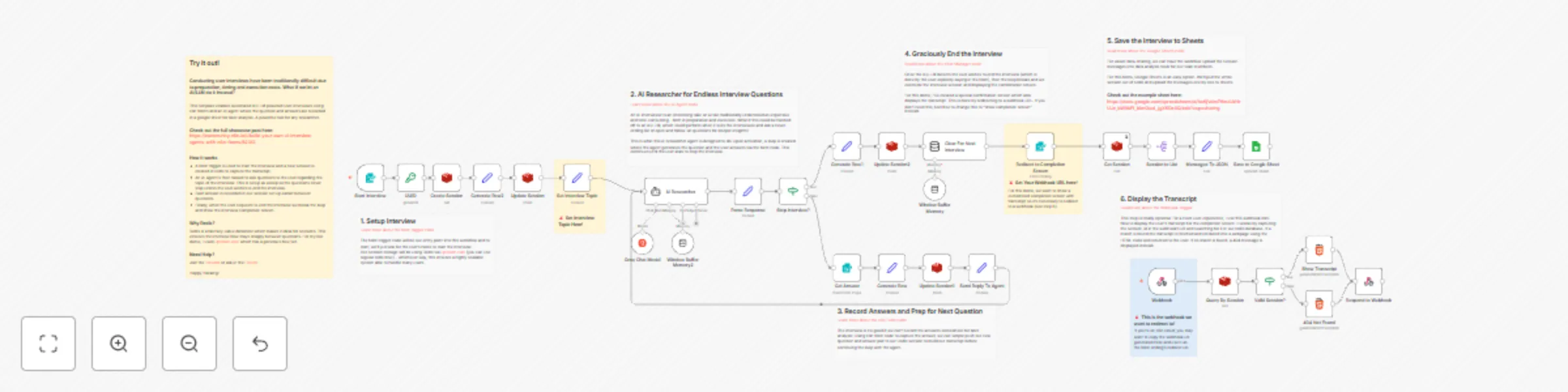
This n8n template combines an AI agent with n8n's multi-page forms to create a novel interaction which allows automated question-and-answer sessions. One of the more obvious use-cases of this interaction is what I'm calling the AI interviewer.

You can read the full post here: https://community.n8n.io/t/build-your-own-ai-interview-agents-with-n8n-forms/62312

Live demo here: https://jimleuk.app.n8n.cloud/form/driving-lessons-survey

How it works

  • A form trigger is used to start the interview and a new session is created in redis to capture the transcript.
  • An AI agent is then tasked to ask questions to the user regarding the topic of the interview. This is setup as a loop so the questions never stop unless the user wishes to end the interview.
  • Each answer is recorded in our session set up earlier between questions.
  • When the user requests to end the interview we break the loop and show the interview completion screen.
  • Finally, the session is then saved in a Google Sheet which can then be shared with team members and for the purpose of data analysis.

How to use

  • You'll need to be on a n8n instance that is accessible to your target audience. Not technical enough to setup your own server? Try out n8n cloud and instantly deploy template!
  • Remember to activate the workflow so the form trigger is published and available for users to use.

Requirements

  • Groq LLM for AI agent. Feel free to swap this out for any other LLM.
  • Redis(-compatible) storage for capturing sessions

Customising this workflow

  • The next step would be adding tools! AI interviews with knowledge retrieval could definitely open up other possibilities. Eg. An onboarding wizard generating questions by pulling facts from internal knowledgebase.

1.2 Logical Blocks

This catalog entry is organized from the workflow JSON. The node-level section below shows the executable blocks available for review before importing the template.

2. Block-by-Block Analysis

Block 1 - Stop Interview?

Type / Role
n8n-nodes-base.if - if
Config choices
Version 2.2

Block 2 - Generate Row

Type / Role
n8n-nodes-base.set - set
Config choices
Version 3.4

Block 3 - Generate Row1

Type / Role
n8n-nodes-base.set - set
Config choices
Version 3.4

Block 4 - Clear For Next Interview

Type / Role
@n8n/n8n-nodes-langchain.memoryManager - memoryManager
Config choices
Version 1.1

Block 5 - Sticky Note

Type / Role
n8n-nodes-base.stickyNote - stickyNote
Config choices
Version 1

Block 6 - Send Reply To Agent

Type / Role
n8n-nodes-base.set - set
Config choices
Version 3.4

Block 7 - Sticky Note1

Type / Role
n8n-nodes-base.stickyNote - stickyNote
Config choices
Version 1

Block 8 - Start Interview

Type / Role
n8n-nodes-base.formTrigger - formTrigger
Config choices
Version 2.2

Block 9 - Sticky Note2

Type / Role
n8n-nodes-base.stickyNote - stickyNote
Config choices
Version 1

Block 10 - Sticky Note3

Type / Role
n8n-nodes-base.stickyNote - stickyNote
Config choices
Version 1

Block 11 - Sticky Note4

Type / Role
n8n-nodes-base.stickyNote - stickyNote
Config choices
Version 1

Block 12 - Get Answer

Type / Role
n8n-nodes-base.form - form
Config choices
Version 1

Block 13 - Sticky Note5

Type / Role
n8n-nodes-base.stickyNote - stickyNote
Config choices
Version 1

Block 14 - Set Interview Topic

Type / Role
n8n-nodes-base.set - set
Config choices
Version 3.4

Block 15 - UUID

Type / Role
n8n-nodes-base.crypto - crypto
Config choices
Version 1

Block 16 - Generate Row2

Type / Role
n8n-nodes-base.set - set
Config choices
Version 3.4

Block 17 - Create Session

Type / Role
n8n-nodes-base.redis - redis
Config choices
Version 1

Block 18 - Update Session

Type / Role
n8n-nodes-base.redis - redis
Config choices
Version 1

Block 19 - Update Session1

Type / Role
n8n-nodes-base.redis - redis
Config choices
Version 1

Block 20 - Update Session2

Type / Role
n8n-nodes-base.redis - redis
Config choices
Version 1

Block 21 - Valid Session?

Type / Role
n8n-nodes-base.if - if
Config choices
Version 2.2

Block 22 - Respond to Webhook

Type / Role
n8n-nodes-base.respondToWebhook - respondToWebhook
Config choices
Version 1.1

Block 23 - Window Buffer Memory2

Type / Role
@n8n/n8n-nodes-langchain.memoryBufferWindow - memoryBufferWindow
Config choices
Version 1.2

Block 24 - Window Buffer Memory

Type / Role
@n8n/n8n-nodes-langchain.memoryBufferWindow - memoryBufferWindow
Config choices
Version 1.2

Showing the first 24 of 40 workflow blocks. Download the JSON for the full node graph.

3. Summary Table

Workflow Conversational interviews with AI agents and n8n forms
Complexity advanced
Nodes 40
Categories Market Research, AI Chatbot
Author Jimleuk
Published 24 Nov 2024

4. Reproducing the Workflow from Scratch

  1. 1. Download the workflow JSON

    Use the JSON export at /data/workflows/2566/2566.json as the source template for this automation.

  2. 2. Import the template into n8n

    Open n8n, import the downloaded JSON, and review each node before activating the workflow.

  3. 3. Configure credentials and variables

    Replace placeholder credentials, API keys, webhook URLs, account IDs, and environment-specific values with your own settings.

  4. 4. Test with sample data

    Run the workflow manually or in a staging workspace, inspect node output, and confirm downstream systems receive the expected data.

  5. 5. Activate and monitor

    Enable the workflow only after testing, then monitor executions, errors, and rate limits during the first production runs.

5. General Notes & Resources

Review imported nodes carefully before activation. This catalog entry is intended to help you inspect the workflow structure, understand required services, and find related templates faster.

Node names, credentials, schedules, webhook paths, and external service limits may need adjustment for your workspace.

Frequently asked questions

What does Conversational interviews with AI agents and n8n forms do?

This n8n template combines an AI agent with n8n's multi page forms to create a novel interaction which allows automated question and answer sessions. One of the more obvious use cases of this inter...

What do I need before importing this workflow?

Review the workflow JSON, configure any required credentials in n8n, and test the automation in a safe workspace before using it in production.

Can I customize this workflow?

Yes. Use the block-by-block analysis and the downloadable JSON to inspect each node, then adjust credentials, prompts, schedules, filters, or destinations for your Market Research, AI Chatbot use case.