Block 1 - Sticky Note1
- Type / Role
- n8n-nodes-base.stickyNote - stickyNote
- Config choices
- Version 1


 Early Deal
This workflow is provided as-is. Please review and test before using in production.
How it works ++Download the google sheet here++ and replace this with the googles sheet node: [Google sheet](https://www.dropbox.com/scl/fi/zaif45nt9uzgz8mrhht9n/competitor price drop automation.xl...
n8n-nodes-base.stickynote, n8n-nodes-base.scheduletrigger, n8n-nodes-base.googlesheets, n8n-nodes-base.splitinbatches, n8n-nodes-base.wait, n8n-nodes-base.httprequest, n8n-nodes-base.html, n8n-nodes-base.code
This workflow is cataloged by N8N Workflows and links back to its original n8n.io source page by Tony Paul.
Original n8n.io source++Download the google sheet here++ and replace this with the googles sheet node: Google sheet , upload to google sheets and replace in the google sheets node.
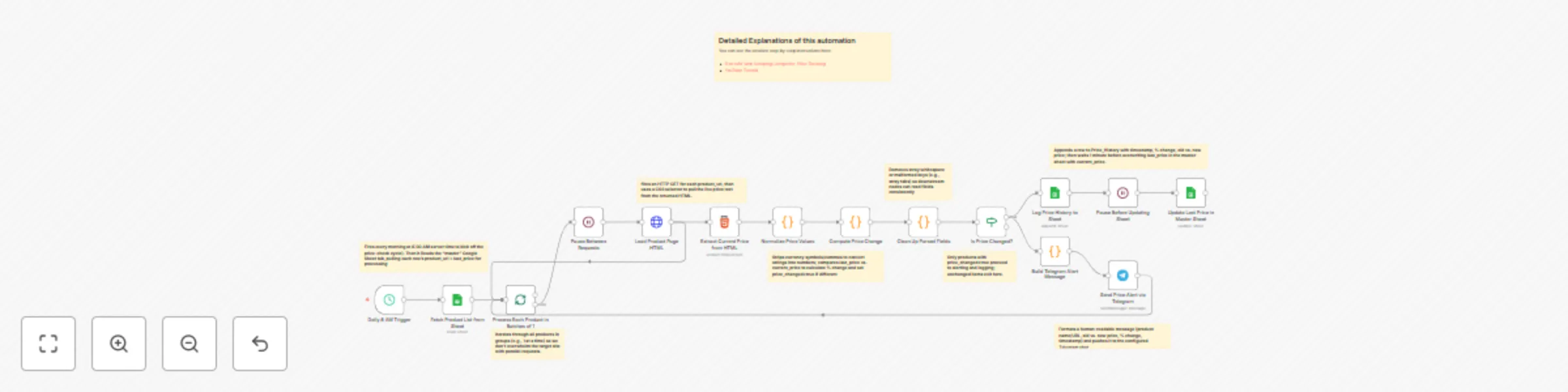
Scheduled trigger: Runs once a day at 8 AM (server time).
Fetch product list: Reads your “master” sheet (product_url + last known price) from Google Sheets.
Loop with delay: Iterates over each row (product) one at a time, inserting a short pause (20 s) between HTTP requests to avoid blocking.
Scrape current price: Loads each product_url, extracts the current price via a simple CSS selector.
Compare & normalize: Compares the newly scraped price against the “last_price” from your sheet, calculates percentage change, and tags items where price_changed == true.
On price change:
Send alert: Formats a Telegram message (“Price Drop” or “Price Hike”) and pushes it to your configured chat.
Log history: Appends a new row to a separate “price_tracking” tab with timestamp, old price, new price, and % change.
Update master sheet: After a 1 min pause, writes the updated current_price back to your “master” sheet so future runs use it as the new baseline.
Verify the schedule in the Schedule Trigger node is set to 08:00 (or adjust to your preferred run time).
In the Loop Over Items node, confirm “Batch Size” is 1 (to process one URL at a time).
Adjust the Delay to avoid Request Blocking node if your site requires a longer pause (default is 20 s).
In the Parse Data From The HTML Page node, double-check the CSS selector matches how prices appear on your target site.
Once credentials are in place and your sheet tabs match the expected column names, the flow should be ready to activate. Total setup time is under 15 minutes—detailed notes are embedded as sticky comments throughout the workflow to help you tweak selectors, change timeouts, or adjust sheet names without digging into code.
This catalog entry is organized from the workflow JSON. The node-level section below shows the executable blocks available for review before importing the template.
| Workflow | Competitor price monitoring with web scraping,Google Sheets & Telegram |
|---|---|
| Complexity | advanced |
| Nodes | 24 |
| Categories | Market Research |
| Author | Tony Paul |
| Published | 04 Jun 2025 |
Use the JSON export at /data/workflows/4640/4640.json as the source template for this automation.
Open n8n, import the downloaded JSON, and review each node before activating the workflow.
Replace placeholder credentials, API keys, webhook URLs, account IDs, and environment-specific values with your own settings.
Run the workflow manually or in a staging workspace, inspect node output, and confirm downstream systems receive the expected data.
Enable the workflow only after testing, then monitor executions, errors, and rate limits during the first production runs.
Review imported nodes carefully before activation. This catalog entry is intended to help you inspect the workflow structure, understand required services, and find related templates faster.
Node names, credentials, schedules, webhook paths, and external service limits may need adjustment for your workspace.
How it works ++Download the google sheet here++ and replace this with the googles sheet node: [Google sheet](https://www.dropbox.com/scl/fi/zaif45nt9uzgz8mrhht9n/competitor price drop automation.xl...
Review the workflow JSON, configure any required credentials in n8n, and test the automation in a safe workspace before using it in production.
Yes. Use the block-by-block analysis and the downloadable JSON to inspect each node, then adjust credentials, prompts, schedules, filters, or destinations for your Market Research use case.