Block 1 - Google Sheets Trigger: New Feedback Entry
- Type / Role
- n8n-nodes-base.googleSheetsTrigger - googleSheetsTrigger
- Config choices
- Version 1


 Early Deal
This workflow is provided as-is. Please review and test before using in production.
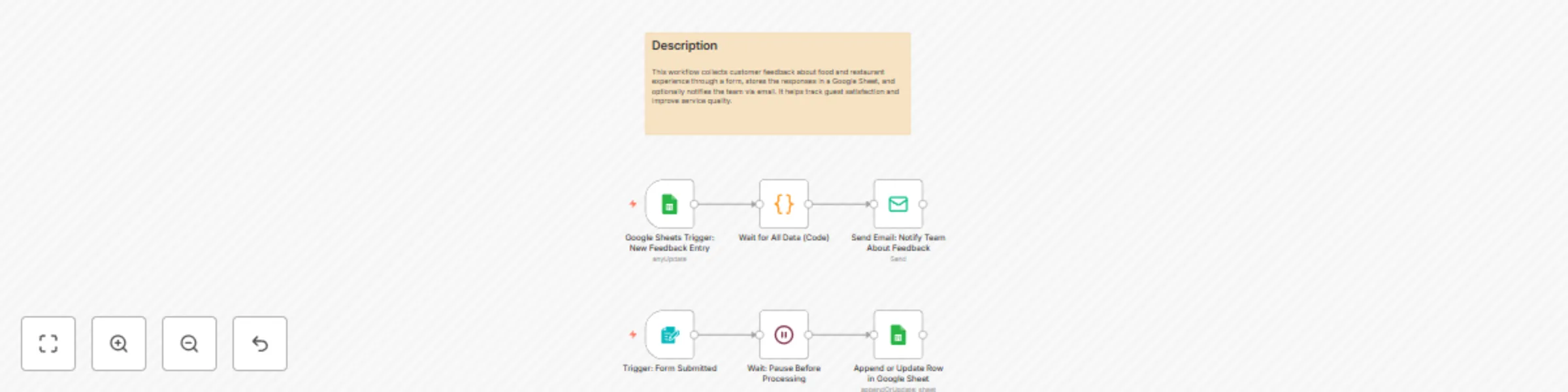
This n8n template demonstrates how to create an automated customer feedback collection system for restaurants. The workflow triggers when new customer emails are added to an Excel sheet, automatica...
n8n-nodes-base.googlesheetstrigger, n8n-nodes-base.code, n8n-nodes-base.emailsend, n8n-nodes-base.formtrigger, n8n-nodes-base.wait, n8n-nodes-base.googlesheets, n8n-nodes-base.stickynote
This workflow is cataloged by N8N Workflows and links back to its original n8n.io source page by Oneclick AI Squad.
Original n8n.io sourceThis n8n template demonstrates how to create an automated customer feedback collection system for restaurants. The workflow triggers when new customer emails are added to an Excel sheet, automatically sends personalized feedback forms, and stores all responses in a separate Excel tracking sheet. Perfect for restaurants wanting to systematically gather customer insights and improve service quality.
Good to know
Name - Customer's full nameEmail - Customer's email address for form distributionTimestamp - Date and time of form submissionName - Customer's full nameE-Mail - Customer's email addressContact Number - Customer's phone numberHow was the cleanliness of the dining area? - Cleanliness rating/feedbackDid you like the taste of the food? - Food taste evaluationWhat dish did you enjoy the most? - Favorite dish identificationWas your order accurate and timely? - Service accuracy ratingWas our staff polite and helpful? - Staff service evaluationWas the food presentation appealing? - Food presentation ratingHow would you rate your overall dining experience? - Overall experience scoreAny additional comments or suggestions? - Open-ended feedback fieldThis catalog entry is organized from the workflow JSON. The node-level section below shows the executable blocks available for review before importing the template.
| Workflow | Collect & store restaurant customer feedback with Google Sheets and email forms |
|---|---|
| Complexity | intermediate |
| Nodes | 7 |
| Categories | Market Research |
| Author | Oneclick AI Squad |
| Published | 10 Jul 2025 |
Use the JSON export at /data/workflows/5848/5848.json as the source template for this automation.
Open n8n, import the downloaded JSON, and review each node before activating the workflow.
Replace placeholder credentials, API keys, webhook URLs, account IDs, and environment-specific values with your own settings.
Run the workflow manually or in a staging workspace, inspect node output, and confirm downstream systems receive the expected data.
Enable the workflow only after testing, then monitor executions, errors, and rate limits during the first production runs.
Review imported nodes carefully before activation. This catalog entry is intended to help you inspect the workflow structure, understand required services, and find related templates faster.
Node names, credentials, schedules, webhook paths, and external service limits may need adjustment for your workspace.
This n8n template demonstrates how to create an automated customer feedback collection system for restaurants. The workflow triggers when new customer emails are added to an Excel sheet, automatica...
Review the workflow JSON, configure any required credentials in n8n, and test the automation in a safe workspace before using it in production.
Yes. Use the block-by-block analysis and the downloadable JSON to inspect each node, then adjust credentials, prompts, schedules, filters, or destinations for your Market Research use case.