Block 1 - Sensor Input
- Type / Role
- n8n-nodes-base.webhook - webhook
- Config choices
- Version 1


 Early Deal
This workflow is provided as-is. Please review and test before using in production.
IoT Sensor Data Cleaner + InfluxDB Logger (n8n Webhook Function InfluxDB) This workflow accepts raw sensor data from IoT devices via webhook, applies basic cleaning and transformation logi...
n8n-nodes-base.webhook, n8n-nodes-base.function, n8n-nodes-base.set, n8n-nodes-base.httprequest
This workflow is cataloged by N8N Workflows and links back to its original n8n.io source page by WeblineIndia.
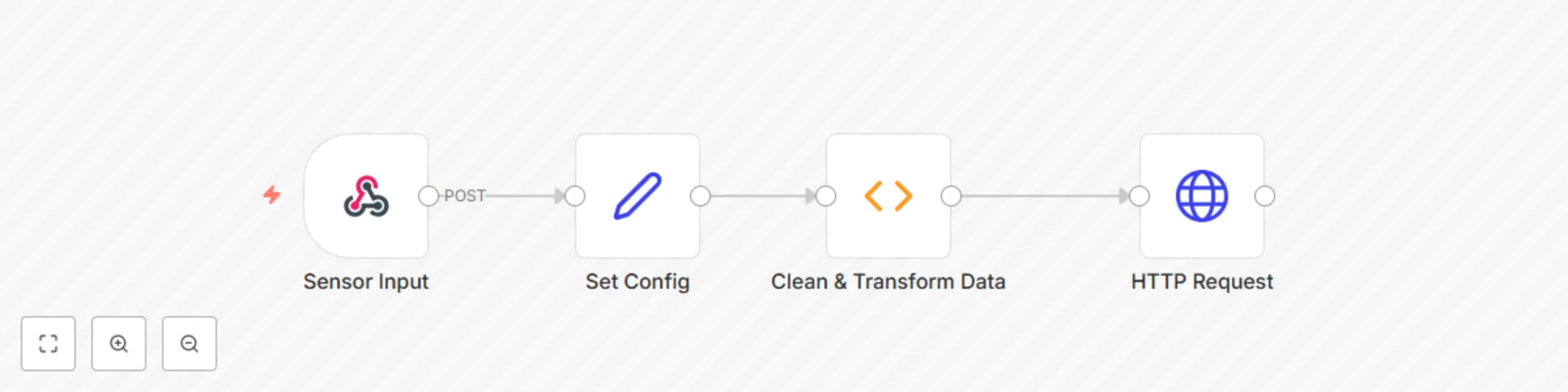
Original n8n.io sourceThis workflow accepts raw sensor data from IoT devices via webhook, applies basic cleaning and transformation logic, and writes the cleaned data to an InfluxDB instance for time-series tracking. Perfect for renewable energy sites, smart farms and environmental monitoring setups using dashboards like Grafana or Chronograf.
/webhook/sensor-data) in your IoT device or form to send sensor data.| Tool | Purpose |
|---|---|
| n8n Instance | For automation |
| InfluxDB (v1 or v2) | To store time-series sensor data |
| IoT Device or Platform | To POST sensor data |
| Function Node | To filter and transform data |
Import Workflow:
.json file into your n8n workspace.Edit Configuration Node:
Set Config node:influxDbHost, influxDbDatabase, influxDbUsername, influxDbPasswordmeasurement: What you want to name the data set (e.g., sensor_readings)Send Data to Webhook:
https://your-n8n/webhook/sensor-data{
"temperature": 78.3,
"humidity": 44.2,
"voltage": 395.7,
"timestamp": "2024-06-01T12:00:00Z"
}
View in InfluxDB:
| Customization | Method |
|---|---|
| Add more fields (e.g., wind_speed) | Update the Function & InfluxDB nodes |
| Add field/unit conversion | Use math in the Function node |
| Send email alerts on anomalies | Add IF → Email branch after Function node |
| Store in parallel in Google Sheets | Add Google Sheets node for hybrid logging |
| Add-on | Description |
|---|---|
| 📊 Grafana Integration | Real-time charts using InfluxDB |
| 📧 Email on Faulty Data | Notify if voltage < 0 or temperature too high |
| 🧠 AI Filtering | Add OpenAI or TensorFlow for anomaly detection |
| 🗃 Dual Logging | Save data to both InfluxDB and BigQuery/Sheets |
| Issue | Cause | Solution |
|---|---|---|
| No data logged in InfluxDB | Invalid credentials or DB name | Recheck InfluxDB values in config |
| Webhook not triggered | Wrong method or endpoint | Confirm it is a POST to /webhook/sensor-data |
| Data gets filtered | Readings outside valid range | Check logic in Function node |
| Data not appearing in dashboard | Influx write format error | Inspect InfluxDB log and field names |
Need help integrating this workflow into your energy monitoring system or need InfluxDB dashboards built for you?
👉 Contact WeblineIndia | Experts in workflow automation and time-series analytics.
This catalog entry is organized from the workflow JSON. The node-level section below shows the executable blocks available for review before importing the template.
| Workflow | Clean and log IoT sensor data to InfluxDB (Webhook | Function | HTTP) |
|---|---|
| Complexity | beginner |
| Nodes | 4 |
| Categories | Engineering, Multimodal AI |
| Author | WeblineIndia |
| Published | 11 Aug 2025 |
Use the JSON export at /data/workflows/7248/7248.json as the source template for this automation.
Open n8n, import the downloaded JSON, and review each node before activating the workflow.
Replace placeholder credentials, API keys, webhook URLs, account IDs, and environment-specific values with your own settings.
Run the workflow manually or in a staging workspace, inspect node output, and confirm downstream systems receive the expected data.
Enable the workflow only after testing, then monitor executions, errors, and rate limits during the first production runs.
Review imported nodes carefully before activation. This catalog entry is intended to help you inspect the workflow structure, understand required services, and find related templates faster.
Node names, credentials, schedules, webhook paths, and external service limits may need adjustment for your workspace.
IoT Sensor Data Cleaner + InfluxDB Logger (n8n Webhook Function InfluxDB) This workflow accepts raw sensor data from IoT devices via webhook, applies basic cleaning and transformation logi...
Review the workflow JSON, configure any required credentials in n8n, and test the automation in a safe workspace before using it in production.
Yes. Use the block-by-block analysis and the downloadable JSON to inspect each node, then adjust credentials, prompts, schedules, filters, or destinations for your Engineering, Multimodal AI use case.