Classify YouTube videos & generate email summaries with GPT-4 and Gmail

Workflow preview

Workflow preview
100%
Classify YouTube videos & generate email summaries with GPT-4 and Gmail preview
Open on n8n.io

Important notice

This workflow is provided as-is. Please review and test before using in production.

1. Workflow Overview

Classify YouTube Trends and Generate Email Summaries with GPT 4 and Gmail ![YouTube](https://im...

Best for

  • Market Research automation workflows
  • AI Summarization automation workflows
  • advanced n8n builders looking for reusable templates

Tools used

n8n-nodes-base.manualtrigger, n8n-nodes-base.stickynote, n8n-nodes-base.set, n8n-nodes-base.splitout, n8n-nodes-base.rssfeedread, n8n-nodes-base.if, n8n-nodes-base.httprequest, n8n-nodes-base.code

Source and attribution

This workflow is cataloged by N8N Workflows and links back to its original n8n.io source page by Kai Hölters .

Original n8n.io source

1.1 Workflow description

Title
Classify YouTube videos & generate email summaries with GPT-4 and Gmail
Workflow name
Classify YouTube videos & generate email summaries with GPT-4 and Gmail

Classify YouTube Trends and Generate Email Summaries with GPT-4 and Gmail

Monitor YouTube channels, fetch stats, classify videos as viral (≥ 1000 likes) or normal, and auto‑generate LinkedIn/email summaries with GPT‑4. Deliver via Gmail or SMTP. Clear node names, examples, and auditable fields.


🎯 Overview

This template monitors YouTube channels via RSS or the YouTube Data API, retrieves video stats, classifies each video as viral (≥ 1000 likes) or normal, and produces concise LinkedIn/email summaries with OpenAI (GPT‑4 family). It can send a compact weekly briefing via Gmail (OAuth2) or SMTP. Built for creators, marketing teams, and agencies who want automated trend alerts and ready‑to‑use content.

This screenshot shows the Gmail-ready weekly briefing generated by the Generate Weekly Briefing (HTML) node in my YouTube Trend Detector workflow, confirming the end-to-end pipeline: RSS/API → stats → like-based classification (≥ 1000 = viral) → LLM summaries → HTML email.


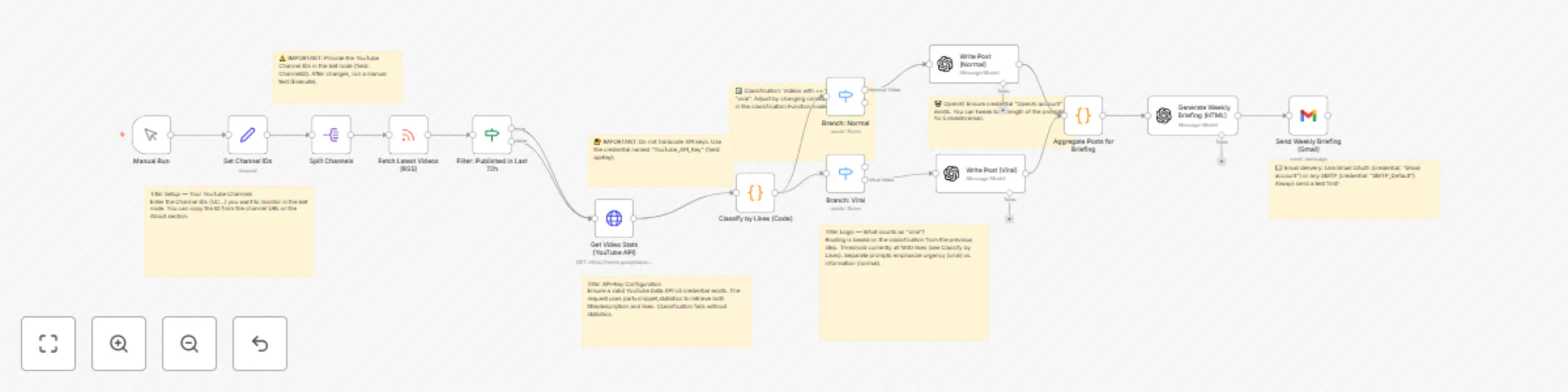
🧭 How It Works (Node Map)

  1. Manual Run – ad‑hoc execution
  2. Set Channel IDs – provide one or more YouTube channelId values
  3. Split Channels – process channels one by one
  4. Fetch Latest Videos (RSS) – pull recent uploads via channel RSS
  5. Filter: Published in Last 72h – only recent items are kept
  6. Get Video Stats (YouTube API) – request snippet,statistics for likes and details
  7. Classify by Likes (Code) – sets classification to viral or normal
  8. Branch: Normal / Branch: Viral – separate LLM prompts per relevance
  9. Write Post (Normal / Viral) – generate LinkedIn‑style notes via OpenAI
  10. Aggregate Posts for Briefing – merge all texts into one block
  11. Generate Weekly Briefing (HTML) – produce a Gmail‑robust HTML email via GPT
  12. Send Weekly Briefing (Gmail/SMTP) – deliver briefing (you set recipients)

⚙️ Quick Start (≈ 3 minutes)

  1. Import the sanitized JSON into n8n (Menu → Import).
  2. Create credentials (use exact names):
    • YouTube_API_Key — Generic credential (field: apiKey)
    • OpenAi account — OpenAI API Key
    • Gmail account (OAuth2) or SMTP_Default (SMTP)
  3. Configure channels: In Set Channel IDs, list your YouTube channelId values (e.g., UC…).
  4. Set recipients: In Send Weekly Briefing, add your target email(s).
  5. Test: Run Execute Workflow and review outputs from the LLM and send nodes.

🔑 Required Credentials

  • YouTube_API_Key — YouTube Data API v3 key (field apiKey)
  • OpenAi account — OpenAI API key for LLM nodes
  • Gmail account (OAuth2, recommended) or SMTP_Default (server/port/TLS + app password if 2FA)

🧩 Key Parameters & Adjustments

  • Viral threshold: In Classify by Likes (Code)const THRESHOLD = 1000;
  • YouTube API parts: Use part=snippet,statistics to obtain likeCount
  • Time window: The filter keeps videos from the last 72 hours

🧪 Troubleshooting

  • Missing likeCount / classification = "unknown" → ensure part=statistics and a valid API key credential.
  • Gmail OAuth redirect_mismatch / access_denied → redirect must be https://<your-n8n-host>/rest/oauth2-credential/callback and test users added if restricted.
  • SMTP auth issues → set correct server/port/TLS and use an app password when 2FA is enabled.
  • Empty LLM output → verify OpenAI key/quota and inspect node logs.

🧾 Example Outputs

1) Classification (single video)

{
  "videoId": "abc123XYZ",
  "title": "How to Ship an n8n Workflow with OpenAI",
  "likeCount": 1587,
  "classification": "viral",
  "needsStatsFetch": false
}

2) LinkedIn draft (viral)

Did you know how much faster prompt workflows get with structured inputs?
• Setup: n8n + YouTube API + OpenAI for auto-briefs
• Tip: include `part=statistics` for reliable like counts
Useful for teams tracking trending how-to content.
What’s your best “viral” signal besides likes?
#n8n #YouTubeAPI #OpenAI #Automation #Growth

3) Plain‑text email preview

Subject: Weekly AI Briefing — YouTube Trend Highlights

Hi team,
Highlights from our tracked channels:
• Viral: “How to Ship an n8n Workflow with OpenAI” (1.6k likes)
• Normal: “RSS vs API: What’s Best for Monitoring?”
Generated via n8n + GPT‑4.

✅ Submission Checklist (meets the guidelines)

  • Title clarity: Mentions GPT‑4 and Gmail
  • Language: Entire document in English
  • Node naming: Descriptive, non‑generic labels
  • HTML → Markdown: No HTML in this description; badges are Markdown images
  • Examples: Included (JSON, LinkedIn draft, email)
  • Security: No secrets in JSON; uses credentials by name

📸 Suggested Screenshots (optional)

  1. Full canvas overview (entire workflow)
  2. LLM output (expanded) showing generated summary
  3. Send‑node result with messageId/status
  4. Optional: aggregated briefing preview

📜 License & Support

License: MIT
Support/Contact: [email protected]

1.2 Logical Blocks

This catalog entry is organized from the workflow JSON. The node-level section below shows the executable blocks available for review before importing the template.

2. Block-by-Block Analysis

Block 1 - Manual Run

Type / Role
n8n-nodes-base.manualTrigger - manualTrigger
Config choices
Version 1

Block 2 - Note: Channel IDs

Type / Role
n8n-nodes-base.stickyNote - stickyNote
Config choices
Version 1

Block 3 - Note: API Key

Type / Role
n8n-nodes-base.stickyNote - stickyNote
Config choices
Version 1

Block 4 - Note: Threshold

Type / Role
n8n-nodes-base.stickyNote - stickyNote
Config choices
Version 1

Block 5 - Note: OpenAI

Type / Role
n8n-nodes-base.stickyNote - stickyNote
Config choices
Version 1

Block 6 - Note: Email

Type / Role
n8n-nodes-base.stickyNote - stickyNote
Config choices
Version 1

Block 7 - Set Channel IDs

Type / Role
n8n-nodes-base.set - set
Config choices
Version 3.4

Block 8 - Split Channels

Type / Role
n8n-nodes-base.splitOut - splitOut
Config choices
Version 1

Block 9 - Fetch Latest Videos (RSS)

Type / Role
n8n-nodes-base.rssFeedRead - rssFeedRead
Config choices
Version 1.2

Block 10 - Filter: Published in Last 72h

Type / Role
n8n-nodes-base.if - if
Config choices
Version 2.2

Block 11 - Get Video Stats (YouTube API)

Type / Role
n8n-nodes-base.httpRequest - httpRequest
Config choices
Version 4.2

Block 12 - Classify by Likes (Code)

Type / Role
n8n-nodes-base.code - code
Config choices
Version 2

Block 13 - Branch: Normal

Type / Role
n8n-nodes-base.switch - switch
Config choices
Version 3.2

Block 14 - Branch: Viral

Type / Role
n8n-nodes-base.switch - switch
Config choices
Version 3.2

Block 15 - Write Post (Normal)

Type / Role
@n8n/n8n-nodes-langchain.openAi - openAi
Config choices
Version 1.8

Block 16 - Write Post (Viral)

Type / Role
@n8n/n8n-nodes-langchain.openAi - openAi
Config choices
Version 1.8

Block 17 - Aggregate Posts for Briefing

Type / Role
n8n-nodes-base.code - code
Config choices
Version 2

Block 18 - Generate Weekly Briefing (HTML)

Type / Role
@n8n/n8n-nodes-langchain.openAi - openAi
Config choices
Version 1.8

Block 19 - Send Weekly Briefing (Gmail)

Type / Role
n8n-nodes-base.gmail - gmail
Config choices
Version 2.1

Block 20 - Note: Setup

Type / Role
n8n-nodes-base.stickyNote - stickyNote
Config choices
Version 1

Block 21 - Note: YouTube API

Type / Role
n8n-nodes-base.stickyNote - stickyNote
Config choices
Version 1

Block 22 - Note: Logic

Type / Role
n8n-nodes-base.stickyNote - stickyNote
Config choices
Version 1

3. Summary Table

Workflow Classify YouTube videos & generate email summaries with GPT-4 and Gmail
Complexity advanced
Nodes 22
Categories Market Research, AI Summarization
Author Kai Hölters
Published 14 Oct 2025

4. Reproducing the Workflow from Scratch

  1. 1. Download the workflow JSON

    Use the JSON export at /data/workflows/9616/9616.json as the source template for this automation.

  2. 2. Import the template into n8n

    Open n8n, import the downloaded JSON, and review each node before activating the workflow.

  3. 3. Configure credentials and variables

    Replace placeholder credentials, API keys, webhook URLs, account IDs, and environment-specific values with your own settings.

  4. 4. Test with sample data

    Run the workflow manually or in a staging workspace, inspect node output, and confirm downstream systems receive the expected data.

  5. 5. Activate and monitor

    Enable the workflow only after testing, then monitor executions, errors, and rate limits during the first production runs.

5. General Notes & Resources

Review imported nodes carefully before activation. This catalog entry is intended to help you inspect the workflow structure, understand required services, and find related templates faster.

Node names, credentials, schedules, webhook paths, and external service limits may need adjustment for your workspace.

Frequently asked questions

What does Classify YouTube videos & generate email summaries with GPT-4 and Gmail do?

Classify YouTube Trends and Generate Email Summaries with GPT 4 and Gmail ![YouTube](https://im...

What do I need before importing this workflow?

Review the workflow JSON, configure any required credentials in n8n, and test the automation in a safe workspace before using it in production.

Can I customize this workflow?

Yes. Use the block-by-block analysis and the downloadable JSON to inspect each node, then adjust credentials, prompts, schedules, filters, or destinations for your Market Research, AI Summarization use case.