Block 1 - Linear Trigger
- Type / Role
- n8n-nodes-base.linearTrigger - linearTrigger
- Config choices
- Version 1


 Early Deal
This workflow is provided as-is. Please review and test before using in production.
Use case When working with multiple teams, bugs must get in front of the right team as quickly as possible to be resolved. Normally this includes a manual grooming of new bugs that have arrived in ...
n8n-nodes-base.lineartrigger, n8n-nodes-base.filter, n8n-nodes-base.stickynote, n8n-nodes-base.linear, n8n-nodes-base.httprequest, n8n-nodes-base.set, n8n-nodes-base.if, n8n-nodes-base.slack
This workflow is cataloged by N8N Workflows and links back to its original n8n.io source page by Niklas Hatje.
Original n8n.io sourceWhen working with multiple teams, bugs must get in front of the right team as quickly as possible to be resolved. Normally this includes a manual grooming of new bugs that have arrived in your ticketing system (in our case Linear). We found this way too time-consuming. That's why we built this workflow.
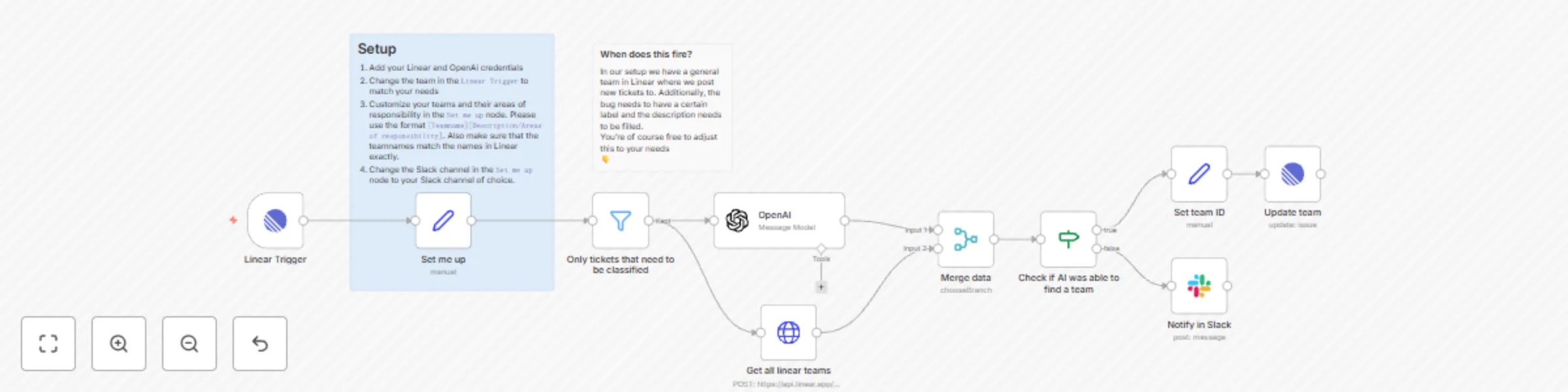
This workflow triggers every time a Linear issue is created or updated within a certain team. For us at n8n, we created one general team called Engineering where all bugs get added in the beginning. The workflow then checks if the issue meets the criteria to be auto-moved to a certain team. In our case, that means that the description is filled, that it has the bug label, and that it's in the Triage state. The workflow then classifies the bug using OpenAI's GPT-4 model before updating the team property of the Linear issue. If the AI fails to classify a team, the workflow sends an alert to Slack.
Linear Trigger to match your needsSet me up node. Please use the format [Teamname][Description/Areas of responsibility]. Also, make sure that the team names match the names in Linear exactly.Set me up node to your Slack channel of choice.At n8n we use this workflow in combination with some others. E.g. we have the following things on top:
/bug command in Slack (check out this template if that's interesting to you)This workflow was built using n8n version 1.30.0
This catalog entry is organized from the workflow JSON. The node-level section below shows the executable blocks available for review before importing the template.
| Workflow | Classify new bugs in Linear with OpenAI's GPT-4 and move them to the right team |
|---|---|
| Complexity | intermediate |
| Nodes | 12 |
| Categories | Ticket Management, AI Summarization |
| Author | Niklas Hatje |
| Published | 29 Feb 2024 |
Use the JSON export at /data/workflows/2154/2154.json as the source template for this automation.
Open n8n, import the downloaded JSON, and review each node before activating the workflow.
Replace placeholder credentials, API keys, webhook URLs, account IDs, and environment-specific values with your own settings.
Run the workflow manually or in a staging workspace, inspect node output, and confirm downstream systems receive the expected data.
Enable the workflow only after testing, then monitor executions, errors, and rate limits during the first production runs.
Review imported nodes carefully before activation. This catalog entry is intended to help you inspect the workflow structure, understand required services, and find related templates faster.
Node names, credentials, schedules, webhook paths, and external service limits may need adjustment for your workspace.
Use case When working with multiple teams, bugs must get in front of the right team as quickly as possible to be resolved. Normally this includes a manual grooming of new bugs that have arrived in ...
Review the workflow JSON, configure any required credentials in n8n, and test the automation in a safe workspace before using it in production.
Yes. Use the block-by-block analysis and the downloadable JSON to inspect each node, then adjust credentials, prompts, schedules, filters, or destinations for your Ticket Management, AI Summarization use case.