Block 1 - Receive File Hash
- Type / Role
- n8n-nodes-base.webhook - webhook
- Config choices
- Version 2.1


 Early Deal
Template Description File Hash Reputation Checker is a security automation workflow that validates file hashes ( MD5 , SHA1 , SHA256 ) and checks their reputation using the VirusTotal API . It i...
n8n-nodes-base.webhook, n8n-nodes-base.respondtowebhook, n8n-nodes-base.slack, n8n-nodes-base.if, n8n-nodes-base.code, n8n-nodes-base.httprequest, n8n-nodes-base.stickynote, n8n-nodes-base.set
This workflow is cataloged by N8N Workflows and links back to its original n8n.io source page by Edson Encinas.
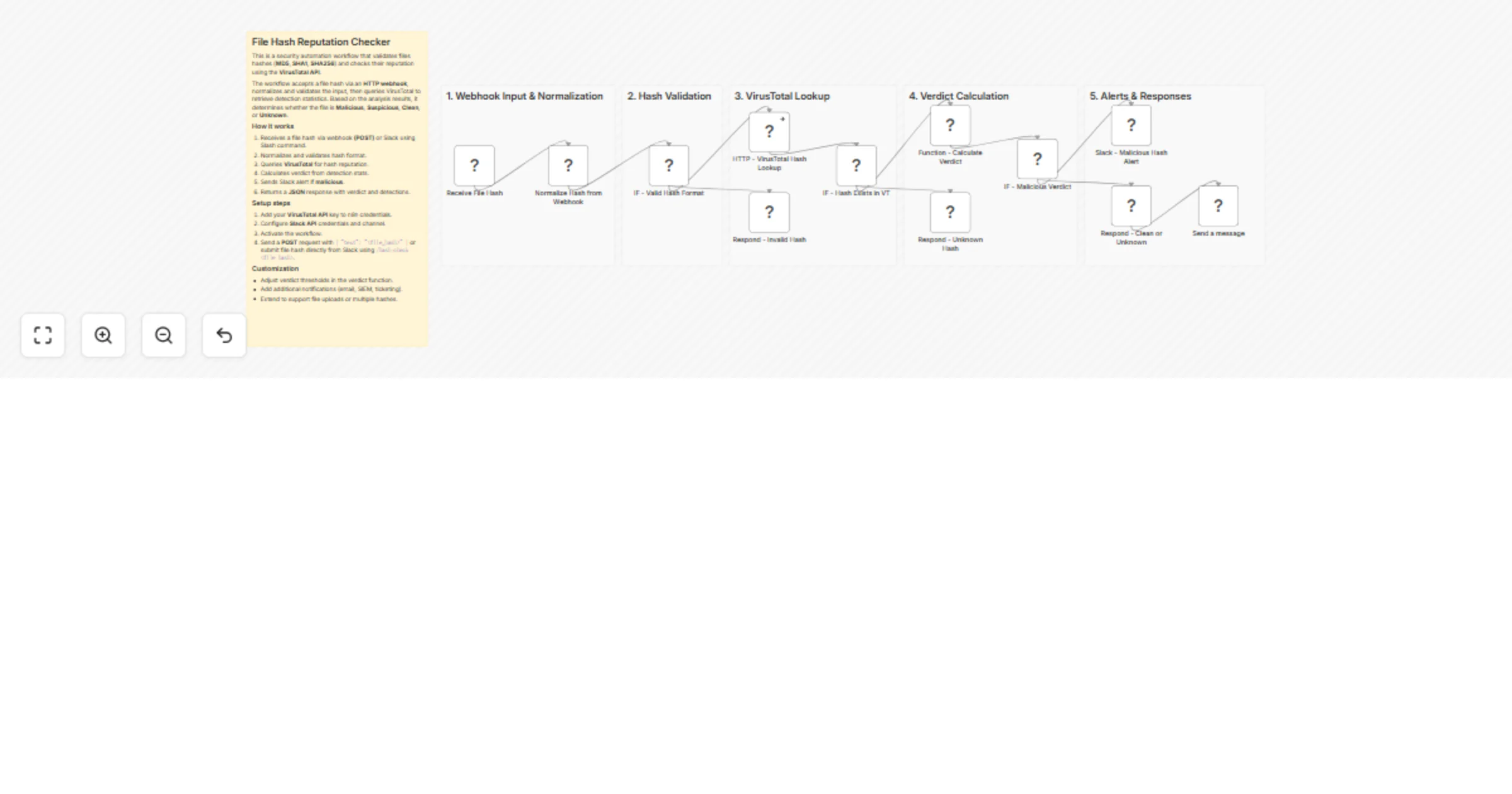
Original n8n.io sourceFile Hash Reputation Checker is a security automation workflow that validates file hashes (MD5, SHA1, SHA256) and checks their reputation using the VirusTotal API. It is designed for SOC teams, security engineers, and automation pipelines that need fast and consistent malware verdicts from a single hash input.
The workflow supports two input methods:
An HTTP webhook for API-based integrations
A Slack slash command (/hash-check) for quick analyst-driven checks directly from Slack
Once a hash is submitted, the workflow normalizes and validates the input, queries VirusTotal for detection statistics, and determines whether the file is Malicious, Suspicious, Clean, or Unknown. Results are returned as a structured JSON response and also posted to Slack with severity-based formatting.
A file hash is submitted via HTTP POST or Slack using /hash-check FILE_HASH.
The hash is normalized (lowercased and trimmed).
The workflow validates the hash format (MD5, SHA1, or SHA256).
VirusTotal is queried for hash reputation data.
Detection statistics are analyzed to calculate a verdict:
A Slack message is sent for all verdicts, with alert-style formatting for malicious results.
A structured JSON response is returned to the requester.
Create or use an existing VirusTotal account.
Add your API key to n8n as VirusTotal API credentials.
/hash-check.Activate the workflow in n8n.
Test using:
HTTP POST: { "text": "file_hash" }
Slack: /hash-check FILE_HASH;
Route Slack messages to different channels based on severity.
Add additional outputs (email, SIEM, ticketing systems).
Extend the workflow to support multiple hashes per request.
This catalog entry is organized from the workflow JSON. The node-level section below shows the executable blocks available for review before importing the template.
| Workflow | Check file hash reputation with VirusTotal and Slack alerts |
|---|---|
| Complexity | advanced |
| Nodes | 18 |
| Categories | SecOps, AI Summarization |
| Author | Edson Encinas |
| Published | 05 Feb 2026 |
Use the JSON export at /data/workflows/13229/13229.json as the source template for this automation.
Open n8n, import the downloaded JSON, and review each node before activating the workflow.
Replace placeholder credentials, API keys, webhook URLs, account IDs, and environment-specific values with your own settings.
Run the workflow manually or in a staging workspace, inspect node output, and confirm downstream systems receive the expected data.
Enable the workflow only after testing, then monitor executions, errors, and rate limits during the first production runs.
Review imported nodes carefully before activation. This catalog entry is intended to help you inspect the workflow structure, understand required services, and find related templates faster.
Node names, credentials, schedules, webhook paths, and external service limits may need adjustment for your workspace.
Template Description File Hash Reputation Checker is a security automation workflow that validates file hashes ( MD5 , SHA1 , SHA256 ) and checks their reputation using the VirusTotal API . It i...
Review the workflow JSON, configure any required credentials in n8n, and test the automation in a safe workspace before using it in production.
Yes. Use the block-by-block analysis and the downloadable JSON to inspect each node, then adjust credentials, prompts, schedules, filters, or destinations for your SecOps, AI Summarization use case.