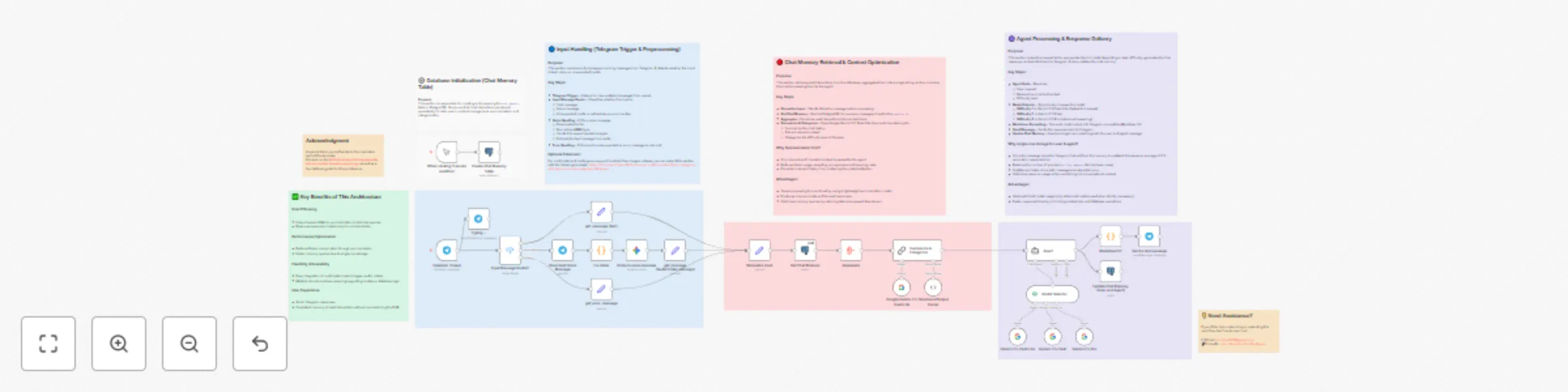
Cheaper, faster, accurate answers with memory summarization & dynamic routing!

Workflow preview

Workflow preview
100%
Cheaper, faster, accurate answers with memory summarization & dynamic routing! preview
Open on n8n.io

Important notice

This workflow is provided as-is. Please review and test before using in production.

1. Workflow Overview

Smart Telegram AI Assistant with Memory Summarization & Dynamic Model Selection Optimize your AI workflows, cut costs, and get faster, more accurate answers. Description Tired of expen...

Best for

  • AI Chatbot automation workflows
  • Multimodal AI automation workflows
  • advanced n8n builders looking for reusable templates

Tools used

@n8n/n8n-nodes-langchain.modelselector, @n8n/n8n-nodes-langchain.outputparserstructured, @n8n/n8n-nodes-langchain.lmchatgooglegemini, n8n-nodes-base.postgres, n8n-nodes-base.code, n8n-nodes-base.telegram, n8n-nodes-base.set, @n8n/n8n-nodes-langchain.googlegemini

Source and attribution

This workflow is cataloged by N8N Workflows and links back to its original n8n.io source page by John Alejandro SIlva.

Original n8n.io source

1.1 Workflow description

Title
Cheaper, faster, accurate answers with memory summarization & dynamic routing!
Workflow name
Cheaper, faster, accurate answers with memory summarization & dynamic routing!

🤖💬 Smart Telegram AI Assistant with Memory Summarization & Dynamic Model Selection

> Optimize your AI workflows, cut costs, and get faster, more accurate answers.


📋 Description

Tired of expensive AI calls, slow responses, or bots that forget your context?
This Telegram AI Assistant template is designed to optimize cost, speed, and precision in your AI-powered conversations.

By combining PostgreSQL chat memory, AI summarization, and dynamic model selection, this workflow ensures you only pay for what you really need. Simple queries get routed to lightweight models, while complex requests automatically trigger more advanced ones. The result? Smarter context, lower costs, and better answers.

This template is perfect for anyone who wants to:

  • Save money by using cheaper models for easy tasks.
  • 🧠 Keep context relevant with AI-powered summarization.
  • ⏱️ Respond faster thanks to optimized chat memory storage.
  • 💬 Deliver better answers directly inside Telegram.

✨ Key Benefits

  • 💸 Cost Optimization: Automatically routes simple requests to Gemini Flash Lite and reserves Gemini Pro only for complex reasoning.
  • 🧠 Smarter Context: Summarization ensures only the most relevant chat history is used.
  • ⏱️ Faster Workflows: Storing user + agent messages in a single row reduces DB queries by half and saves ~0.3s per response.
  • 🎤 Voice Message Support: Convert Telegram voice notes to text and reply intelligently.
  • 🛡️ Error-Proof Formatting: Safe MarkdownV2 ensures Telegram-ready answers.

💼 Use Case

This template is for anyone who needs an AI chatbot on Telegram that balances cost, performance, and intelligence.

  • Customer support teams can reduce expenses by using lightweight models for FAQs.
  • Freelancers and consultants can offer faster AI-powered chats without losing context.
  • Power users can handle voice + text seamlessly while keeping conversations memory-aware.

Whether you’re scaling a business or just want a smarter assistant, this workflow adapts to your needs and budget.


💬 Example Interactions

  • Quick Q&A → Routed to Gemini Flash Lite for fast, low-cost answers.
  • Complex problem-solving → Sent to Gemini Pro for in-depth reasoning.
  • Voice messages → Automatically transcribed, summarized, and answered.
  • Long conversations → Context is summarized, ensuring precise and efficient replies.

🔑 Required Credentials

  • Telegram Bot API (Bot Token)
  • PostgreSQL (Database connection)
  • Google Gemini API (Flash Lite, Flash, Pro)

⚙️ Setup Instructions

  1. 🗄️ Create the PostgreSQL table (chat_memory) from the Gray section SQL.
  2. 🔌 Configure the Telegram Trigger with your bot token.
  3. 🤖 Connect your Gemini API credentials.
  4. 🗂️ Set up PostgreSQL nodes with your DB details.
  5. ▶️ Activate the workflow and start chatting with your AI-powered Telegram bot.

🏷 Tags

telegram ai-assistant chatbot postgresql
summarization memory gemini dynamic-routing
workflow-optimization cost-saving voice-to-text


🙏 Acknowledgement

A special thank you to Davide for the inspiration behind this template.
His work on the AI Orchestrator that dynamically selects models based on input type served as a foundational guide for this architecture.


💡 Need Assistance?

Want to customize this workflow for your business or project? Let’s connect:

📧 Email: [email protected]
🔗 LinkedIn: John Alejandro Silva Rodríguez

1.2 Logical Blocks

This catalog entry is organized from the workflow JSON. The node-level section below shows the executable blocks available for review before importing the template.

2. Block-by-Block Analysis

Block 1 - Model Selector

Type / Role
@n8n/n8n-nodes-langchain.modelSelector - modelSelector
Config choices
Version 1

Block 2 - Structured Output Parser

Type / Role
@n8n/n8n-nodes-langchain.outputParserStructured - outputParserStructured
Config choices
Version 1.3

Block 3 - Gemini 2.5 Flash Lite

Type / Role
@n8n/n8n-nodes-langchain.lmChatGoogleGemini - lmChatGoogleGemini
Config choices
Version 1

Block 4 - Gemini 2.5 Flash

Type / Role
@n8n/n8n-nodes-langchain.lmChatGoogleGemini - lmChatGoogleGemini
Config choices
Version 1

Block 5 - Gemini 2.5 Pro

Type / Role
@n8n/n8n-nodes-langchain.lmChatGoogleGemini - lmChatGoogleGemini
Config choices
Version 1

Block 6 - Get Chat Memory

Type / Role
n8n-nodes-base.postgres - postgres
Config choices
Version 2.6

Block 7 - MarkdownV2

Type / Role
n8n-nodes-base.code - code
Config choices
Version 2

Block 8 - Send a text message

Type / Role
n8n-nodes-base.telegram - telegram
Config choices
Version 1.2

Block 9 - Fix mime

Type / Role
n8n-nodes-base.code - code
Config choices
Version 2

Block 10 - Typing…

Type / Role
n8n-nodes-base.telegram - telegram
Config choices
Version 1.2

Block 11 - get_message (Audio/Video message)

Type / Role
n8n-nodes-base.set - set
Config choices
Version 3.4

Block 12 - Analyze voice message

Type / Role
@n8n/n8n-nodes-langchain.googleGemini - googleGemini
Config choices
Version 1

Block 13 - get_message (text)

Type / Role
n8n-nodes-base.set - set
Config choices
Version 3.4

Block 14 - Input Message Router1

Type / Role
n8n-nodes-base.switch - switch
Config choices
Version 3.2

Block 15 - Download Voice Message

Type / Role
n8n-nodes-base.telegram - telegram
Config choices
Version 1.2

Block 16 - Telegram Trigger

Type / Role
n8n-nodes-base.telegramTrigger - telegramTrigger
Config choices
Version 1.2

Block 17 - Normalize input

Type / Role
n8n-nodes-base.set - set
Config choices
Version 3.4

Block 18 - Aggregate

Type / Role
n8n-nodes-base.aggregate - aggregate
Config choices
Version 1

Block 19 - Google Gemini 2.5 Flash Lite

Type / Role
@n8n/n8n-nodes-langchain.lmChatGoogleGemini - lmChatGoogleGemini
Config choices
Version 1

Block 20 - get_error_message

Type / Role
n8n-nodes-base.set - set
Config choices
Version 3.4

Block 21 - Agent

Type / Role
@n8n/n8n-nodes-langchain.agent - agent
Config choices
Version 2.1

Block 22 - Sticky Note

Type / Role
n8n-nodes-base.stickyNote - stickyNote
Config choices
Version 1

Block 23 - Sticky Note1

Type / Role
n8n-nodes-base.stickyNote - stickyNote
Config choices
Version 1

Block 24 - When clicking ‘Execute workflow’

Type / Role
n8n-nodes-base.manualTrigger - manualTrigger
Config choices
Version 1

Showing the first 24 of 36 workflow blocks. Download the JSON for the full node graph.

3. Summary Table

Workflow Cheaper, faster, accurate answers with memory summarization & dynamic routing!
Complexity advanced
Nodes 36
Categories AI Chatbot, Multimodal AI
Author John Alejandro SIlva
Published 25 Aug 2025

4. Reproducing the Workflow from Scratch

  1. 1. Download the workflow JSON

    Use the JSON export at /data/workflows/7851/7851.json as the source template for this automation.

  2. 2. Import the template into n8n

    Open n8n, import the downloaded JSON, and review each node before activating the workflow.

  3. 3. Configure credentials and variables

    Replace placeholder credentials, API keys, webhook URLs, account IDs, and environment-specific values with your own settings.

  4. 4. Test with sample data

    Run the workflow manually or in a staging workspace, inspect node output, and confirm downstream systems receive the expected data.

  5. 5. Activate and monitor

    Enable the workflow only after testing, then monitor executions, errors, and rate limits during the first production runs.

5. General Notes & Resources

Review imported nodes carefully before activation. This catalog entry is intended to help you inspect the workflow structure, understand required services, and find related templates faster.

Node names, credentials, schedules, webhook paths, and external service limits may need adjustment for your workspace.

Frequently asked questions

What does Cheaper, faster, accurate answers with memory summarization & dynamic routing! do?

Smart Telegram AI Assistant with Memory Summarization & Dynamic Model Selection Optimize your AI workflows, cut costs, and get faster, more accurate answers. Description Tired of expen...

What do I need before importing this workflow?

Review the workflow JSON, configure any required credentials in n8n, and test the automation in a safe workspace before using it in production.

Can I customize this workflow?

Yes. Use the block-by-block analysis and the downloadable JSON to inspect each node, then adjust credentials, prompts, schedules, filters, or destinations for your AI Chatbot, Multimodal AI use case.