Block 1 - Start (Cron @ 08:00)
- Type / Role
- n8n-nodes-base.cron - cron
- Config choices
- Version 2


 Early Deal
This workflow is provided as-is. Please review and test before using in production.
Overview Serene CFO Sunrise is a gentle morning brief for Household CEOs — founders who run a business and a home. At 8:00 AM local time , it gathers bank balances, last 24h shop orders, open/ov...
n8n-nodes-base.cron, n8n-nodes-base.stickynote, n8n-nodes-base.set, n8n-nodes-base.function, n8n-nodes-base.httprequest, n8n-nodes-base.googlecalendar, n8n-nodes-base.openai, n8n-nodes-base.emailsend
This workflow is cataloged by N8N Workflows and links back to its original n8n.io source page by Shelly-Ann Davy.
Original n8n.io source🌸 Overview
Serene CFO Sunrise is a gentle morning brief for Household CEOs — founders who run a business and a home. At 8:00 AM local time, it gathers bank balances, last-24h shop orders, open/overdue invoices, and today’s calendar, then sends one elegant email (optional Telegram). Calm and family-hour friendly.
✨ Perfect For Real estate pros, insurance & tax advisors, Shopify/Etsy owners, and homemaker-entrepreneurs who prefer graceful soft tech over dashboards and data chaos.
🧠 What It Does
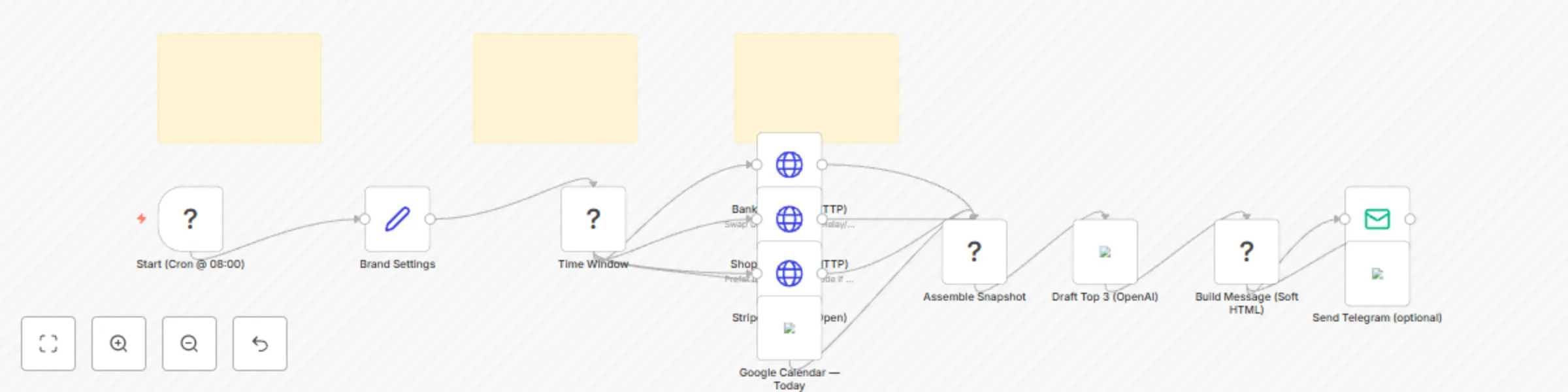
Pulls bank balances (Mercury/Relay/Plaid via HTTP)
Summarizes Shopify orders (last 24h)
Lists Stripe invoices (open/overdue)
Reads Google Calendar (today)
(Optional) Uses OpenAI to draft “Top 3 Priorities”
Sends a soft-styled morning email (+ optional Telegram)
🔐 Requirements
Bank API via HTTP (Mercury/Relay/Plaid)
Shopify Admin API
Stripe API
Google Calendar (OAuth2)
SMTP or Gmail
(Optional) Telegram Bot, OpenAI API
🧩 Placeholders to Update
YOUR_BANK_API_TOKEN
YOUR_SHOP (yourshop.myshopify.com)
YOUR_SHOPIFY_TOKEN
YOUR_STRIPE_SECRET
YOUR_FROM_EMAIL, YOUR_TO_EMAIL
YOUR_TELEGRAM_CHAT_ID (optional)
🛠️Setup (5–10 min)
Add credentials (HTTP Header Auth for Stripe/Shopify/Bank, Google Calendar OAuth2, SMTP/Gmail, optional Telegram, optional OpenAI).
Replace placeholders listed above.
Set the Cron to your preferred hour (default 08:00, local timezone).
Run once manually to confirm each section, then enable.
🔄 Flow (Node Map)
Cron (08:00) → Time Window → HTTP (Bank) + HTTP (Shopify) + HTTP (Stripe) + Google Calendar → Assemble Snapshot → (Optional) OpenAI “Top 3” → Build Message (soft HTML + text) → Email Send (+ optional Telegram)
🧪 Testing Tips
Temporarily set Cron to Every Minute.
Use Stripe test mode keys.
In Shopify, set created_at_min to a recent ISO time to force sample orders.
Add a dummy event to Google Calendar for today.
Check “Assemble Snapshot” output for metrics before sending.
🎨 Brand & Tone
This template includes a Brand Settings block (brandName, signature, accentEmoji) so your brief feels on-voice without edits to the logic.
✅ Template Notes
Use Sticky Notes for setup/testing (included).
No hardcoded API keys — store in credentials.
Keep Markdown headings (##) in this description.
Original use case; practical, production-ready.
🧯Failure Handling
Each data source is optional — if one API fails, the brief still sends the remaining sections so your morning stays calm.
This catalog entry is organized from the workflow JSON. The node-level section below shows the executable blocks available for review before importing the template.
| Workflow | 🌸 CFO sunrise — Soft-Tech morning brief for household CEOs (n8n template) |
|---|---|
| Complexity | advanced |
| Nodes | 15 |
| Categories | Personal Productivity |
| Author | Shelly-Ann Davy |
| Published | 02 Sept 2025 |
Use the JSON export at /data/workflows/8153/8153.json as the source template for this automation.
Open n8n, import the downloaded JSON, and review each node before activating the workflow.
Replace placeholder credentials, API keys, webhook URLs, account IDs, and environment-specific values with your own settings.
Run the workflow manually or in a staging workspace, inspect node output, and confirm downstream systems receive the expected data.
Enable the workflow only after testing, then monitor executions, errors, and rate limits during the first production runs.
Review imported nodes carefully before activation. This catalog entry is intended to help you inspect the workflow structure, understand required services, and find related templates faster.
Node names, credentials, schedules, webhook paths, and external service limits may need adjustment for your workspace.
Overview Serene CFO Sunrise is a gentle morning brief for Household CEOs — founders who run a business and a home. At 8:00 AM local time , it gathers bank balances, last 24h shop orders, open/ov...
Review the workflow JSON, configure any required credentials in n8n, and test the automation in a safe workspace before using it in production.
Yes. Use the block-by-block analysis and the downloadable JSON to inspect each node, then adjust credentials, prompts, schedules, filters, or destinations for your Personal Productivity use case.