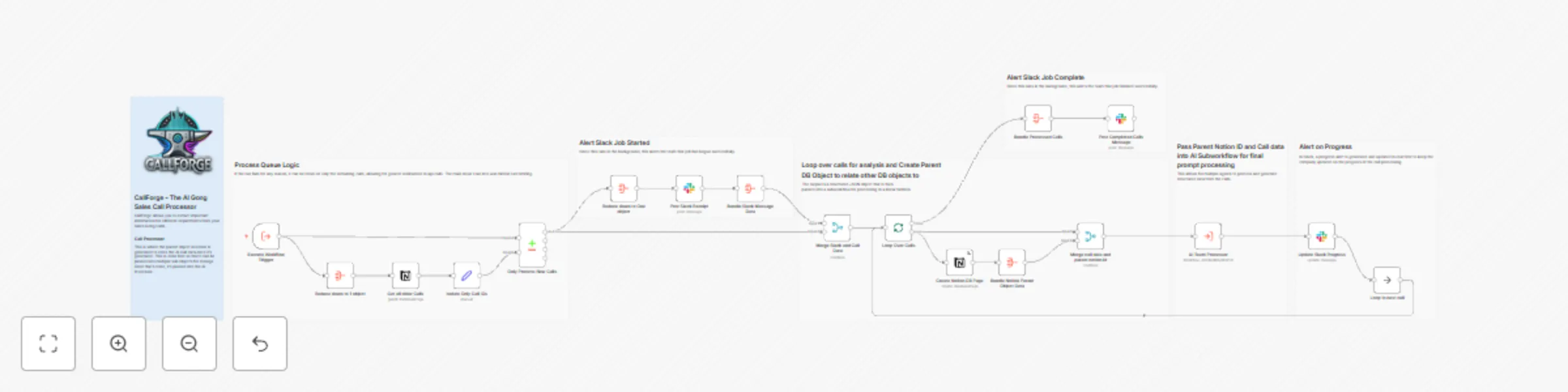
CallForge - 04 - AI workflow for Gong.io sales calls

Workflow preview

Workflow preview
100%
CallForge - 04 - AI workflow for Gong.io sales calls preview
Open on n8n.io

Important notice

This workflow is provided as-is. Please review and test before using in production.

1. Workflow Overview

CallForge AI Gong Sales Call Processing Workflow Automate your Gong.io sales call analysis with AI driven insights , real time tracking, and structured CRM i...

Best for

  • CRM automation workflows
  • AI Summarization automation workflows
  • advanced n8n builders looking for reusable templates

Tools used

n8n-nodes-base.noop, n8n-nodes-base.executeworkflowtrigger, n8n-nodes-base.notion, n8n-nodes-base.stickynote, n8n-nodes-base.slack, n8n-nodes-base.executeworkflow, n8n-nodes-base.merge, n8n-nodes-base.aggregate

Source and attribution

This workflow is cataloged by N8N Workflows and links back to its original n8n.io source page by Angel Menendez.

Original n8n.io source

1.1 Workflow description

Title
CallForge - 04 - AI workflow for Gong.io sales calls
Workflow name
CallForge - 04 - AI workflow for Gong.io sales calls


CallForge - AI Gong Sales Call Processing Workflow

Automate your Gong.io sales call analysis with AI-driven insights, real-time tracking, and structured CRM integration.

Who is This For?

This workflow is designed for:
Sales teams looking to automate sales call processing.
Revenue operations (RevOps) professionals managing high volumes of call data.
AI-driven sales intelligence teams using Gong.io for data-driven insights.

What Problem Does This Workflow Solve?

Manually managing and analyzing large volumes of Gong call data is time-consuming and error-prone.

With CallForge, you can:
Automate call processing to scale AI-driven insights.
Integrate with Notion to track and organize sales call data efficiently.
Get real-time Slack updates to stay informed on call processing progress.
Handle API failures gracefully, allowing easy reruns if a rate limit is hit.
Ensure AI-ready analysis, feeding structured call data into an AI-powered system.

What This Workflow Does

1. Triggers on New Gong Calls

  • Captures new Gong calls and retrieves metadata, call summaries, and participant details.

2. Compares Calls Against Notion Database

  • Checks whether the call has already been processed and stored in Notion.
  • Prevents duplicate entries from being added.

3. Creates a Parent Notion Record for AI Processing

  • Stores call details such as date, title, URL, company name, sales rep, and opportunity details in Notion.
  • Links calls to Salesforce Opportunity (SF Opp) data.
  • Assigns sales representatives and customer information to each call.

4. Loops Through Calls for Processing

  • Ensures resilience by allowing failed runs to restart where they left off.
  • Processes calls one at a time to prevent Notion rate limits.

5. Sends Call Data to an AI Processor

  • Extracts structured call details and sends them to an AI-powered analysis workflow.
  • Allows multiple AI agents to process and extract structured data from calls.

6. Provides Real-Time Slack Alerts

  • Posts a progress update in Slack when the queue starts processing.
  • Sends real-time call progress notifications.
  • Sends a completion alert once all calls are processed.

How to Set Up This Workflow

1. Connect Your APIs

🔹 Gong API Credentials – Ensure you have valid Gong API credentials in n8n.
🔹 Notion Database – Provide access to a Notion database for storing call insights.
🔹 Slack Integration – Configure a Slack channel for progress alerts.
🔹 AI Processing Workflow – Connect an AI-powered call processing workflow for final analysis.

How to Customize This Workflow

💡 Modify Call Storage – Swap Notion for a different CRM or database (e.g., HubSpot, Airtable, Salesforce).
💡 Change AI Processing – Integrate a custom AI model for analyzing sales conversations.
💡 Customize Slack Notifications – Adjust Slack messages or send alerts via email instead.
💡 Expand with More Integrations – Connect with Salesforce, Pipedrive, or HubSpot for further enrichment.

Why Use CallForge?

🚀 Automate Gong call tracking for seamless sales intelligence.
📊 Improve sales operations with structured, AI-powered insights.
Get real-time updates and keep your team informed instantly.

Start optimizing your Gong call processing today!

1.2 Logical Blocks

This catalog entry is organized from the workflow JSON. The node-level section below shows the executable blocks available for review before importing the template.

2. Block-by-Block Analysis

Block 1 - Loop to next call

Type / Role
n8n-nodes-base.noOp - noOp
Config choices
Version 1

Block 2 - Execute Workflow Trigger

Type / Role
n8n-nodes-base.executeWorkflowTrigger - executeWorkflowTrigger
Config choices
Version 1

Block 3 - Create Notion DB Page

Type / Role
n8n-nodes-base.notion - notion
Config choices
Version 2.2

Block 4 - Sticky Note

Type / Role
n8n-nodes-base.stickyNote - stickyNote
Config choices
Version 1

Block 5 - Sticky Note1

Type / Role
n8n-nodes-base.stickyNote - stickyNote
Config choices
Version 1

Block 6 - Sticky Note2

Type / Role
n8n-nodes-base.stickyNote - stickyNote
Config choices
Version 1

Block 7 - Sticky Note3

Type / Role
n8n-nodes-base.stickyNote - stickyNote
Config choices
Version 1

Block 8 - Sticky Note5

Type / Role
n8n-nodes-base.stickyNote - stickyNote
Config choices
Version 1

Block 9 - Sticky Note6

Type / Role
n8n-nodes-base.stickyNote - stickyNote
Config choices
Version 1

Block 10 - Sticky Note7

Type / Role
n8n-nodes-base.stickyNote - stickyNote
Config choices
Version 1

Block 11 - Post Slack Receipt

Type / Role
n8n-nodes-base.slack - slack
Config choices
Version 2.2

Block 12 - AI Team Processor

Type / Role
n8n-nodes-base.executeWorkflow - executeWorkflow
Config choices
Version 1.1

Block 13 - Update Slack Progress

Type / Role
n8n-nodes-base.slack - slack
Config choices
Version 2.2

Block 14 - Merge call data and parent notion id

Type / Role
n8n-nodes-base.merge - merge
Config choices
Version 3

Block 15 - Reduce down to 1 object

Type / Role
n8n-nodes-base.aggregate - aggregate
Config choices
Version 1

Block 16 - Get all older Calls

Type / Role
n8n-nodes-base.notion - notion
Config choices
Version 2.2

Block 17 - Isolate Only Call IDs

Type / Role
n8n-nodes-base.set - set
Config choices
Version 3.4

Block 18 - Only Process New Calls

Type / Role
n8n-nodes-base.compareDatasets - compareDatasets
Config choices
Version 2.3

Block 19 - Reduce down to One object

Type / Role
n8n-nodes-base.aggregate - aggregate
Config choices
Version 1

Block 20 - Bundle Slack Message Data

Type / Role
n8n-nodes-base.aggregate - aggregate
Config choices
Version 1

Block 21 - Merge Slack and Call Data

Type / Role
n8n-nodes-base.merge - merge
Config choices
Version 3

Block 22 - Loop Over Calls

Type / Role
n8n-nodes-base.splitInBatches - splitInBatches
Config choices
Version 3

Block 23 - Bundle Notion Parent Object Data

Type / Role
n8n-nodes-base.aggregate - aggregate
Config choices
Version 1

Block 24 - Bundle Processed Calls

Type / Role
n8n-nodes-base.aggregate - aggregate
Config choices
Version 1

Showing the first 24 of 25 workflow blocks. Download the JSON for the full node graph.

3. Summary Table

Workflow CallForge - 04 - AI workflow for Gong.io sales calls
Complexity advanced
Nodes 25
Categories CRM, AI Summarization
Author Angel Menendez
Published 28 Feb 2025

4. Reproducing the Workflow from Scratch

  1. 1. Download the workflow JSON

    Use the JSON export at /data/workflows/3034/3034.json as the source template for this automation.

  2. 2. Import the template into n8n

    Open n8n, import the downloaded JSON, and review each node before activating the workflow.

  3. 3. Configure credentials and variables

    Replace placeholder credentials, API keys, webhook URLs, account IDs, and environment-specific values with your own settings.

  4. 4. Test with sample data

    Run the workflow manually or in a staging workspace, inspect node output, and confirm downstream systems receive the expected data.

  5. 5. Activate and monitor

    Enable the workflow only after testing, then monitor executions, errors, and rate limits during the first production runs.

5. General Notes & Resources

Review imported nodes carefully before activation. This catalog entry is intended to help you inspect the workflow structure, understand required services, and find related templates faster.

Node names, credentials, schedules, webhook paths, and external service limits may need adjustment for your workspace.

Frequently asked questions

What does CallForge - 04 - AI workflow for Gong.io sales calls do?

CallForge AI Gong Sales Call Processing Workflow Automate your Gong.io sales call analysis with AI driven insights , real time tracking, and structured CRM i...

What do I need before importing this workflow?

Review the workflow JSON, configure any required credentials in n8n, and test the automation in a safe workspace before using it in production.

Can I customize this workflow?

Yes. Use the block-by-block analysis and the downloadable JSON to inspect each node, then adjust credentials, prompts, schedules, filters, or destinations for your CRM, AI Summarization use case.