Block 1 - Execute Workflow Trigger
- Type / Role
- n8n-nodes-base.executeWorkflowTrigger - executeWorkflowTrigger
- Config choices
- Version 1


 Early Deal
This workflow is provided as-is. Please review and test before using in production.
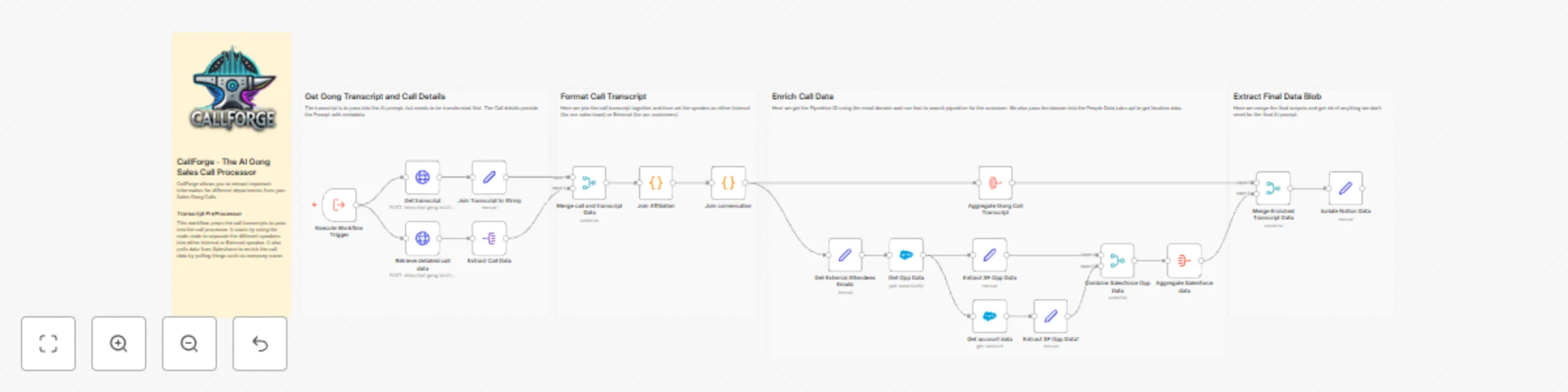
CallForge AI Gong Transcript PreProcessor Transform your Gong.io call transcripts into structured, enriched, and AI ready data for better sales insights and ...
n8n-nodes-base.executeworkflowtrigger, n8n-nodes-base.httprequest, n8n-nodes-base.set, n8n-nodes-base.code, n8n-nodes-base.stickynote, n8n-nodes-base.salesforce, n8n-nodes-base.splitout, n8n-nodes-base.merge
This workflow is cataloged by N8N Workflows and links back to its original n8n.io source page by Angel Menendez.
Original n8n.io sourceTransform your Gong.io call transcripts into structured, enriched, and AI-ready data for better sales insights and analytics.
This workflow is designed for:
✅ Sales teams looking to automate call transcript formatting.
✅ Revenue operations (RevOps) professionals optimizing AI-driven insights.
✅ Businesses using Gong.io that need structured, enriched call transcripts for better decision-making.
Manually processing raw Gong call transcripts is inefficient and often lacks essential context for AI-driven insights.
With CallForge, you can:
✔ Extract and format Gong call transcripts for structured AI processing.
✔ Enhance metadata using sales data from Salesforce.
✔ Classify speakers as internal (sales team) or external (customers).
✔ Identify external companies by filtering out free email domains (e.g., Gmail, Yahoo).
✔ Enrich customer profiles using PeopleDataLabs to identify company details and locations.
✔ Prepare transcripts for AI models by structuring conversations and removing unnecessary noise.
🔹 Gong API Access – Set up your Gong API credentials in n8n.
🔹 Salesforce Setup – Ensure API access if you want customer enrichment.
🔹 PeopleDataLabs API – Required to retrieve company and location details based on email domains.
🔹 Webhook Integration – Modify the webhook call to push enriched call data to an internal system.
💡 Modify Data Sources – Connect different CRMs (e.g., HubSpot, Zoho) instead of Salesforce.
💡 Expand AI Analysis – Add another AI model (e.g., OpenAI GPT, Claude) for advanced conversation insights.
💡 Change Speaker Classification Rules – Adjust internal vs. external speaker logic to match your team’s structure.
💡 Filter Specific Customers – Modify the free email filtering logic to better fit your company’s needs.
🚀 Automate Gong call transcript processing to save time.
📊 Improve AI accuracy with enriched, structured data.
🛠 Enhance sales strategy by extracting actionable insights from calls.
Start optimizing your Gong transcript analysis today!
This catalog entry is organized from the workflow JSON. The node-level section below shows the executable blocks available for review before importing the template.
| Workflow | CallForge - 03 - Gong transcript processor and Salesforce enricher |
|---|---|
| Complexity | advanced |
| Nodes | 23 |
| Categories | CRM, AI Summarization |
| Author | Angel Menendez |
| Published | 28 Feb 2025 |
Use the JSON export at /data/workflows/3033/3033.json as the source template for this automation.
Open n8n, import the downloaded JSON, and review each node before activating the workflow.
Replace placeholder credentials, API keys, webhook URLs, account IDs, and environment-specific values with your own settings.
Run the workflow manually or in a staging workspace, inspect node output, and confirm downstream systems receive the expected data.
Enable the workflow only after testing, then monitor executions, errors, and rate limits during the first production runs.
Review imported nodes carefully before activation. This catalog entry is intended to help you inspect the workflow structure, understand required services, and find related templates faster.
Node names, credentials, schedules, webhook paths, and external service limits may need adjustment for your workspace.
CallForge AI Gong Transcript PreProcessor Transform your Gong.io call transcripts into structured, enriched, and AI ready data for better sales insights and ...
Review the workflow JSON, configure any required credentials in n8n, and test the automation in a safe workspace before using it in production.
Yes. Use the block-by-block analysis and the downloadable JSON to inspect each node, then adjust credentials, prompts, schedules, filters, or destinations for your CRM, AI Summarization use case.