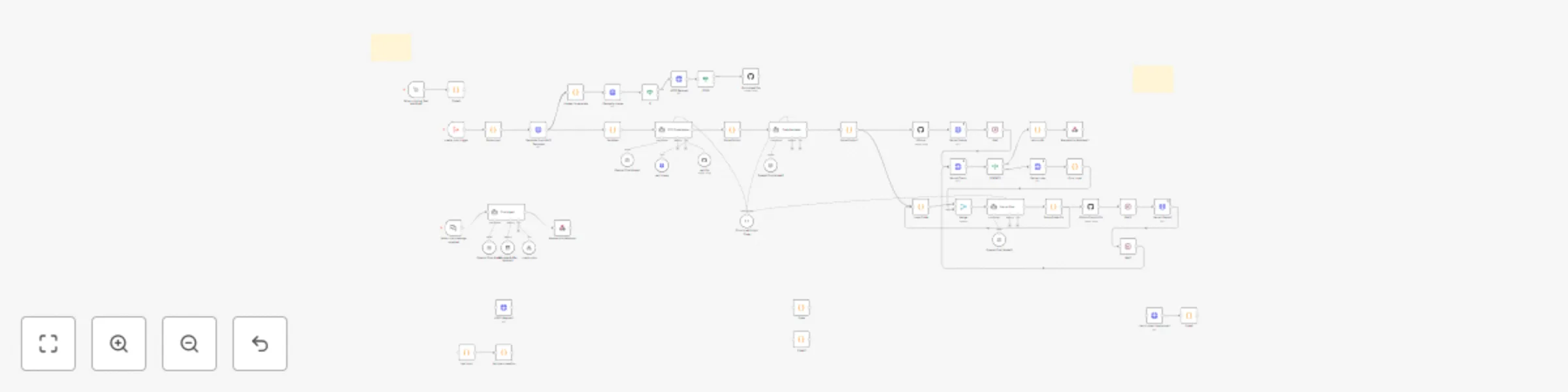
Build & deploy MVPs from text prompts with AI, GitHub & Vercel

Workflow preview

Workflow preview
100%
Build & deploy MVPs from text prompts with AI, GitHub & Vercel preview
Open on n8n.io

Important notice

This workflow is provided as-is. Please review and test before using in production.

1. Workflow Overview

Instant MVP Builder Idea, Build, and Deploy — in Minutes, with AI by Varritech Technologies ️ What Is It? Instant MVP Builder is a plug and play n8n workflow that takes a plain English app idea...

Best for

  • DevOps automation workflows
  • Multimodal AI automation workflows
  • advanced n8n builders looking for reusable templates

Tools used

@n8n/n8n-nodes-langchain.chattrigger, @n8n/n8n-nodes-langchain.agent, @n8n/n8n-nodes-langchain.lmchatopenai, @n8n/n8n-nodes-langchain.memorybufferwindow, n8n-nodes-base.respondtowebhook, n8n-nodes-base.httprequest, @n8n/n8n-nodes-langchain.toolworkflow, n8n-nodes-base.executeworkflowtrigger

Source and attribution

This workflow is cataloged by N8N Workflows and links back to its original n8n.io source page by Varritech.

Original n8n.io source

1.1 Workflow description

Title
Build & deploy MVPs from text prompts with AI, GitHub & Vercel
Workflow name
Build & deploy MVPs from text prompts with AI, GitHub & Vercel

⚡ Instant MVP Builder

Idea, Build, and Deploy — in Minutes, with AI

by Varritech Technologies


🏗️ What Is It?

Instant MVP Builder is a plug-and-play n8n workflow that takes a plain-English app idea and turns it into a fully deployed web application — without writing a single line of code.

Designed for founders, solopreneurs, and agencies, this system uses AI agents, GitHub, and Vercel to automatically:

  • Analyze and structure the app idea
  • Generate source code with GPT
  • Deploy a live frontend to the web

🧠 How It Works

  1. Webhook Trigger
    Accepts a chat message or form input with a basic app idea.

  2. AI Prompt Agent (Langchain)
    Turns the message into structured specs (name, features, stack, etc).

  3. Code Generator Agent (OpenAI)
    Writes frontend code (React) tailored to the app spec.

  4. GitHub Integration
    Creates a new repo from a starter template and pushes the code.

  5. Vercel Deployment
    Deploys the app and returns a public URL — all automatically.


🔧 Built With

  • n8n – Automation engine for flow orchestration
  • Langchain + OpenAI – For AI-powered prompt and code creation
  • GitHub API – To manage repositories
  • Vercel API – For instant frontend deployment
  • JavaScript – For logic and parsing

🎯 Use Cases

  • 🚀 Startup MVP generation
  • 🧪 Hackathon-ready app builds
  • 🎨 Client landing page creation
  • 📦 Internal tool prototypes
  • 💡 “Idea-to-product” workflows

🟨 What Makes It Special?

  • 🧠 AI-generated code, not templates
  • ⚙️ Fully automated from input to deploy
  • 🌍 Public app URL in minutes
  • 🧩 Easily customizable: edit prompts, swap repo, or deploy elsewhere
  • 🧱 Includes built-in sticky notes + Notion setup guide

🛠️ What’s Included

  • ✅ Cleaned, import-ready .json file for n8n
  • Notion setup guide
  • ✅ In-flow sticky notes describing every node
  • ✅ No hardcoded secrets — ready for your credentials
  • ✅ Lifetime access & updates for personal use

📄 License

This workflow is licensed for single-business or internal use.

Need something more? We offer:

  • 🤝 Resell licenses for agencies
  • 🌟 White-label customization
  • 🔧 Prompt tuning or backend extensions

👋 About Varritech

Varritech Technologies is an AI-first development agency helping businesses go from idea to production 5× faster. We specialize in building autonomous engineering workflows, onboarding systems, sales funnels, and internal tools — all powered by modern AI.

📬 [email protected]
🌐 varritech.com


Build smarter. Launch faster. Automate everything.
With Instant MVP Builder, your next app idea doesn’t need a dev — just a trigger.


1.2 Logical Blocks

This catalog entry is organized from the workflow JSON. The node-level section below shows the executable blocks available for review before importing the template.

2. Block-by-Block Analysis

Block 1 - When chat message received

Type / Role
@n8n/n8n-nodes-langchain.chatTrigger - chatTrigger
Config choices
Version 1.1

Block 2 - Chat Agent

Type / Role
@n8n/n8n-nodes-langchain.agent - agent
Config choices
Version 1.6

Block 3 - OpenAI Chat Model

Type / Role
@n8n/n8n-nodes-langchain.lmChatOpenAi - lmChatOpenAi
Config choices
Version 1

Block 4 - Window Buffer Memory

Type / Role
@n8n/n8n-nodes-langchain.memoryBufferWindow - memoryBufferWindow
Config choices
Version 1.2

Block 5 - Respond to Webhook

Type / Role
n8n-nodes-base.respondToWebhook - respondToWebhook
Config choices
Version 1.1

Block 6 - Generate From MVP Template

Type / Role
n8n-nodes-base.httpRequest - httpRequest
Config choices
Version 4.2

Block 7 - create_mvp

Type / Role
@n8n/n8n-nodes-langchain.toolWorkflow - toolWorkflow
Config choices
Version 2.1

Block 8 - create_mvp trigger

Type / Role
n8n-nodes-base.executeWorkflowTrigger - executeWorkflowTrigger
Config choices
Version 1.1

Block 9 - Parse Input

Type / Role
n8n-nodes-base.code - code
Config choices
Version 2

Block 10 - When clicking ‘Test workflow’

Type / Role
n8n-nodes-base.manualTrigger - manualTrigger
Config choices
Version 1

Block 11 - test input

Type / Role
n8n-nodes-base.code - code
Config choices
Version 2

Block 12 - test pos-creaetion

Type / Role
n8n-nodes-base.code - code
Config choices
Version 2

Block 13 - TDD Code Maker

Type / Role
@n8n/n8n-nodes-langchain.agent - agent
Config choices
Version 1.8

Block 14 - OpenAI Chat Model1

Type / Role
@n8n/n8n-nodes-langchain.lmChatOpenAi - lmChatOpenAi
Config choices
Version 1.2

Block 15 - Structured Output Code

Type / Role
@n8n/n8n-nodes-langchain.outputParserStructured - outputParserStructured
Config choices
Version 1.2

Block 16 - get_file

Type / Role
n8n-nodes-base.githubTool - githubTool
Config choices
Version 1

Block 17 - Variables

Type / Role
n8n-nodes-base.code - code
Config choices
Version 2

Block 18 - Parse Output

Type / Role
n8n-nodes-base.code - code
Config choices
Version 2

Block 19 - GitHub

Type / Role
n8n-nodes-base.github - github
Config choices
Version 1

Block 20 - HTTP Request1

Type / Role
n8n-nodes-base.httpRequest - httpRequest
Config choices
Version 4.2

Block 21 - get_image

Type / Role
@n8n/n8n-nodes-langchain.toolHttpRequest - toolHttpRequest
Config choices
Version 1.1

Block 22 - Code

Type / Role
n8n-nodes-base.code - code
Config choices
Version 2

Block 23 - Vercel Deploy

Type / Role
n8n-nodes-base.httpRequest - httpRequest
Config choices
Version 4.2

Block 24 - return URL

Type / Role
n8n-nodes-base.code - code
Config choices
Version 2

Showing the first 24 of 54 workflow blocks. Download the JSON for the full node graph.

3. Summary Table

Workflow Build & deploy MVPs from text prompts with AI, GitHub & Vercel
Complexity advanced
Nodes 54
Categories DevOps, Multimodal AI
Author Varritech
Published 19 Jul 2025

4. Reproducing the Workflow from Scratch

  1. 1. Download the workflow JSON

    Use the JSON export at /data/workflows/6164/6164.json as the source template for this automation.

  2. 2. Import the template into n8n

    Open n8n, import the downloaded JSON, and review each node before activating the workflow.

  3. 3. Configure credentials and variables

    Replace placeholder credentials, API keys, webhook URLs, account IDs, and environment-specific values with your own settings.

  4. 4. Test with sample data

    Run the workflow manually or in a staging workspace, inspect node output, and confirm downstream systems receive the expected data.

  5. 5. Activate and monitor

    Enable the workflow only after testing, then monitor executions, errors, and rate limits during the first production runs.

5. General Notes & Resources

Review imported nodes carefully before activation. This catalog entry is intended to help you inspect the workflow structure, understand required services, and find related templates faster.

Node names, credentials, schedules, webhook paths, and external service limits may need adjustment for your workspace.

Frequently asked questions

What does Build & deploy MVPs from text prompts with AI, GitHub & Vercel do?

Instant MVP Builder Idea, Build, and Deploy — in Minutes, with AI by Varritech Technologies ️ What Is It? Instant MVP Builder is a plug and play n8n workflow that takes a plain English app idea...

What do I need before importing this workflow?

Review the workflow JSON, configure any required credentials in n8n, and test the automation in a safe workspace before using it in production.

Can I customize this workflow?

Yes. Use the block-by-block analysis and the downloadable JSON to inspect each node, then adjust credentials, prompts, schedules, filters, or destinations for your DevOps, Multimodal AI use case.