Block 1 - Knowledge Base Info
- Type / Role
- n8n-nodes-base.stickyNote - stickyNote
- Config choices
- Version 1


 Early Deal
This workflow is provided as-is. Please review and test before using in production.
This workflow contains community nodes that are only compatible with the self hosted version of n8n. Transform Research Papers into a Searchable Knowledge Graph This workflow automatically builds a...
n8n-nodes-base.stickynote, n8n-nodes-base.scheduletrigger, n8n-nodes-pdfvector.pdfvector, n8n-nodes-base.openai, n8n-nodes-base.code, n8n-nodes-base.neo4j, n8n-nodes-base.postgres
This workflow is cataloged by N8N Workflows and links back to its original n8n.io source page by PDF Vector.
Original n8n.io sourceThis workflow contains community nodes that are only compatible with the self-hosted version of n8n.
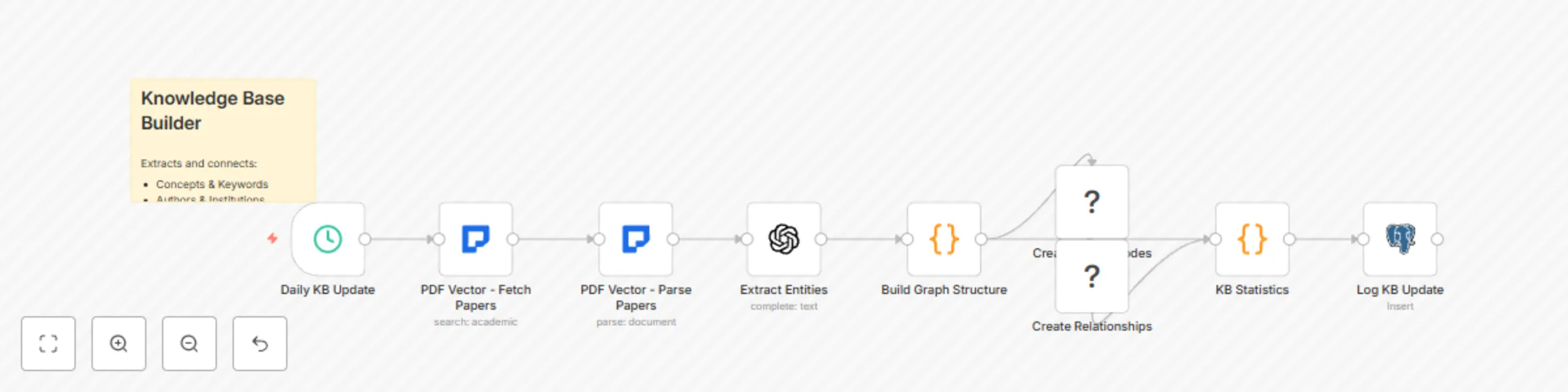
This workflow automatically builds and maintains a comprehensive knowledge graph from academic papers, enabling researchers to discover connections between concepts, track research evolution, and perform semantic searches across their field of study. By combining PDF Vector's paper parsing capabilities with GPT-4's entity extraction and Neo4j's graph database, this template creates a powerful research discovery tool.
This template is designed for:
It solves the problem of information silos in academic research by automatically extracting and connecting key concepts, methods, authors, and findings across thousands of papers.
Configure PDF Vector Credentials
Set Up Neo4j Database
CREATE CONSTRAINT paper_id IF NOT EXISTS ON (p:Paper) ASSERT p.id IS UNIQUE;
CREATE CONSTRAINT author_name IF NOT EXISTS ON (a:Author) ASSERT a.name IS UNIQUE;
CREATE CONSTRAINT concept_name IF NOT EXISTS ON (c:Concept) ASSERT c.name IS UNIQUE;
Configure OpenAI Integration
Import and Configure the Workflow
Test with Sample Papers
The workflow operates in several stages:
Adjusting Entity Types: Edit the GPT-4 prompt in the "Extract Entities" node to include domain-specific entities:
// Add custom entity types like:
// - Algorithms
// - Datasets
// - Institutions
// - Funding sources
Modifying Relationship Types: Extend the "Build Graph Structure" node to create custom relationships:
// Examples:
// COLLABORATES_WITH (between authors)
// EXTENDS (between papers)
// FUNDED_BY (paper to funding source)
Changing Search Scope:
Scaling Considerations:
This catalog entry is organized from the workflow JSON. The node-level section below shows the executable blocks available for review before importing the template.
| Workflow | Build academic knowledge graph from research papers with PDF vector, GPT-4 and Neo4j |
|---|---|
| Complexity | intermediate |
| Nodes | 10 |
| Categories | AI RAG, Multimodal AI |
| Author | PDF Vector |
| Published | 14 Aug 2025 |
Use the JSON export at /data/workflows/7362/7362.json as the source template for this automation.
Open n8n, import the downloaded JSON, and review each node before activating the workflow.
Replace placeholder credentials, API keys, webhook URLs, account IDs, and environment-specific values with your own settings.
Run the workflow manually or in a staging workspace, inspect node output, and confirm downstream systems receive the expected data.
Enable the workflow only after testing, then monitor executions, errors, and rate limits during the first production runs.
Review imported nodes carefully before activation. This catalog entry is intended to help you inspect the workflow structure, understand required services, and find related templates faster.
Node names, credentials, schedules, webhook paths, and external service limits may need adjustment for your workspace.
This workflow contains community nodes that are only compatible with the self hosted version of n8n. Transform Research Papers into a Searchable Knowledge Graph This workflow automatically builds a...
Review the workflow JSON, configure any required credentials in n8n, and test the automation in a safe workspace before using it in production.
Yes. Use the block-by-block analysis and the downloadable JSON to inspect each node, then adjust credentials, prompts, schedules, filters, or destinations for your AI RAG, Multimodal AI use case.