Block 1 - Webhook
- Type / Role
- n8n-nodes-base.webhook - webhook
- Config choices
- Version 2


 Early Deal
This workflow is provided as-is. Please review and test before using in production.
Idea The idea for app came since I wanted to build a unique gift for my niece because she gets excited for her birthday (which Im going to miss this year). The web app has a simple countdown (in ht...
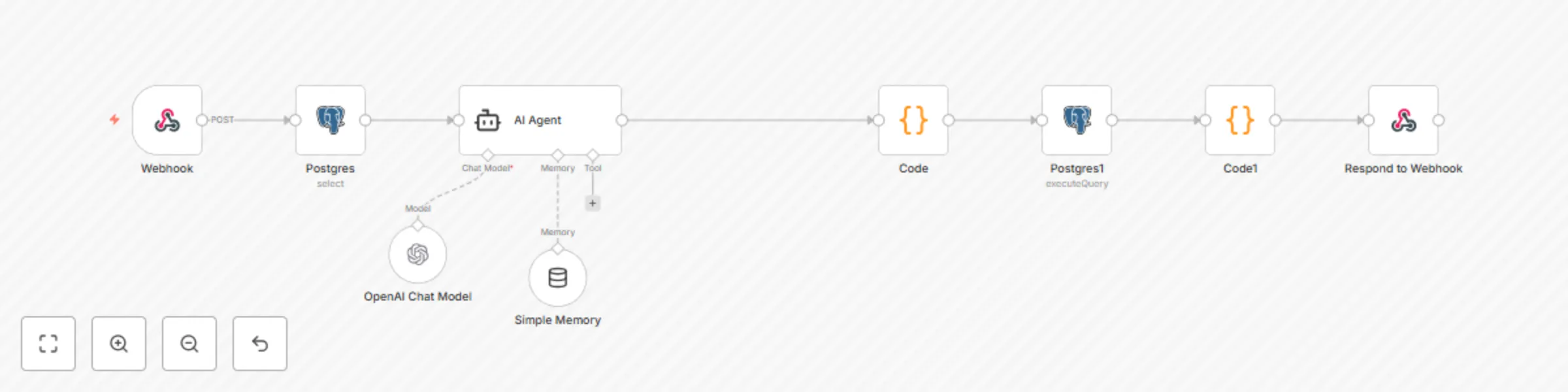
n8n-nodes-base.webhook, n8n-nodes-base.respondtowebhook, @n8n/n8n-nodes-langchain.agent, @n8n/n8n-nodes-langchain.lmchatopenai, n8n-nodes-base.postgres, n8n-nodes-base.code, @n8n/n8n-nodes-langchain.memorybufferwindow
This workflow is cataloged by N8N Workflows and links back to its original n8n.io source page by Praveena.
Original n8n.io sourceThe idea for app came since I wanted to build a unique gift for my niece because she gets excited for her birthday (which Im going to miss this year). The web app has a simple countdown (in html and JS) but more importantly, there is an AI agent that will answer some specific questions and know her preferences.
The questions from app are sent via web hook to N8N which has pulls preferences file (about her likes, dislikes, personality) from postgre and AI Agent that will answer questions/respond. The current status is stored back in postgre (especially about status of cat and universe happenings) before responding back.
CREATE TABLE fifi_world_context (
    id TEXT PRIMARY KEY, -- e.g., 'agent_fifi'

    cat_location TEXT,        -- e.g., "Bubble Nebula"
    cat_activity TEXT,        -- e.g., "Playing laser tag with moon mice"

    fifi_preferences JSONB,   -- e.g., likes/dislikes/foods/shows
    world_history TEXT,       -- Summary of narrative events

    last_updated TIMESTAMP DEFAULT CURRENT_TIMESTAMP
);
5.Modify system prompt as per your needs.
N8N Self hosted Self hosted web app Hosted on Vercel Total spend = <£1 (AI costs only) Total Time = <1 day
Watch this video for web app overview and how it looks. <https://youtu.be/e7PlrTdvwoM>
Contact me on [email protected]/ [email protected] for any queries
Hope you enjoy!!
This catalog entry is organized from the workflow JSON. The node-level section below shows the executable blocks available for review before importing the template.
| Workflow | Build a personalized birthday AI companion with GPT-4 and PostgreSQL |
|---|---|
| Complexity | intermediate |
| Nodes | 9 |
| Categories | Personal Productivity, AI Chatbot |
| Author | Praveena |
| Published | 06 Jul 2025 |
Use the JSON export at /data/workflows/5721/5721.json as the source template for this automation.
Open n8n, import the downloaded JSON, and review each node before activating the workflow.
Replace placeholder credentials, API keys, webhook URLs, account IDs, and environment-specific values with your own settings.
Run the workflow manually or in a staging workspace, inspect node output, and confirm downstream systems receive the expected data.
Enable the workflow only after testing, then monitor executions, errors, and rate limits during the first production runs.
Review imported nodes carefully before activation. This catalog entry is intended to help you inspect the workflow structure, understand required services, and find related templates faster.
Node names, credentials, schedules, webhook paths, and external service limits may need adjustment for your workspace.
Idea The idea for app came since I wanted to build a unique gift for my niece because she gets excited for her birthday (which Im going to miss this year). The web app has a simple countdown (in ht...
Review the workflow JSON, configure any required credentials in n8n, and test the automation in a safe workspace before using it in production.
Yes. Use the block-by-block analysis and the downloadable JSON to inspect each node, then adjust credentials, prompts, schedules, filters, or destinations for your Personal Productivity, AI Chatbot use case.