Praveena
Workflows by Praveena
Build a personalized birthday AI companion with GPT-4 and PostgreSQL
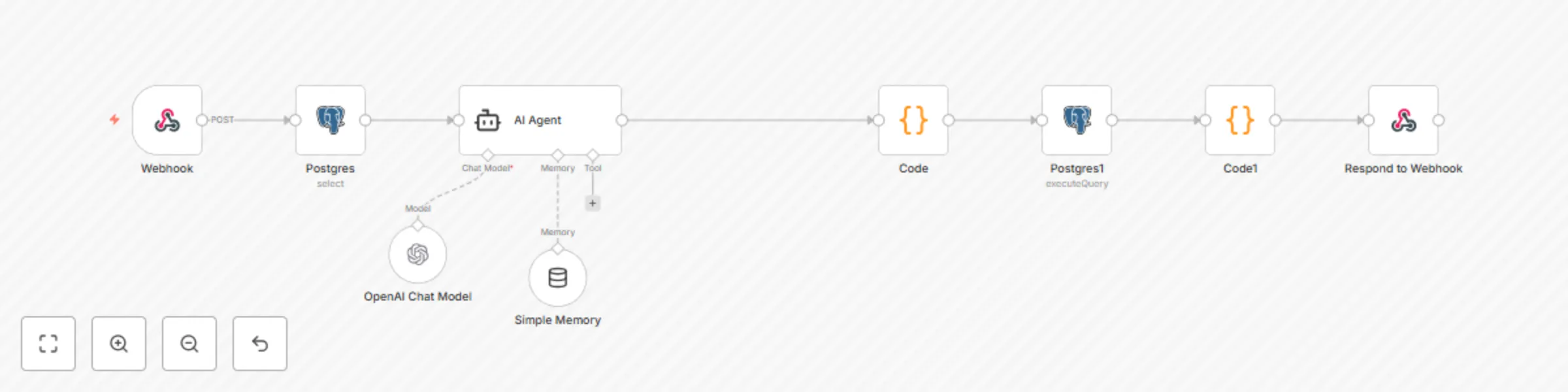
# Idea The idea for app came since I wanted to build a unique gift for my niece because she gets excited for her birthday (which Im going to miss this year). The web app has a simple countdown (in html and JS) but more importantly, there is an AI agent that will answer some specific questions and know her preferences. ## How it works The questions from app are sent via web hook to N8N which has pulls preferences file (about her likes, dislikes, personality) from postgre and AI Agent that will answer questions/respond. The current status is stored back in postgre (especially about status of cat and universe happenings) before responding back. ## Features - Integrated AI chatbot via N8N webhook - Persistent conversation history - Minimizable chat interface - Fallback support for offline testing - Features: -- Wheres Mittens - This is a query to track her lost cat in multiverse. -- Multiverse updates with recent update stored ## Pre Requisites - Postgre SQL database is available. Alternatively, use any other database but change the N8N nodes. - LLM Api Key. ## Step by Step Instructions 1. Export this N8N Workflow. 2. Modify LLM API Key, I used openAI, 4.1 3. For web app scofflding,you will need Node, HTML and Javascript. I've created a mini version using Node and JS with web app and N8N connection settings here: <https://github.com/productiser/FiBirthdayAgent> 4. PostgreSQL Database Script (1 table for memory and context storage): ``` CREATE TABLE fifi_world_context ( id TEXT PRIMARY KEY, -- e.g., 'agent_fifi' cat_location TEXT, -- e.g., "Bubble Nebula" cat_activity TEXT, -- e.g., "Playing laser tag with moon mice" fifi_preferences JSONB, -- e.g., likes/dislikes/foods/shows world_history TEXT, -- Summary of narrative events last_updated TIMESTAMP DEFAULT CURRENT_TIMESTAMP ); ``` 5.Modify system prompt as per your needs. ### Built With N8N Self hosted Self hosted web app Hosted on Vercel Total spend = <£1 (AI costs only) Total Time = <1 day ### Support Watch this video for web app overview and how it looks. <https://youtu.be/e7PlrTdvwoM> Contact me on [email protected]/ [email protected] for any queries Hope you enjoy!!
Complete lesson automation for modern UK teachers
# Why Teachers now spend 3-4 hours per lesson creating materials and resources from scratch. With additional/special needs, this makes it difficult to create additional materials. This is unsustainable and takes their time away from teaching. Tailored for UK teachers but can be expanded globally with prompt and form enhancements. ## How it works I built a system with three specialized AI agents that create complete lesson packages and automatically uploads a document in Google drive and puts an appointment in calendar to review the document. ### Features 1. Research agent to pull specific information including special education needs and curriculums. 2. The scoring and assessment agent to generate tailored assessment plans, assignments, grading mechanism based on chosen requirements. 3. The integration agent just provides ideas to expand to other tools. In nfuture there is opportunity to add on Kahoot or other tools to create quizzes. 4. Finally the enriched document is emailed and a calendar invite is sent for review. ## What you need N8N Any LLM API Key (I used OpenAI) Google drive integration Google calendar integration Modify the email id from [email protected] to your Email id in email component. ## Support Watch this video for intro on how it works. Contact me on [email protected] for any queries.
Monitor elderly health vitals & send alerts with Apple Health, Twilio & Gmail
# What is Elderwatch Elder Watch is a simple system that checks daily vitals — like heart rate, oxygen, and walking symmetry — using data from an iPhone or Apple Watch. If something looks off — say oxygen drops or heart rate spikes — it flags that as “attention required.” And depending on that status, it can either: Email a daily report to a caregiver Or if there’s an alert — trigger a phone call via Twilio ## Why do we need this Elder Watch can help older people living alone for children or care givers to keey an eye on without obsessively checking apps. It’s useful for clinics that run home-care programs. ## Requirements 1. Self hosted or cloud N8N 2. Apple health vis iphone/watch 3. Twilio VOIP phone number (to place a call) ### Workflows 1. Core workflow for getting health data, processing and making a phone call. 2. Twilio workflow to invoke Calls API to place an outbound voice call. ### twilio workflow ```json { "name": "Twilio Bridge Caller copy", "nodes": [ { "parameters": { "httpMethod": "POST", "path": "twilio-call", "responseMode": "responseNode", "options": {} }, "type": "n8n-nodes-base.webhook", "typeVersion": 2, "position": [ 0, 0 ], "id": "ca3e6c69-3e7f-4d28-b699-4789a6fa2a6d", "name": "Webhook", "webhookId": "eb3d63df-800c-401d-931a-c6fba7d834ae" }, { "parameters": { "respondWith": "text", "responseBody": "={{ $json.body }}", "options": { "responseCode": 200, "responseHeaders": { "entries": [ { "name": "Content-Type", "value": "text/xml" } ] } } }, "type": "n8n-nodes-base.respondToWebhook", "typeVersion": 1.1, "position": [ 580, 0 ], "id": "6587b7e2-ace8-4e2b-9f4b-ed028a363c25", "name": "Respond to Webhook" }, { "parameters": { "jsCode": "const summary = $input.first().json.query.summary || 'No summary, check mail for critical health info';\n\nreturn [\n {\n json: {\n body: `<Response>\n <Say voice=\"alice\">${summary}</Say>\n</Response>`\n }\n }\n];\n" }, "type": "n8n-nodes-base.code", "typeVersion": 2, "position": [ 340, 0 ], "id": "0d4abf87-daf3-4533-8811-64ae61265f5d", "name": "Voice Twilio response" } ], "pinData": { "Webhook": [ { "json": { "headers": { "host": "n8n.domain.com", "user-agent": "curl/8.7.1", "content-length": "0", "accept": "*/*", "accept-encoding": "gzip, br" }, "params": {}, "query": { "lead": " 44711111111111" }, "body": {}, "webhookUrl": "https://n8n.domain.com/webhook/twilio-call", "executionMode": "production" } } ] }, "connections": { "Webhook": { "main": [ [ { "node": "Voice Twilio response", "type": "main", "index": 0 } ] ] }, "Voice Twilio response": { "main": [ [ { "node": "Respond to Webhook", "type": "main", "index": 0 } ] ] } }, "active": true, "settings": { "executionOrder": "v1" }, "versionId": "b58c5a12-75be-4b1d-b144-8c7251468021", "meta": { "instanceId": "8dc0e8a0878d0086b2f46ef04bb00ae07186c936d82d0f0a67563e9652996d33" }, "id": "RHaKqf8Wqt7fIuGH", "tags": [] } ``` ### Samples   ## Resources https://www.youtube.com/watch?v=HYk5_jtMlgc ## Questions/Support Contact me on [email protected].
Switch between work and personal contexts with GPT-4.1 and iPhone automation
## Purpose The purpose of this automation is to help context switch from office to some side projects or passion gigs so you can be free of distracting thoughts and re-set your perspective. ## Benefits Anyone who works full time and also does something on the side (perhaps a side gig/being a mom/just follow your passion project) ## What you need 1. N8N (lol) 2. Any LLM API Key (I used OpenAI 4.1) 3. IPhone (automations and shortcuts) ## Template Setup 1. Setup LLM API key. 2. Import template file to new workflow. 3. On Iphone create a new shortcut as per video. 4. Create automation steps. ## Resources [Youtube](https://youtube.com/shorts/m9L76nGDV_c?feature=share )