Boost sales: Convert product photos into 360° videos instantly

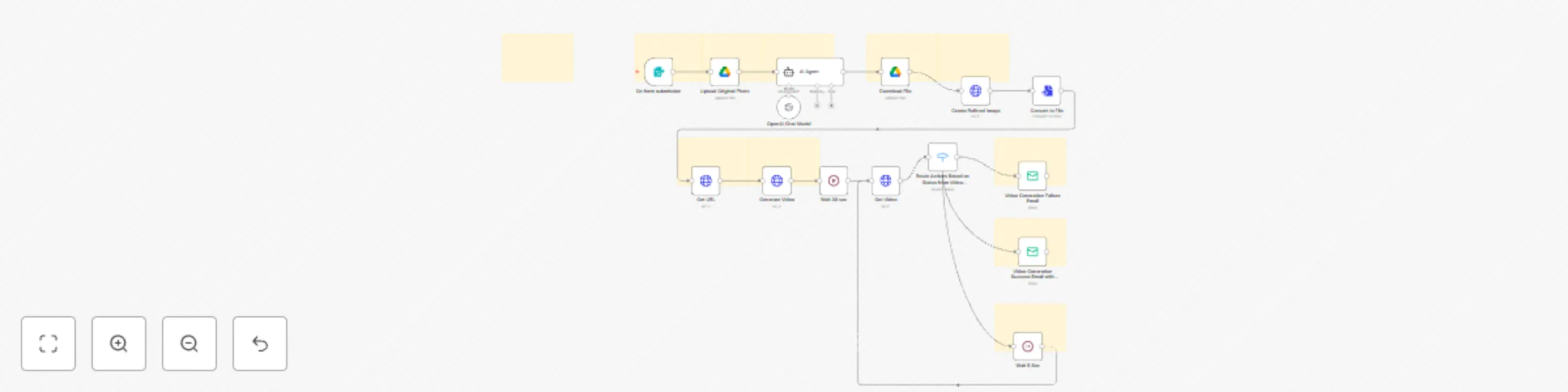
Workflow preview

Workflow preview
100%
Boost sales: Convert product photos into 360° videos instantly preview
Open on n8n.io

Important notice

This workflow is provided as-is. Please review and test before using in production.

1. Workflow Overview

Transform Product Images into Stunning 360° Videos with AI (OpenAI + RunwayML Workflow) Turn static product photos into eye catching 360° rotating product videos —fully automated with AI. Perfect f...

Best for

  • Content Creation automation workflows
  • Multimodal AI automation workflows
  • advanced n8n builders looking for reusable templates

Tools used

n8n-nodes-base.formtrigger, n8n-nodes-base.googledrive, @n8n/n8n-nodes-langchain.agent, @n8n/n8n-nodes-langchain.lmchatopenai, n8n-nodes-base.converttofile, n8n-nodes-base.httprequest, n8n-nodes-base.wait, n8n-nodes-base.stickynote

Source and attribution

This workflow is cataloged by N8N Workflows and links back to its original n8n.io source page by Aayushman Sharma.

Original n8n.io source

1.1 Workflow description

Title
Boost sales: Convert product photos into 360° videos instantly
Workflow name
Boost sales: Convert product photos into 360° videos instantly

Transform Product Images into Stunning 360° Videos with AI (OpenAI + RunwayML Workflow)

Turn static product photos into eye-catching 360° rotating product videos—fully automated with AI.
Perfect for Shopify, WooCommerce, Amazon sellers, digital marketers, and content creators looking to boost engagement, increase conversions, and stand out online.


Why This Workflow is a Game-Changer

With this AI-powered product video automation, you can:

  • Convert simple product shots into premium, studio-quality videos—no expensive gear or editing required.
  • Speed up your product media pipeline from hours to minutes.
  • Boost click-through rates on ads, listings, and social media posts.
  • Maintain consistent brand visuals across all product media.

How the Automation Works

This n8n + OpenAI + RunwayML workflow takes a product image, title, and description from a form submission and delivers a ready-to-publish video—completely hands-off:

  1. Upload Product Photo → Saved to Google Drive for processing.
  2. Generate AI-Optimized Prompt → OpenAI enhances details for visual quality.
  3. Refine the Image → AI improves lighting, sharpness, and background for a premium look.
  4. Create a 360° Product Spin Video → RunwayML API generates a smooth rotating showcase.
  5. Deliver the Final Video → (Optional) Send via email or store in cloud storage.

Best Use Cases

  • eCommerce Product Pages → Give customers a 360° view for higher purchase confidence.
  • Social Media Marketing → Auto-generate reels, TikToks, and carousel videos.
  • Paid Ads & Campaigns → Create thumb-stopping visuals for Facebook, Instagram, and Google Ads.
  • Product Launches → Showcase new arrivals without manual editing.

Quick Setup Guide

Prerequisites

  • Active n8n instance (self-hosted or cloud)
  • API credentials for:
    • Google Drive OAuth2 / Service Account
    • OpenAI API Key
    • RunwayML API Key
    • (Optional) SMTP / Email service for notifications

Installation Steps

  1. Import the Workflow → Upload the provided JSON file into n8n.
  2. Connect API Credentials:
    • Google Drive for storage.
    • OpenAI for prompt generation.
    • RunwayML for video rendering.
  3. Update Placeholders:
  4. Deploy & Test → Trigger via form submission or webhook.

Customization Possibilities

  • Style Tweaks → Change backgrounds, lighting, and colors.
  • Video Settings → Adjust rotation speed, duration, and aspect ratio (1:1, 4:5, 16:9).
  • Brand Elements → Add logos, watermarks, or custom overlays.
  • Delivery Channels → Save to Google Drive, Dropbox, or auto-post to social media.
  • Notification Emails → Use branded templates for delivery.

Workflow Highlights

  • End-to-End Automation → From upload to final video, all handled by AI.
  • No Technical Skills Needed → Plug-and-play with minimal setup.
  • Scalable → Works for a single product or thousands.
  • Secure → Credentials stored safely—no hardcoding.

Keywords for SEO Targeting

360° product video automation
AI product video generator
eCommerce product videography workflow
Shopify product video automation
RunwayML product showcase
OpenAI product image enhancement
n8n eCommerce automation


Ready to make your product listings impossible to scroll past?
Deploy this AI-powered workflow today and start generating professional 360° videos—on autopilot.

1.2 Logical Blocks

This catalog entry is organized from the workflow JSON. The node-level section below shows the executable blocks available for review before importing the template.

2. Block-by-Block Analysis

Block 1 - On form submission

Type / Role
n8n-nodes-base.formTrigger - formTrigger
Config choices
Version 2.2

Block 2 - Upload Original Photo

Type / Role
n8n-nodes-base.googleDrive - googleDrive
Config choices
Version 3

Block 3 - AI Agent

Type / Role
@n8n/n8n-nodes-langchain.agent - agent
Config choices
Version 1.8

Block 4 - OpenAI Chat Model

Type / Role
@n8n/n8n-nodes-langchain.lmChatOpenAi - lmChatOpenAi
Config choices
Version 1.2

Block 5 - Convert to File

Type / Role
n8n-nodes-base.convertToFile - convertToFile
Config choices
Version 1.1

Block 6 - Generate Video

Type / Role
n8n-nodes-base.httpRequest - httpRequest
Config choices
Version 4.2

Block 7 - Get Video

Type / Role
n8n-nodes-base.httpRequest - httpRequest
Config choices
Version 4.2

Block 8 - Wait 30 sec

Type / Role
n8n-nodes-base.wait - wait
Config choices
Version 1.1

Block 9 - Download File

Type / Role
n8n-nodes-base.googleDrive - googleDrive
Config choices
Version 3

Block 10 - Create Refined Image

Type / Role
n8n-nodes-base.httpRequest - httpRequest
Config choices
Version 4.2

Block 11 - Get URL

Type / Role
n8n-nodes-base.httpRequest - httpRequest
Config choices
Version 4.2

Block 12 - Sticky Note

Type / Role
n8n-nodes-base.stickyNote - stickyNote
Config choices
Version 1

Block 13 - Sticky Note1

Type / Role
n8n-nodes-base.stickyNote - stickyNote
Config choices
Version 1

Block 14 - Sticky Note2

Type / Role
n8n-nodes-base.stickyNote - stickyNote
Config choices
Version 1

Block 15 - Sticky Note3

Type / Role
n8n-nodes-base.stickyNote - stickyNote
Config choices
Version 1

Block 16 - Sticky Note4

Type / Role
n8n-nodes-base.stickyNote - stickyNote
Config choices
Version 1

Block 17 - Sticky Note5

Type / Role
n8n-nodes-base.stickyNote - stickyNote
Config choices
Version 1

Block 18 - Sticky Note6

Type / Role
n8n-nodes-base.stickyNote - stickyNote
Config choices
Version 1

Block 19 - Sticky Note7

Type / Role
n8n-nodes-base.stickyNote - stickyNote
Config choices
Version 1

Block 20 - Sticky Note8

Type / Role
n8n-nodes-base.stickyNote - stickyNote
Config choices
Version 1

Block 21 - Video Generation Failure Email

Type / Role
n8n-nodes-base.emailSend - emailSend
Config choices
Version 2.1

Block 22 - Video Generation Success Email with Video URL

Type / Role
n8n-nodes-base.emailSend - emailSend
Config choices
Version 2.1

Block 23 - Sticky Note9

Type / Role
n8n-nodes-base.stickyNote - stickyNote
Config choices
Version 1

Block 24 - Sticky Note10

Type / Role
n8n-nodes-base.stickyNote - stickyNote
Config choices
Version 1

Showing the first 24 of 26 workflow blocks. Download the JSON for the full node graph.

3. Summary Table

Workflow Boost sales: Convert product photos into 360° videos instantly
Complexity advanced
Nodes 26
Categories Content Creation, Multimodal AI
Author Aayushman Sharma
Published 09 May 2025

4. Reproducing the Workflow from Scratch

  1. 1. Download the workflow JSON

    Use the JSON export at /data/workflows/3957/3957.json as the source template for this automation.

  2. 2. Import the template into n8n

    Open n8n, import the downloaded JSON, and review each node before activating the workflow.

  3. 3. Configure credentials and variables

    Replace placeholder credentials, API keys, webhook URLs, account IDs, and environment-specific values with your own settings.

  4. 4. Test with sample data

    Run the workflow manually or in a staging workspace, inspect node output, and confirm downstream systems receive the expected data.

  5. 5. Activate and monitor

    Enable the workflow only after testing, then monitor executions, errors, and rate limits during the first production runs.

5. General Notes & Resources

Review imported nodes carefully before activation. This catalog entry is intended to help you inspect the workflow structure, understand required services, and find related templates faster.

Node names, credentials, schedules, webhook paths, and external service limits may need adjustment for your workspace.

Frequently asked questions

What does Boost sales: Convert product photos into 360° videos instantly do?

Transform Product Images into Stunning 360° Videos with AI (OpenAI + RunwayML Workflow) Turn static product photos into eye catching 360° rotating product videos —fully automated with AI. Perfect f...

What do I need before importing this workflow?

Review the workflow JSON, configure any required credentials in n8n, and test the automation in a safe workspace before using it in production.

Can I customize this workflow?

Yes. Use the block-by-block analysis and the downloadable JSON to inspect each node, then adjust credentials, prompts, schedules, filters, or destinations for your Content Creation, Multimodal AI use case.