A

Aayushman Sharma

8
Workflows

Workflows by Aayushman Sharma

Workflow preview: Automated customer feedback analysis & response with Jotform, GPT-4.1 & Google Sheets
Free advanced

Automated customer feedback analysis & response with Jotform, GPT-4.1 & Google Sheets

## AI-powered feedback analysis and response automation from Jotform to Google Sheets and Slack ### Who’s it for Businesses using **Jotform** to collect customer feedback who want to automate sentiment analysis, email responses, and internal reporting — especially **eCommerce**, **support**, or **CX teams** looking to scale without hiring more agents. --- ### How it works This workflow captures every new Jotform submission, extracts key fields, and uses **OpenAI GPT-4.1** to classify sentiment and root cause. - **Negative feedback or ratings ≤3:** Generates a recovery email, logs it in Google Sheets, and alerts your CX team on Slack. - **Positive or neutral feedback:** Sends a personalized thank-you email with a link to leave a public review. All submissions are stored in Google Sheets for analytics and performance tracking. --- ### How to set up 1. Visit [Jotform](https://www.jotform.com/?partner=aayushmansharma) and **sign up** (if you’re new) or **log in** to your existing account. 2. Click your **profile icon (top-right)** → go to **Settings**. 3. In the left sidebar, open the **API** section. 4. Click **Create New Key**. 5. Set permission to **Full Access** (recommended for full workflow functionality). 6. Copy the generated API key. 7. In **n8n**, open **Credentials → Create New → JotForm API**. 8. Paste your API key and save it as `JotForm account`. 9. Test the connection by running your **Jotform Trigger** node. --- ### Jotform Configuration Guide (for n8n Feedback Workflow) Follow these steps to connect your Jotform to n8n: ### 1️⃣ Create the Feedback Form Build a form in Jotform with the following exact fields: - Field Label - Field Type - Example Input - Full Name - Short Text - Customer Name - Email - Email - [email protected] - Whatsapp Number - Short Text- 91xxxxxxxxxx - Order Id - Short Text - #2321 - Ratings - Ratings - 3 - Please describe your experience in detail. - Long Text - “Feedback” - Would you recommend us to others? - Single Choice (Yes/No) - No 💡 **Tip:** Keep field labels identical — n8n uses these exact keys for data mapping. --- ### Requirements - Jotform API key (Full Access) - OpenAI API key - SMTP or transactional email service - Google service account or Authenticate using Oauth2 - Slack token --- ### How to customize You can easily adjust rating thresholds, AI prompts, or email templates to match your brand’s tone. The structure is modular — no code changes needed, just edit nodes and re-deploy. ![image.png](fileId:2935)

A
Aayushman Sharma
Support Chatbot
14 Oct 2025
47
0
Workflow preview: Smart knowledge base builder — auto-convert websites into AI training data
Free advanced

Smart knowledge base builder — auto-convert websites into AI training data

## AI-Powered Knowledge Base Builder — Turn Any Website into LLM-Optimized Markdown & TXT Files **Automate the entire process** of converting any website or domain into clean, structured, AI-ready knowledge bases for Large Language Models (LLMs), semantic search, and chatbot development. --- ### Key Workflow Highlights - **URL Input via Simple Form** – Paste a single link or a full domain. - **Automated Link Discovery** – Crawl and map all related pages with Firecrawl API. - **Clean Markdown Extraction** – Use Parsera API for accurate, clutter-free content. - **LLM-Optimized Formatting** – Standardize with OpenAI GPT-4.1-mini for `llms.txt`. - **Cloud Storage Integration** – Save directly to Google Drive for instant access. - **Batch Processing at Scale** – Handle single pages or hundreds of URLs effortlessly. --- ### Perfect For: - AI engineers building **domain-specific training datasets** - Data scientists running **semantic search & vector database pipelines** - Researchers collecting **website archives for AI or analytics** - Automation specialists creating **chatbot-ready content libraries** --- ### Why This Workflow Outperforms Manual Processes - **100% Automated** — From link input to Google Drive-ready `.txt` file - **Flexible Scope** — Choose between single-page extraction or full-site crawling - **Clean, AI-Friendly Output** — Markdown converted to standardized LLM format - **Scalable & Reliable** — Handles bulk data ingestion without formatting issues - **Cloud-First** — Centralized storage for team-wide accessibility --- ### Problems Solved - No more **manual copy-paste** from dozens of web pages - Eliminate **formatting inconsistencies** across datasets - Avoid **scattered files** — all output stored in one central folder **Instead, you get:** - Automated URL mapping for deep data coverage - Proxy-enabled scraping for accurate extraction - Ready-to-use `llms.txt` files for **chatbots, fine-tuning, and AI pipelines** --- ### How It Works — Step-by-Step 1. **Form Submission** Input your URL and choose “Single Page” or “Full Domain Crawl.” 2. **URL Mapping with Firecrawl API** Automatically discovers all internal links related to the starting URL. 3. **Content Extraction with Parsera API** Removes ads, navigation clutter, and irrelevant elements to produce clean Markdown. 4. **LLM-Optimized Formatting with OpenAI GPT-4.1-mini** Generates structured files including: - Site title & meta description - Page sections with summaries & full text 5. **Cloud Upload to Google Drive** Final `.txt` or `.md` files stored in your specified folder. --- ### Business & AI Advantages - Save **90%+ time** preparing AI training datasets - Improve AI accuracy with **high-quality, consistent input** - Maintain centralized, **cloud-based storage** - Scale globally with **proxy-based content collection** --- ### Setup in Under 10 Minutes 1. Import the workflow into **n8n**. 2. Add credentials for: - Firecrawl API - Parsera API - OpenAI API Key - Google Drive (Service Account or OAuth) 3. Update your Google Drive folder ID. 4. Run a test job with a sample URL. 5. Deploy and connect to your AI pipeline. --- ### Tools & Integrations Used - **n8n Form Trigger** – For user-friendly input - **Firecrawl API** – Comprehensive internal link mapping - **Parsera API** – Clean, structured content extraction - **OpenAI GPT-4.1-mini** – LLM-optimized formatting - **Google Drive API** – Secure cloud storage - **Batch & Switch Logic** – Efficient multi-page processing --- ### Advanced Customization Options - Change output format: `.md`, `.json`, `.csv` - Swap storage to Dropbox, AWS S3, Notion, Airtable - Modify AI prompts for alternative formatting - Filter by keywords or metadata before saving - Automate runs via Google Sheets, email triggers, or cron schedules - Add AI-powered translation for multilingual datasets - Enrich with SEO metadata or author information - Push directly to vector databases like Pinecone, Weaviate, Qdrant --- ### SEO-Optimized Keywords for Maximum Reach - AI data extraction workflow - Automated LLM training dataset builder - Web to Markdown converter for AI - Firecrawl Parsera OpenAI n8n integration - llms.txt file generator for chatbots - Automated website content scraper for AI - Knowledge base creation automation - AI-ready data pipeline for semantic search - Batch website-to-dataset conversion

A
Aayushman Sharma
Document Extraction
12 Aug 2025
160
0
Workflow preview: Save time hiring with AI: automate screening, assessments & interviews
Free advanced

Save time hiring with AI: automate screening, assessments & interviews

## AI Recruitment Automation Pipeline – Resume Parsing, GPT-4 Evaluation, Assessment Triggers & Interview Scheduling This end-to-end **AI-powered recruitment automation workflow** helps HR and talent acquisition teams automate the complete hiring pipeline—from **resume intake and parsing** to **GPT-4-based evaluation**, **TA approvals**, **assessment delivery**, and **interview scheduling**. Built using **n8n**, this template integrates with **OpenAI GPT-4**, **Google Sheets**, **Google Drive**, **Slack**, and **SMTP** to reduce time-to-hire, improve candidate quality, and eliminate repetitive manual tasks. The workflow enables scalable, consistent, and intelligent decision-making by automating resume evaluation, semantic fit analysis, and candidate communication. This template is ideal for **recruiters**, **TA teams**, and **founders** looking to optimize hiring for tech, sales, support, and other roles with high applicant volume. --- ### Who is this for? - HR and TA teams handling high-volume recruitment - Startups and SMBs looking to reduce hiring time and cost - Hiring managers seeking to automate CV parsing and candidate evaluation --- ### What problem does this solve? - Eliminates manual resume screening - Sends real-time updates to TA team on assessment completion - Automates assessments, scoring, and interview scheduling - Keeps candidate communication consistent and timely --- ### What this workflow does #### Smart Resume Intake Form - Collects candidate data: name, email, phone, LinkedIn, job role, and CV (PDF). - Custom-designed UI with branding-ready CSS. #### PDF Resume Parsing & Storage - CV is uploaded to a dedicated **Google Drive** folder. - Resume text is extracted for semantic analysis. #### AI-Based Candidate Evaluation (GPT-4 via LangChain) - Extracts: City, Education, Job History, Skills. - Summarizes candidate profile (100 words). - Retrieves and summarizes job description from **Google Sheets**. - Performs detailed evaluation: - ✅ Semantic fit scoring (0–100%) - ✅ Key matches and skill gaps - ✅ Soft skills extraction - ✅ Red flag detection (job-hopping, missing info) - ✅ Final score (1–10) with rationale #### Google Sheets Integration - Logs and updates candidate data at each stage: `CV Submitted → Scored → Shortlisted → Assessment Sent → Interview Scheduled → Rejected` #### TA Approval via Email (Send & Wait) - TA receives evaluation summary and gives one-click **approve/reject**. - ✅ Approved → Status: Resume Selected - ❌ Rejected → Status: Resume Rejected #### Assessment Trigger (Post Approval) - Sends assessment link to shortlisted candidates. - Notifies TA via **Slack and Email** when assessment is submitted. #### Interview Scheduling - Sends **Calendly link** for self-scheduled interview booking. - Candidate receives detailed next-step instructions. #### Status-Based Candidate Emails - Automatically sends: - ✔️ Shortlisting confirmation + interview setup - ❌ Rejection email with branded message --- ### Business Benefits - **Save 80%+ time** spent on manual resume reviews and coordination - **Reduce cost-per-hire** by eliminating manual tasks - **Improve hiring accuracy** with structured, AI-based decision-making - **Scalable recruitment** for 100s of candidates per week - **Enhance candidate experience** with instant status updates - **Centralize data** in Google Sheets for full team visibility --- ### 🔧 Setup Instructions #### 1. Google Service Account Setup (One-Time) Before using Google Sheets or Google Drive in n8n: - Go to [Google Cloud Console](https://console.cloud.google.com/). - Create a **Service Account** under your project. - Enable these APIs: - Google Sheets API - Google Drive API - Download the **JSON credentials** for the service account. - IMPORTANT: Share your target Google Sheets and Docs with the **service account email** (e.g., `[email protected]`). --- #### Add Applicant's Details to Google Sheet - **Document**: Select the `Profiles` Google Sheet document. - **Sheet**: Select the `Applicant's Details` sheet. - **Fields to Map**: - `EMAIL`: `{{ $('On form submission').item.json.Email }}` - `DATE`: `{{ $now.format('dd-MM-yyyy') }}` - `NAME`: `{{ $('On form submission').item.json.Name }}` - `LINKEDIN URL`: `{{ $('On form submission').item.json["LinkedIn Profile URL"] }}` - `JOB PROFILE`: `{{ $('On form submission').item.json["Job Openings"] }}` - `STATUS`: `CV SUBMITTED` - `LAST UPDATED DATE`: `{{ $now.format('dd-MM-yyyy hh:mm:ss') }}` --- #### Extract Applicant's Resume Text - **Text**: `{{ $('Extract from File').item.json.text }}` --- #### Get Job Description from Google Sheet - **Document**: `Profiles` - **Sheet**: `Job Openings` - **Filter**: - **Column**: `Job Profile` - **Value**: `{{ $('On form submission').item.json["Job Openings"] }}` --- #### Save Evaluation Results in Google Sheets - **Document**: `Profiles` - **Sheet**: `Applicant's Details` - **Column Match On**: `EMAIL` - **Fields to Map**: - `EMAIL`: `{{ $('On form submission').item.json.Email }}` - `CITY`: `{{ $('Applicant\'s Details').item.json.output.City }}` - `EDUCATIONAL`: `{{ $('Applicant\'s Details').item.json.output["Educational Qualification"] }}` - `JOB HISTORY`: `{{ $('Applicant\'s Details').item.json.output["Job History"] }}` - `SKILLS`: `{{ $('Applicant\'s Details').item.json.output.Skills }}` - `SUMMARIZE`: `{{ $('Summarize Applicant\'s Profile').item.json.response.text }}` - `SEMANTIC FIT SCORE`: `{{ $json.output.semantic_fit.score }}` - `KEY MATCHES`: `{{ $json.output.semantic_fit.key_matches.toJsonString() }}` - `KEY GAPS`: `{{ $json.output.semantic_fit.key_gaps.toJsonString() }}` - `SEMANTIC FIT CONSIDERATION`: `{{ $json.output.semantic_fit.consideration }}` - `SOFT SKILLS`: `{{ $json.output.soft_skills.toJsonString() }}` - `EXPERIENCE GAP DETECTED`: `{{ $json.output.experience_analysis.experience_gap_detected }}` - `OVER QUALIFICATION DETECTED`: `{{ $json.output.experience_analysis.overqualification_detected }}` - `EXPERIENCE ANALYSIS CONSIDERATION`: `{{ $json.output.experience_analysis.consideration }}` - `RED FLAGS ISSUES DETECTED`: `{{ $json.output.red_flags.issues_detected.toJsonString() }}` - `RED FLAGS CONSIDERATION`: `{{ $json.output.red_flags.consideration }}` - `VOTE`: `{{ $json.output.overall_evaluation.final_vote }}` - `FINAL CONSIDERATION`: `{{ $json.output.overall_evaluation.consideration }}` - `STATUS`: `CV SCORED` - `LAST UPDATED DATE`: `{{ $now.format('dd-MM-yyyy hh:mm:ss') }}` --- ### Update Applicant Statuses #### Resume Selected - **Document**: `Profiles` - **Sheet**: `Applicant's Details` - **Column Match On**: `EMAIL` - **Update**: - `STATUS`: `RESUME SELECTED` - `LAST UPDATED DATE`: `{{ $now.format('dd-MM-yyyy hh:mm:ss') }}` #### Resume Rejected - **Update**: - `STATUS`: `RESUME REJECTED` - `LAST UPDATED DATE`: `{{ $now.format('dd-MM-yyyy hh:mm:ss') }}` #### Assessment Sent - **Email**: `{{ $('Loop to Send Assessment Link to Each Candidate').item.json.EMAIL }}` - **Update**: - `STATUS`: `ASSESSMENT SENT` - `LAST UPDATED DATE`: `{{ $now.format('dd-MM-yyyy hh:mm:ss') }}` #### Assessment Submitted - **Email**: `{{ $json["Enter Your Email Address"] }}` - **Update**: - `STATUS`: `ASSESSMENT SUBMITTED` - `LAST UPDATED DATE`: `{{ $now.format('dd-MM-yyyy hh:mm:ss') }}` #### Interview Booked - **Email**: `{{ $json.payload.email }}` - **Update**: - `STATUS`: `INTERVIEW BOOKED` - `LAST UPDATED DATE`: `{{ $now.format('dd-MM-yyyy hh:mm:ss') }}` --- #### Fetch Applicants with Specific Status #### Status: `RESUME SELECTED` - **Document**: `Profiles` - **Sheet**: `Applicant's Details` - **Filter**: - **Column**: `STATUS` - **Value**: `RESUME SELECTED` --- #### Get Assessment Form URL from Job Profile - **Document**: `Profiles` - **Sheet**: `Job Openings` - **Filter**: - **Column**: `Job Profile` - **Value**: `{{ $json["JOB PROFILE"] }}` --- #### Trigger on Applicant Status Update - **Document**: `Profiles` - **Sheet**: `Applicant's Details` - **Trigger Settings**: - **Columns to Watch**: `STATUS` --- #### ⚠️ Important Notes - Always use **“Select Document from List”** instead of manually pasting the sheet/document ID. - Share your Sheets/Docs with the **Google Service Account email** for proper access. - Keep your date formats consistent using `{{ $now.format('dd-MM-yyyy hh:mm:ss') }}`. --- 1. Add credentials for: - Google Drive - Google Sheets - SMTP (for emails) - OpenAI API Key (GPT-4) 2. Replace placeholders: - Google Sheet & Folder IDs - Calendly Link - Assessment Link 3. (Optional) Customize GPT-4 prompts for domain-specific scoring 4. (Optional) Use your Slack webhook for TA notifications --- ### 🛠️ Tools & Integrations - **Form Trigger** – Candidate form with file upload - **Google Drive + Extract PDF** – CV parsing - **Google Sheets** – Database for all applicant statuses - **LangChain GPT-4 Nodes** – AI profile + job analysis - **Email Send & Send & Wait** – Candidate/TA communication - **IF Node** – Logic for approve/reject - **Slack Integration** – TA notification - **Calendly Link** – Interview scheduling --- `AI resume screening`, `GPT-4 recruitment workflow`, `automated hiring pipeline`, `semantic fit evaluation`, `LangChain for HR`, `resume parsing automation`, `AI in talent acquisition`, `assessment workflow automation`, `interview scheduling automation`, `candidate shortlisting automation`, `OpenAI HR integration`, `Google Sheets recruitment tracker`, `n8n HR automation template`, `self-scheduling interviews with Calendly`, `Slack notifications in recruitment`

A
Aayushman Sharma
HR
9 Jun 2025
2139
0
Workflow preview: AI talent screener – CV parser, job fit evaluator & email notifier
Free advanced

AI talent screener – CV parser, job fit evaluator & email notifier

## AI Talent Screener – CV Parser, Job Fit Evaluator & Email Notifier ### Who is this for? This template is ideal for HR teams, recruiters, staffing agencies, and tech-enabled hiring managers looking to automate the intake, analysis, and shortlisting of job applicants directly from CV submissions. ### What problem is this workflow solving? Manually evaluating resumes for job openings is time-consuming and prone to bias or oversight. This workflow uses AI to extract candidate data, analyze fit based on job descriptions, and make data-backed shortlisting decisions — automatically updating Google Sheets and notifying both Talent Acquisition and candidates. ### What this workflow does This workflow automates your recruitment pipeline by: **1. Accepting CV submissions via an embedded form.** **2. Saving resumes to Google Drive.** **3. Extracting and parsing resume content using AI.** **4. Fetching the relevant job description from Google Sheets.** **5. Summarizing both job and applicant profiles.** **6. Conducting an AI-powered fit evaluation (semantic match, red flags, soft skills, etc.).** **7. Updating detailed analysis in a centralized Google Sheet.** **8. Notifying the TA team for approval.** **9. Automatically sending shortlisting or rejection emails to candidates based on approval.** ### Setup **1. Connect credentials for:** * Google Sheets * Google Drive * OpenAI API * SMTP email (for notification) **2. Update the Google Sheets document IDs and folder IDs in the relevant nodes.** **3. Adjust the form fields in the "Form Trigger" node if needed.** **4. Customize email sender/receiver addresses in the email nodes.** **5. Enable the workflow and embed the form on your career page.** For convenience, the sticky notes guide you through what each block does. ### How to customize this workflow to your needs * Change job roles by editing the dropdown options in the form. * Modify evaluation criteria in the “Semantic Fit & Evaluation by HR Expert” prompt. * Add more fields (e.g., GitHub, portfolio links) to the form and extend parsing. * Connect to ATS or Slack if you'd like to integrate further.

A
Aayushman Sharma
HR
15 May 2025
1503
0
Workflow preview: Boost sales: Convert product photos into 360° videos instantly
Free advanced

Boost sales: Convert product photos into 360° videos instantly

## Transform Product Images into Stunning 360° Videos with AI (OpenAI + RunwayML Workflow) Turn static product photos into **eye-catching 360° rotating product videos**—fully automated with AI. Perfect for **Shopify, WooCommerce, Amazon sellers, digital marketers, and content creators** looking to **boost engagement, increase conversions, and stand out online**. --- ### Why This Workflow is a Game-Changer With this AI-powered **product video automation**, you can: - **Convert simple product shots into premium, studio-quality videos**—no expensive gear or editing required. - **Speed up your product media pipeline** from hours to minutes. - **Boost click-through rates** on ads, listings, and social media posts. - Maintain **consistent brand visuals** across all product media. --- ### How the Automation Works This **n8n + OpenAI + RunwayML workflow** takes a product image, title, and description from a form submission and delivers a ready-to-publish video—completely hands-off: 1. **Upload Product Photo** → Saved to Google Drive for processing. 2. **Generate AI-Optimized Prompt** → OpenAI enhances details for visual quality. 3. **Refine the Image** → AI improves lighting, sharpness, and background for a premium look. 4. **Create a 360° Product Spin Video** → RunwayML API generates a smooth rotating showcase. 5. **Deliver the Final Video** → (Optional) Send via email or store in cloud storage. --- ### Best Use Cases - **eCommerce Product Pages** → Give customers a 360° view for higher purchase confidence. - **Social Media Marketing** → Auto-generate reels, TikToks, and carousel videos. - **Paid Ads & Campaigns** → Create thumb-stopping visuals for Facebook, Instagram, and Google Ads. - **Product Launches** → Showcase new arrivals without manual editing. --- ### Quick Setup Guide ### **Prerequisites** - Active **n8n instance** (self-hosted or cloud) - API credentials for: - **Google Drive OAuth2 / Service Account** - **OpenAI API Key** - **RunwayML API Key** - *(Optional)* SMTP / Email service for notifications ### **Installation Steps** 1. **Import the Workflow** → Upload the provided JSON file into n8n. 2. **Connect API Credentials**: - Google Drive for storage. - OpenAI for prompt generation. - RunwayML for video rendering. 3. **Update Placeholders**: - `{{GDRIVE_FOLDER_ID}}` - Email address: `[email protected]` 4. **Deploy & Test** → Trigger via form submission or webhook. --- ### Customization Possibilities - **Style Tweaks** → Change backgrounds, lighting, and colors. - **Video Settings** → Adjust rotation speed, duration, and aspect ratio (1:1, 4:5, 16:9). - **Brand Elements** → Add logos, watermarks, or custom overlays. - **Delivery Channels** → Save to Google Drive, Dropbox, or auto-post to social media. - **Notification Emails** → Use branded templates for delivery. --- ### Workflow Highlights - **End-to-End Automation** → From upload to final video, all handled by AI. - **No Technical Skills Needed** → Plug-and-play with minimal setup. - **Scalable** → Works for a single product or thousands. - **Secure** → Credentials stored safely—no hardcoding. --- ### Keywords for SEO Targeting `360° product video automation` `AI product video generator` `eCommerce product videography workflow` `Shopify product video automation` `RunwayML product showcase` `OpenAI product image enhancement` `n8n eCommerce automation` --- **Ready to make your product listings impossible to scroll past?** Deploy this AI-powered workflow today and start generating **professional 360° videos—on autopilot**.

A
Aayushman Sharma
Content Creation
9 May 2025
621
0
Workflow preview: Sync Youtube video URLs with Google Sheets
Free intermediate

Sync Youtube video URLs with Google Sheets

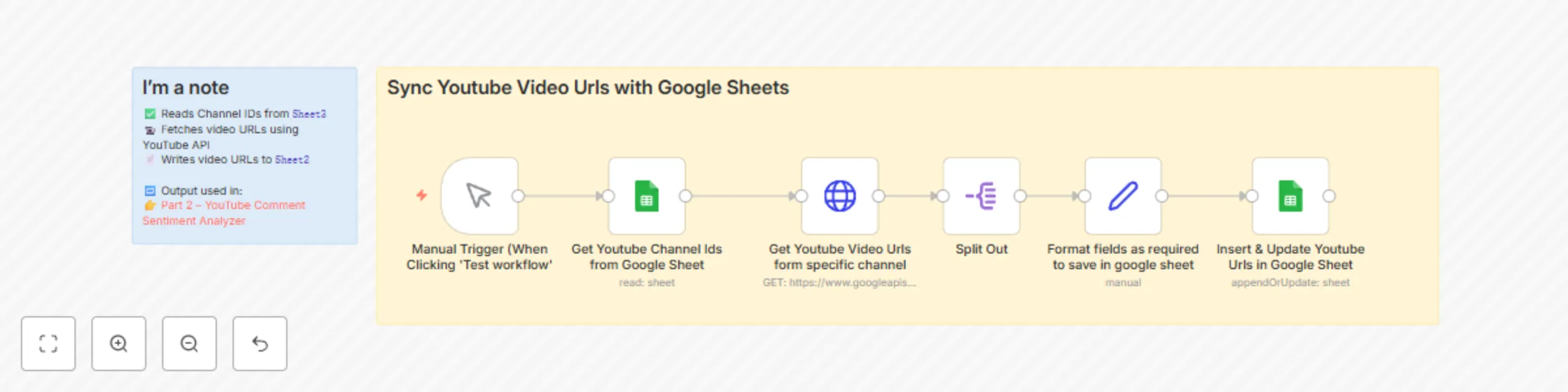
## Sync Youtube Videos with Google Sheets **(Part 1 of Youtube comments sentiment analyze automation along with detailed dashboard)** This workflow is the **first part of a multi-part automation system** designed to perform large-scale YouTube comment sentiment analysis alongwith detailed dashboard. It solves the problem of manually tracking new videos across multiple YouTube channels by automatically fetching and organizing video URLs in a Google Sheet, setting the stage for deeper analysis in Part 2. ### What It Does 1. **Reads Channel IDs** from `Sheet3` of a connected Google Sheet. 2. **Fetches the latest videos** from each Channel ID using the **YouTube Data API**. 3. **Extracts video URLs and metadata** (like title and publish date). 4. **Appends the video data** to `Sheet2` of the same Google Sheet — this sheet is later used by Part 2 for further processing. ### Part of a Multi-Step System This is **Part 1** of a 2-workflow system: - **Part 1 (this workflow)** populates a sheet with the latest videos from a list of channels. - **Part 2** reads the video URLs from `Sheet2`, fetches comments for each video, analyzes their sentiment using **OpenAI**, and stores structured results in `Sheet1`. 👉 Continue to [Part 2 – YouTube Comment Sentiment Analyzer with Google Sheets & OpenAI](https://n8n.io/workflows/3855-youtube-comment-sentiment-analyzer-with-google-sheets-and-openai/) --- ### ✅ Use Cases - Monitor and organize new videos from a list of YouTube channels - Automate content pipelines for social media teams and analysts - Build scalable datasets for comment and sentiment analysis - Perfect for creators, agencies, or data analysts managing multiple YouTube accounts --- ### 🔧 Apps Used - **Google Sheets** – To read and write channel/video data - **YouTube** – To fetch video data from public channels --- ### 💡 Why Use This? Manually checking YouTube channels for new content is time-consuming and error-prone. This automation ensures your data stays current and structured — enabling consistent tracking and deeper analysis (especially when paired with Part 2). It brings speed, scale, and automation to your YouTube content operations. --- ## How to Customize ### 1. Modify Trigger Settings - Change the **Google Sheet (Sheet 3)** channel ID entry to track other channels. - Use a **time-based trigger** to fetch new videos regularly, ensuring your data stays up to date. ### 2. Adjust Output Fields - Fetch **additional details** from YouTube, such as view count, description, or thumbnails. - Add **custom columns** in **Sheet 2** for organizing videos by different criteria, such as: - "Published Date" - "Video Type" - "View Count" - "Video Description" ### 3. Extend with Integrations - Integrate with other workflows like **YouTube Comment Sentiment Analysis** (Part 2) for a deeper dive into content analysis. - Use **filters** to fetch videos by certain tags, keywords, or publish dates. ### 4. Adjust Sheet Structure - Modify the structure of **Sheet 2** to categorize videos based on criteria like: - Channel - Video Status (e.g., "Published," "Scheduled") - Video Type (e.g., "Tutorial," "Review") ### 5. Schedule Regular Fetching - Set a **schedule trigger** to fetch videos at regular intervals (e.g., daily or weekly), ensuring new content is automatically added to your sheet. ### 6. Customize Google Sheet Layout - Change the layout of **Sheet 2** to better fit your needs. For example, you can add additional columns for

A
Aayushman Sharma
Market Research
6 May 2025
649
0
Workflow preview: 🚀 YouTube comment sentiment analyzer with Google Sheets & OpenAI
Free advanced

🚀 YouTube comment sentiment analyzer with Google Sheets & OpenAI

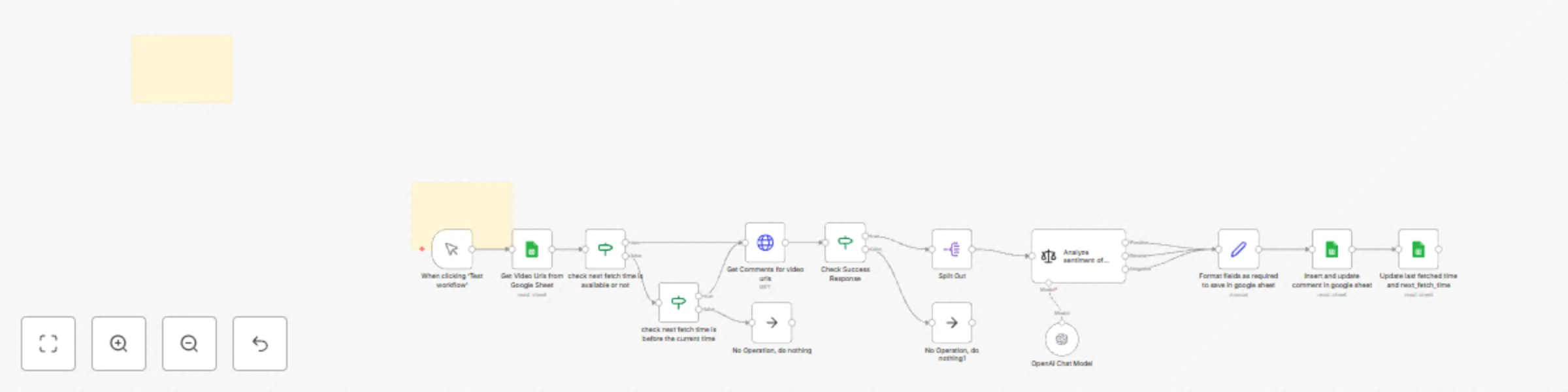
# 🚀 YouTube Comment Sentiment Analyzer with Google Sheets & OpenAI --- ### Who Should Use This? Influencers, marketers, and data teams who need **instant insights** into audience sentiment—without manual exports or scattered tools. --- ### The Challenge - **Manual exports** from YouTube Studio - **Time-consuming** sentiment tagging - **Data scattered** across multiple platforms Our workflow automates **everything**: from fetching comments to logging analysis—so you can focus on insights, not spreadsheets. --- ### What You’ll Get 1. **Dynamic Input** Read a list of YouTube URLs from your Google Sheet. 2. **Full Comment Harvest** Pull **all** top-level comments (handles pagination 100/page). 3. **Deep Sentiment Scan** Classify each comment as **Positive**, **Neutral**, or **Negative** using OpenAI. 4. **Smart Formatting** Capture metadata (author, likes, timestamp) alongside sentiment. 5. **Seamless Storage** Append or update rows in your Google Sheet—ready for reporting. --- ### Easy Setup 1. **Prepare Google Sheet** - Create a sheet with a `video_urls` column (full YouTube links). - Add and authorize a Google Sheets Oauth or service-account credential in n8n. 2. **Enable YouTube API** - Activate Data API v3 in Google Cloud, grab an API key, and save as an HTTP credential in n8n. 3. **Configure OpenAI** - Enter your API key under the “OpenAI Chat” credential in n8n. 4. **Import the Workflow** - Paste the provided JSON into n8n. 5. **Run Manually** - Use the **Manual Trigger** node to start fetching and analyzing comments on demand. --- ### Customize to Your Needs - **Filter Comments**: Add an IF node to process only comments with specific keywords or minimum likes. - **Automate Schedule**: Swap the Manual Trigger for a Cron node if you later want periodic runs. - **Extended Analysis**: Swap sentiment classification for topic extraction, summarization, or translation by tweaking the LLM prompt. - **Alternate Destinations**: Replace Google Sheets with Airtable, Notion, or any database node. --- ### Tags ``YouTube`` ``Google Sheets`` ``OpenAI`` ``Sentiment Analysis`` ``n8n`` ``Manual Trigger``

A
Aayushman Sharma
Market Research
4 May 2025
643
0
Workflow preview: Automatically create Google Tasks from Gmail labeled emails
Free beginner

Automatically create Google Tasks from Gmail labeled emails

### Automatically create Google Tasks from new Gmail emails labeled "To-Do". **Who is this for?** - This template is perfect for individuals and teams who want to boost their productivity by automatically converting important emails into actionable tasks in Google Tasks. **What problem is this workflow solving**? - Manually managing emails and creating tasks can be tedious. This workflow ensures you never miss a follow-up by instantly turning important emails into tasks without switching between apps. **What this workflow does?** - Watches for new emails in Gmail with the label "To-Do". - Creates a new Google Task with the email subject as the task title and the email snippet as notes. - Sets the task due date to 24 hours after the email is received. **Setup** - Create a label "To-Do" in your Gmail account if it doesn't already exist. - Connect your Gmail and Google Tasks accounts to n8n using OAuth2 credentials. - Import the workflow into n8n and activate it. **How to customize this workflow to your needs?** - Change the Gmail label to a different one (e.g., "Important", "Follow-up"). - Modify the due date logic in the expression if you want more/less time to complete tasks: {{ $now.add(2, 'days').toISOString() }} - Add additional Gmail filters (like only unread emails) to refine which emails create tasks.

A
Aayushman Sharma
Personal Productivity
28 Apr 2025
1234
0