Block 1 - Instagram Webhook Trigger
- Type / Role
- n8n-nodes-base.webhook - webhook
- Config choices
- Version 2


 Early Deal
This workflow is provided as-is. Please review and test before using in production.
Description Instagram AI Beauty Assistant with Booking & Calendar Automation Smart Instagram AI Assistant for Beauty & Cosmetics Brands Help customers instantly on Instagram using a smart AI ...
n8n-nodes-base.webhook, n8n-nodes-base.set, n8n-nodes-base.if, n8n-nodes-base.httprequest, @n8n/n8n-nodes-langchain.openai, n8n-nodes-base.code, n8n-nodes-base.googledocstool, n8n-nodes-base.datetimetool
This workflow is cataloged by N8N Workflows and links back to its original n8n.io source page by Tharwat Mohamed.
Original n8n.io source📝 Description
Instagram AI Beauty Assistant with Booking & Calendar Automation
💄 Smart Instagram AI Assistant for Beauty & Cosmetics Brands
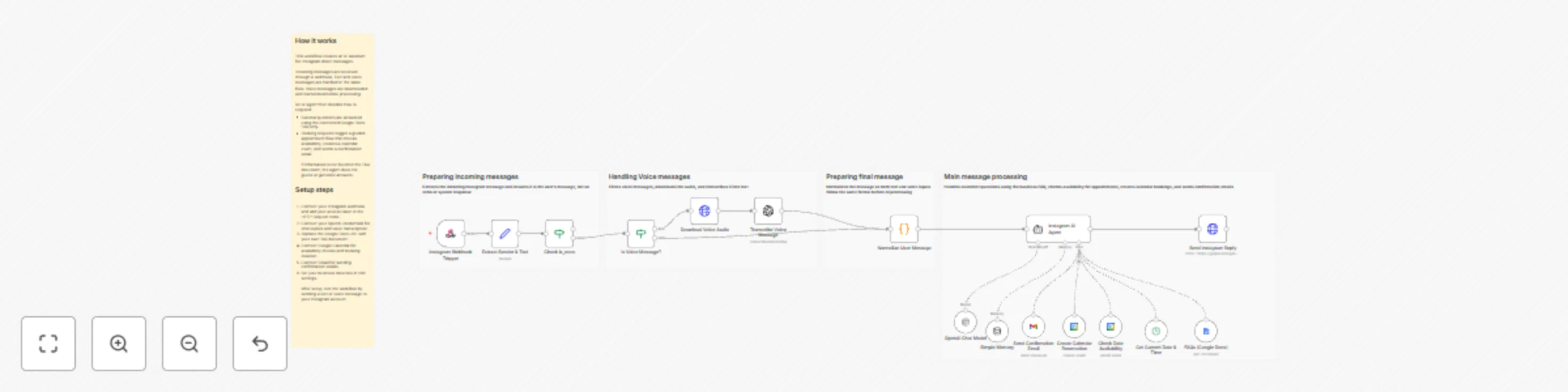
Help customers instantly on Instagram using a smart AI assistant designed specifically for beauty, skincare, makeup, and nail businesses. This workflow answers product questions using FAQs only, handles voice messages, and schedules consultation bookings with timezone-safe Google Calendar reservations and automatic confirmation emails.
Perfect for salons, cosmetic brands, clinics, and Instagram-first businesses.
⚙️ How it works
Customers send messages or voice notes via Instagram DM
The AI detects whether the message is:
A product or policy question
A voice message (which gets transcribed)
A request to book a consultation or meeting
Product questions are answered only using your FAQs (no hallucinations)
Booking requests:
Get grounded using the current date and time
Check available slots before booking
Collect customer details (name, phone, email, topic)
Confirmed bookings are created in Google Calendar with rich event summaries
A confirmation email is sent automatically to the customer
🧰 Setup steps
Connect your Instagram webhook or messaging API
Connect your OpenAI account (chat + voice transcription)
Connect Google Calendar for reservations
Connect Gmail for confirmation emails
Customize your FAQs and availability rules
Set your business timezone
That’s it — your Instagram assistant is ready to work 24/7 ✨
🔄 Customization tips
Update FAQs anytime without retraining the AI
Adjust tone and branding in the system message
Customize calendar summaries and email templates
Add rescheduling, cancellation, or reminders
Clone the workflow for multiple beauty brands or clients
🤝 Need Help Setting It Up or Customizing It?
If you’d like help connecting Instagram, setting up Google Calendar and Gmail, or customizing this AI assistant for your business or for clients…
📩 I offer setup and customization services including:
Instagram DM automation setup
Google Calendar & Gmail configuration
Timezone-safe booking logic
FAQ structuring and prompt tuning
Branding and tone customization
Error handling and escalation logic
You can reach me here:
Email: [email protected]
WhatsApp: +20 106 180 3236
This catalog entry is organized from the workflow JSON. The node-level section below shows the executable blocks available for review before importing the template.
| Workflow | Book beauty appointments and answer FAQs with GPT-4, Google Calendar, Gmail, and Instagram |
|---|---|
| Complexity | advanced |
| Nodes | 21 |
| Categories | Support Chatbot, AI Chatbot |
| Author | Tharwat Mohamed |
| Published | 13 Dec 2025 |
Use the JSON export at /data/workflows/11771/11771.json as the source template for this automation.
Open n8n, import the downloaded JSON, and review each node before activating the workflow.
Replace placeholder credentials, API keys, webhook URLs, account IDs, and environment-specific values with your own settings.
Run the workflow manually or in a staging workspace, inspect node output, and confirm downstream systems receive the expected data.
Enable the workflow only after testing, then monitor executions, errors, and rate limits during the first production runs.
Review imported nodes carefully before activation. This catalog entry is intended to help you inspect the workflow structure, understand required services, and find related templates faster.
Node names, credentials, schedules, webhook paths, and external service limits may need adjustment for your workspace.
Description Instagram AI Beauty Assistant with Booking & Calendar Automation Smart Instagram AI Assistant for Beauty & Cosmetics Brands Help customers instantly on Instagram using a smart AI ...
Review the workflow JSON, configure any required credentials in n8n, and test the automation in a safe workspace before using it in production.
Yes. Use the block-by-block analysis and the downloadable JSON to inspect each node, then adjust credentials, prompts, schedules, filters, or destinations for your Support Chatbot, AI Chatbot use case.